Hello,
Many of you know me from my previous picture posts, to refresh your memory look below:
https://goccf.com/t/60963https://goccf.com/t/60790https://goccf.com/t/60744Anyway, after some, well stupid, moves I slowed down and gave it all some thought and while doing so I tried using Picasa 3 (by Google) to scan some of my coins with great results. The previous software I was using was the Epson software that came with my Epson Perfection V300 Photo Scanner. The Epson software is meant especially for photos.
So, I went out today and purchased a 2000-D uncirculated
Sacagawea dollar from my local coin dealer. The coin has a few marks on it, but nothing I'm worried about. My dealer again gave me a hard time about, "looking at the coins through a microscope." as he puts it.
So I did a comparison scan through both pieces of software and here are the results.
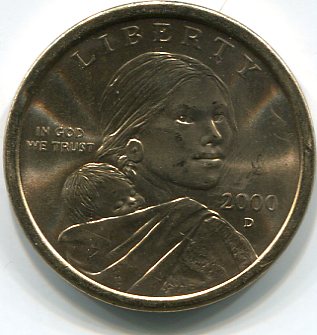
Sacagawea Obverse scanned with Epson software
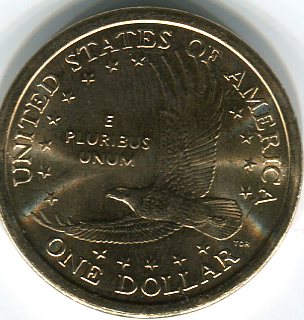
Sacagawea Reverse scanned with Epson software
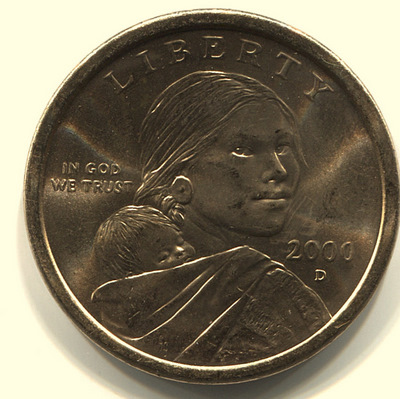
Sacagawea Obverse scanned with Picasa 3 software
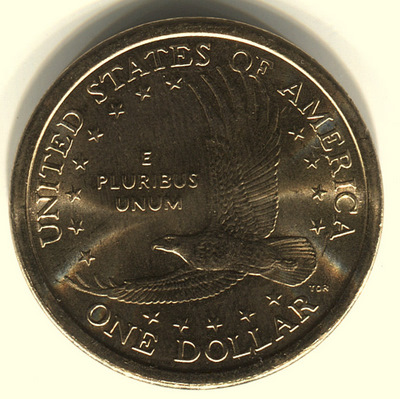
Sacagawea Reverse scanned with Picasa 3 software
The pictures of the coin scanned with Picasa are great and I'm VERY happy with them. I have absolutely NO stress over this like before and I will be posting those pictures on my website and continuing an uncirculated Sacagawea collection. I can only imagine what a piece of software that is not free but reasonably priced could do.
These pictures are not "perfect" but they show a lot of detail and look great and I'm happy and not stressed. I also learned that by wearing my cotton gloves I not only protect the coin but I protect the scanner glass from fingerprint smudges.
Let me know your thoughts.
Thanks,
Rich










 Posted 03/13/2010 9:59 pm


