Coin Community Family of Web Sites Join Thousands of Coin, Bullion, & Money Collectors
Royal Estate Auctions - $1 Coin AuctionsCoin, Banknote and Medal Collectors's Online Mall Royal Canadian Mint products, Canadian, Polish, American, and world coins and banknotes. 300,000 items to help build your collection! Specializing in Modern Numismatics Vancouvers #1 Coin and Paper Money Dealer Join Thousands of Coin, Bullion, & Money Collectors


Username:
Password:
Save Password
Forgot your Password?


This page may contain links that result in small commissions to keep this free site up and running.

Welcome Guest! Registering and/or logging in will remove the anchor (bottom) ads. It's Free!

Help Required

To participate in the forum you must log in or register.
First Page  Showing last 15 replies.
Author Previous TopicReplies: 17 / Views: 3,174Next Topic Page 2 of 2
Pillar of the Community
Australia
750 Posts
 Posted 11/29/2012  5:55 pm  Show Profile   Bookmark this reply Add The Unicorn to your friends list
Hey Kel,

In addition to Stevo's suggestion, if you want one on your PC, the following may help.

If you are running XP, Microsoft has a powertoy image resizer utility which is good.
http://windows.microsoft.com/en-AU/...TC=powertoys

I used to run it, but now on Vista (yeah still old) and use the freeware version of this one. (The longer you use it unregistered, the longer the message at the start stays up, but it's still excellent).

http://www.obviousidea.com/windows-...age-resizer/

Edited by The Unicorn
11/29/2012 6:08 pm
Pillar of the Community
Australia
877 Posts
 Posted 11/29/2012  6:30 pm  Show Profile   Bookmark this reply Add Jeff to your friends list
Plenty of ways to do it. The Windows Powertoys resizer only works with XP.
If you have Vista, 7 or 8 then try the one found here http://imageresizer.codeplex.com/. This is Microsoft's open source project page. MS never ported the XP version to other Windows versions but the one here is as good (and more features to come).
Has a right click option for images from My Computer/Windows explorer pages.

Jeff
Edited by Jeff
11/29/2012 6:47 pm
Pillar of the Community
Australia
762 Posts
 Posted 11/29/2012  6:33 pm  Show Profile   Bookmark this reply Add MobOfRoos to your friends list
Or you can just use "Paint" which is already in windows. Just open up the image in "paint" and choose the resize option. Thats what I do
Valued Member
Australia
428 Posts
 Posted 11/30/2012  01:12 am  Show Profile   Bookmark this reply Add keldaw2222 to your friends list
thanks guys , my brain is like this just now , I will try the lot and see which one is best, I have tried the one on here
free image optimizer ,i get a good shot then when I hit save it , I lose it most times , so I will try some others and see if I can get a good one for me to work easy on . thanks again . ,, kel ,,
Valued Member
Australia
428 Posts
 Posted 11/30/2012  01:25 am  Show Profile   Bookmark this reply Add keldaw2222 to your friends list
i forgot to mention I have 7

,, kel ,,
Valued Member
Australia
428 Posts
 Posted 11/30/2012  01:37 am  Show Profile   Bookmark this reply Add keldaw2222 to your friends list
this is my problem,
how do I get the picture over to paint , or anywhere else , and when I reduce the size of it , how do I get it onto this forum ,
,, kel ,,
Pillar of the Community
Australia
1607 Posts
 Posted 11/30/2012  01:46 am  Show Profile   Bookmark this reply Add appleangel07 to your friends list
Hi Kel, bring the pic up on your computer,then right click on the pic,a list of things will come up,you want the open with tab,hover over open with & another drop down will appear & in that list choose PAINT,the picture will automatically open in the paint window.
Pillar of the Community
Australia
1607 Posts
 Posted 11/30/2012  01:48 am  Show Profile   Bookmark this reply Add appleangel07 to your friends list
As for the forum uploader,i have no idea sorry as I've never used it.
Moderator
Learn More...
United States
14463 Posts
 Posted 11/30/2012  01:52 am  Show Profile   Bookmark this reply Add Fuzzy317 to your friends list
Here is the tutorial about uploading and posting images
Edited by Fuzzy317
11/30/2012 01:53 am
Valued Member
Australia
428 Posts
 Posted 11/30/2012  03:58 am  Show Profile   Bookmark this reply Add keldaw2222 to your friends list


Help-Requiredthank you all for your help and tips
.. ,, kel ,,
Valued Member
Australia
428 Posts
 Posted 11/30/2012  04:14 am  Show Profile   Bookmark this reply Add keldaw2222 to your friends list


Help-Required
Valued Member
Australia
428 Posts
 Posted 11/30/2012  04:17 am  Show Profile   Bookmark this reply Add keldaw2222 to your friends list
ok thanks all,
i may have it now ,
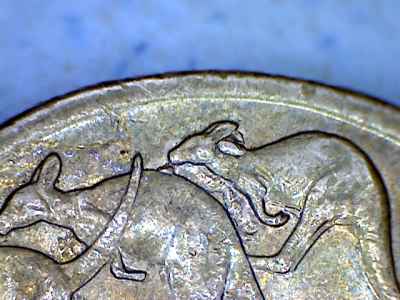
this is my new find ,
just for practice,
it is a dollar coin with
rabbit ears and also a spew roo because of the Cud on the 2nd roo,s back . ,, kel ,,
Edited by keldaw2222
11/30/2012 04:19 am
Pillar of the Community
Australia
4411 Posts
 Posted 11/30/2012  06:18 am  Show Profile   Bookmark this reply Add enworb to your friends list
I like that coin. I havent found a spew and rabbit double before.
Pillar of the Community
1119 Posts
 Posted 11/30/2012  6:57 pm  Show Profile   Bookmark this reply Add erkle to your friends list
picasa gives the option to resize pics when you export them
Moderator
Learn More...
United States
14463 Posts
 Posted 11/30/2012  7:05 pm  Show Profile   Bookmark this reply Add Fuzzy317 to your friends list
picasa also lets you manually rotate an image from 1% to 25% CW or CCW
Edited by Fuzzy317
11/30/2012 7:12 pm
Page 2 of 2   Previous TopicReplies: 17 / Views: 3,174Next Topic Page 2 of 2
First Page  Showing last 15 replies.
To participate in the forum you must log in or register.


Disclaimer: While a tremendous amount of effort goes into ensuring the accuracy of the information contained in this site, Coin Community assumes no liability for errors. Copyright 2005 - 2026 Coin Community Family- all rights reserved worldwide. Use of any images or content on this website without prior written permission of Coin Community or the original lender is strictly prohibited.
Contact Us  |  Advertise Here  |  Privacy Policy / Terms of Use

Coin Community Forum © 2005 - 2026 Coin Community Forums
It took 0.38 seconds to rattle this change. Forums