| Author |
 Replies: 22 / Views: 2,312 Replies: 22 / Views: 2,312 |
Page 2 of 2
|
|
|
|
Pillar of the Community
United States
740 Posts |
Nice find. It would be amazing if it was WAM too. There was a post a few months ago of an off center WAM |
|
Bedrock of the Community
United States
62064 Posts |
One of that last years that moved the coins in bags. After 2001 they used bins to ship the coins to the locations to be rolled.
|
|
Pillar of the Community
United States
740 Posts |
Hey coop: I saw you post recently about these lines. This is some more evidence they are not on the dies, since the off center did not strike this area 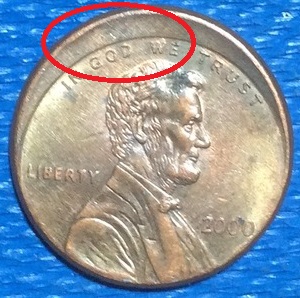 Edited by BlueSolo
07/27/2015 10:24 am
|
|
Bedrock of the Community
United States
62064 Posts |
Thanks Blue Solo on the heads up on this one. Thanks for posting this Hello There. Your image has been added to my educational files.  |
|
Pillar of the Community
 United States
1191 Posts |
Edited by Hello There
07/27/2015 12:23 pm
|
|
Pillar of the Community
 United States
5828 Posts |
Nice find  |
|
Pillar of the Community
United States
740 Posts |
Glad I can finally help Coop with something! It's always the other way around :D
|
|
Bedrock of the Community
United States
62064 Posts |
The image was so background was so large and the coins image was so small that I didn't see it. Glad you did. It makes are great teaching aid. Thanks again.
|
|
Pillar of the Community
United States
1414 Posts |
Nice find! I've never found one that O/C from CRH.
|
|
Pillar of the Community
United States
740 Posts |
Everyone's finding off centers on here lately. I need to get on pennies more.
By the way Hello There: You might want to crop your images. It doesn't take long (I cropped yours in a matter of seconds), it reduces the file size and utilizes the full resolution of your image. You should be able to do this on any system, windows/mac with default programs MSPaint/Preview.
For a quick tutorial, just select the region you want to keep, right click, copy. In windows you can select new image and just paste. For mac there is an option to make new photo from clipboard.
|
|
Pillar of the Community
United States
1191 Posts |
I'm using my iPad for pictures and uploading through photo bucket
|
|
Valued Member
United States
127 Posts |
Hello There......great find!!   |
|
Pillar of the Community
United States
1512 Posts |
Photobucket has editing tools, just don't use the sharpening. It makes the images look weird.
|
|
Pillar of the Community
United States
740 Posts |
Even better! iOS has a built in crop tool that is really easy to use! :D
Tap edit on the photo you want to crop, then there should be an icon that's two edges that form a square. Drag the corners to the area you wish to crop to and then tap save
|
|
Pillar of the Community
United States
1191 Posts |
The crop worked!
Thanks Blue, I'll use it for future uploads.
|
|
Page 2 of 2
|
Replies: 22 / Views: 2,312 |
Page 2 of 2
|








 First Page


 Posted 07/27/2015 01:14 am


