| Author |
 Replies: 23 / Views: 5,075 Replies: 23 / Views: 5,075 |
Page 2 of 2
|
|
|
|
Valued Member
United States
103 Posts |
Very impressive imaging, looking forward to seeing more working examples.
|
|
Pillar of the Community
United States
1304 Posts |
|
|
Moderator
 United States
54297 Posts |
You don't have to re-shoot it, just rotate the images with your editing software. 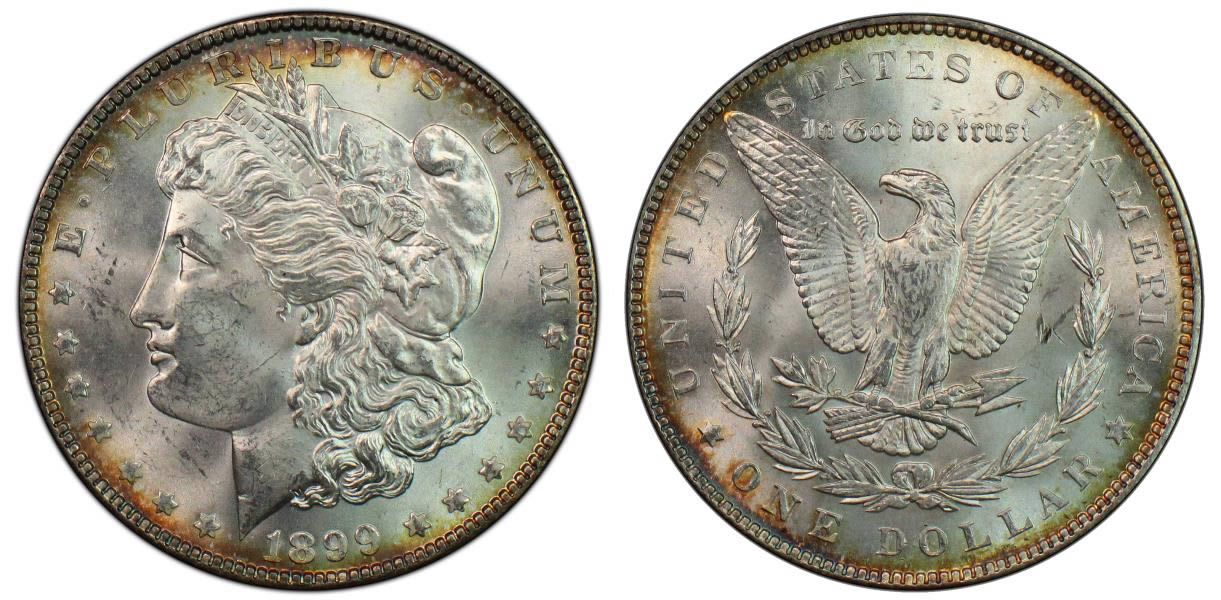 |
|
Pillar of the Community
United States
1304 Posts |
Quote:
I'm sorry I am just now seeing this. I will try to get some photos of the setup and get back to you soon. WheatBack, I bet you forgot about this. Sorry if I am rushing the response. Ham |
|
Valued Member
United States
103 Posts |
How did you get the bright white background? Are you imaging on a light table?
|
|
Pillar of the Community
 United States
2859 Posts |
I'll try to remember to get a photo of my setup and get a screenshot of my camera settings next go around. As for this: Quote:
Additionally, what are you doing in post to finalize those fantastic Morgan pics? Thanks in advance. Quote:
How did you get the bright white background? Are you imaging on a light table? I use Photoshop to finalize my photos. I crop each coin using a circular crop. I will then adjust the sharpness and then the contrast (if necessary). I then take the obverse and reverse and put them onto a white background with a black outer glow to sorta bring it all together. That's really all I do. It's all in the lighting and your camera's settings. No fancy Photoshop tricks here. For the photo below I only adjusted the sharpness. No other post-processing was done -- It's all a product of the lighting.  |
|
Pillar of the Community
United States
1304 Posts |
Excellent, just outstanding.  Looking forward to pics of your setup and screen shot of settings. Ham |
|
Pillar of the Community
United States
2859 Posts |
Below are my settings and setup. I have a custom white balance that I adjust accordingly. I shoot on a white piece of copy paper as my background. Nothing fancy with this setup. One of the lights was free and the other two were about $5 each at Walmart. I am using a Canon EOS T6 using a macro lens with a macro wide angle conversion lens attachment. I have three gooseneck lamps surrounding the camera at the base of the camera lens. Two of the lamps are LED and the other uses a standard CFL bulb. The base of the lens is about 7" from the table's surface directly over the coin I am shooting. I then do remote shooting using Canon's EOS Utility so I can make live adjustments by viewing the shot from my computer.   |
|
Pillar of the Community
United States
1304 Posts |
WheatBack, Thanks for the information and photo of your setup. Ham
|
|
Valued Member
United States
441 Posts |
 Thanks! |
|
Valued Member
United States
142 Posts |
|
|
Pillar of the Community
United States
1376 Posts |
Quote:
... with a black outer glow to sorta bring it all together. Wheatback, Is the outer glow effect something that is easily done in Photoshop? A blur or something similar? or are you making it by layering? Since I use GIMP and not PS, I'm trying to figure out (so far unsuccessfully) how to create this effect in GIMP. Any GIMP users out there know how to do this? Thanks! |
|
New Member
Greece
45 Posts |
For Photoshop go to:
Layer ---> Layer Style ----> Outer Glow
There you can make your experiments on how your glow can be.
|
|
Moderator
United States
54297 Posts |
Quote:
I'm trying to figure out (so far unsuccessfully) how to create this effect in GIMP. I googled - outer glow gimp, and got results. |
|
Pillar of the Community
United States
1376 Posts |
Quote:
I googled - outer glow gimp, and got results. Thanks nss-52! I wasn't searching for the right key words, and this did it for me. If anyone else is interested, you have to create a alien glow layer (Filters -> Alpha to Logo -> Alien Glow). I found that a glow size of around 100 pixels seems to work pretty well. Looks like the process is a bit more complicated (you have to create and arrange some layers) to create this effect in GIMP, but it can be done and GIMP is free  |
|
Page 2 of 2
|
Replies: 23 / Views: 5,075 |
Page 2 of 2
|






 First Page


 Posted 08/08/2017 07:53 am





