| Author |
 Replies: 20 / Views: 11,831 Replies: 20 / Views: 11,831 |
Page 2 of 2
|
|
|
|
Valued Member
 Australia
70 Posts |
I just realized that I am starting to sound like an advertisment for this camera...
Believe me, I am not selling them, just recommending them =o)
Simon
|
|
Pillar of the Community
Philippines
1156 Posts |
Hi Jackool! you just sold me on this one, just posted looking for an inexpensive unit - before- I saw your post The pic on the detail below the "2" is ok! amazing!  |
|
Pillar of the Community
United States
1571 Posts |
Jackool, does this camera have Remote Shutter Control? I shake too much to even ust the time delay! I have a Canon A590 IS, and it is a great camera, but it doesn't have the RSC, so I get mediocre pictures. I have another USB camera, but haven't figured how to recover the pictures. I only have the CD with the software, so I am up the proverbial creek. I use it for scanning, however, due to a vision problem, and ti makes my daty! I am considering the scope you memtion, and the price is definitely right. Thabnks for your input,
Dick
Edited by livingdinasaur
12/18/2009 9:34 pm
|
|
Pillar of the Community
Canada
868 Posts |
Look to me to be a very good USB Camera to bad I got my self a microscope for this closing up picture.
Andre
|
|
Valued Member
Australia
70 Posts |
Hello Dick, My sincerest apoligies for the lateness of my reply, I didn't realise there was any activity in this post. To finally answer your question, yes it does have Remote Shutter Control... By clicking the mouse, you take the pictures. So no need to touch the camera at all When trying to take pictures I shake like a tree in high wind, so that feature was important to me aswell. Well I hope I have helped.  Oh, Also I must add that if you check your "C drive" in "My Computer" you might see a folder called "pictures" and that may be where the pictures are storing themselves. Just a thought, but I am sure the pictures from your current usb camera can be located. Just take a few shots and look for that folder I mentioned. If that does not work, I suggest opening the "Search" and searching "All Files and folders" for "*.jpg" and/or "*.jpeg" and see what comes up. If you have any luck, be it good or bad, please let me know. As I will try to figure other ways for you to find your pictures. Simon |
|
Pillar of the Community
United States
621 Posts |
Great gadget. I was wondering how it does for the whole coin. Can you post a pic of a half dollar and a copper cent?
|
|
Bedrock of the Community
United States
14454 Posts |
it kind of looks like a knock off of the dino lite microscope. I think the dino lite is 1.3 MP though and allot higher. Hey if it works as good and cheaper doesn't matter , just thought I would say what I think it looks like in the photos. I actually like the dino lite better than my QX-5 because it will take pictures of the whole coin
|
|
Pillar of the Community
United States
1000 Posts |
|
|
Pillar of the Community
United Kingdom
2838 Posts |
Wow thats cheap! Nice one. I got the Veho version at Christmas but I bet they are all the same on the inside. They are great - takes a bit of time to get the contrast etc set up at first and as is said above the software is not fantastic but once its done it just takes a couple of seconds to get a good quality pic. Would never go back to a camera now. Unfortunately mine came with no instructions and it took me a week to work out that you have to take the clear lens cap off it when taking a picture  |
|
Pillar of the Community
United Kingdom
2838 Posts |
Quote:
Great gadget. I was wondering how it does for the whole coin. Can you post a pic of a half dollar and a copper cent? 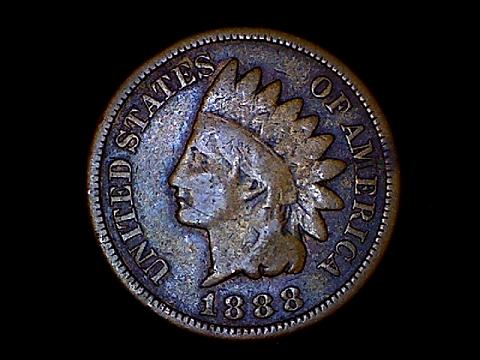 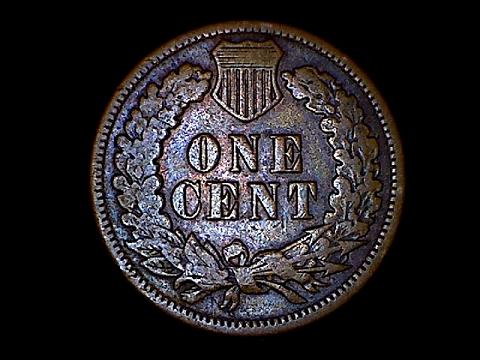 Sorry don't have a half dollar but found a cent - remember these pics had to be shrunk to under 100kb so they could be uploaded so will have lost a little quality. Edited by bobbyhelmet
02/22/2010 4:58 pm
|
|
Pillar of the Community
United States
621 Posts |
thanks bobbyhelmet.
Hey Mint_marq, could you post some pics of whole coins, half and a copper cent when you get yours. Now I'm really interested too.
|
|
Valued Member
Australia
70 Posts |
Hey it is me Jackool... For some reason my account won't let me in anymore. Mint_Marq... WOW That is cheap. I am really impressed. Deadmunny... Sorry mate, I don't have those coin types in my collection. But taking pictures of large coins like Aussie Pennies you have to purch the cam' about 6 inches above the coin. But the pictures I have managed to take from distances like that are really basic. (See Below - although shrunken in size/quality to fit the kb cap) Bobbyhelmet has taken some nice shots of a smaller coin, and they have come out great. Oh and Bobby, I had the exact same "issue" with the lens cap. I felt like a twit. This is one of my efforts: 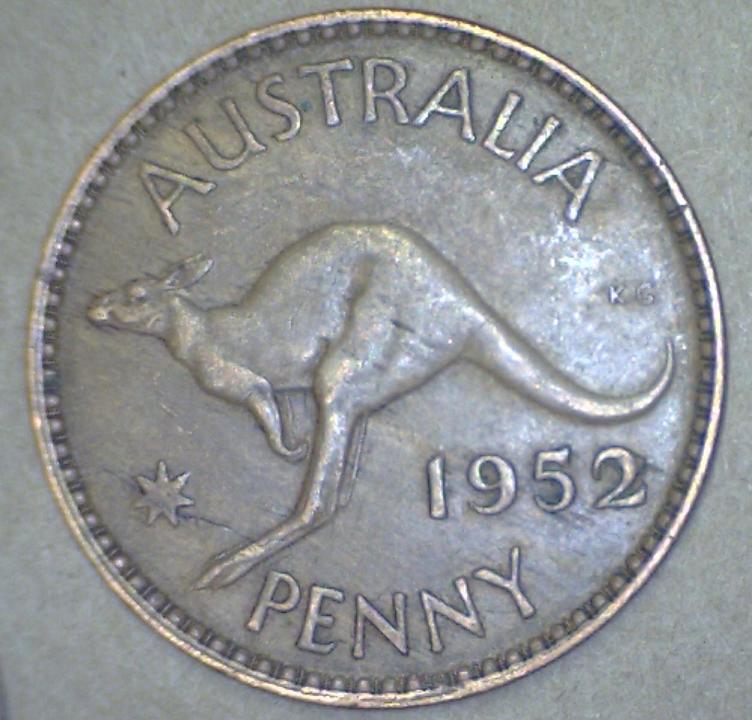 There you go Simon |
|
Pillar of the Community
United States
1000 Posts |
As promised, I am checking in with my review. I have played with it 2 times so far, but I think for the use of taking a picture of a whole coin, it may be a little impractical. For close ups of dates or errors it is great.
|
|
Valued Member
United States
71 Posts |
This looks terrific for a rookie who is testing, testing, testing ... do you have any experience converting existing microscopes with a digital camera ? Something that simply attaches to the eyepiece ?
|
|
Moderator
 United States
23522 Posts |
Quote:
do you have any experience converting existing microscopes with a digital camera ? There are many different adapters made for this specific purpose. It will depend on what you already have for a camera and microscope. Here's an example: http://www.zarfenterprises.com/Don't look at those prices, by the way - I posted the link just as an example of what people are doing. You can find adapters for considerably less.  |
|
Page 2 of 2
|
Replies: 20 / Views: 11,831 |
Page 2 of 2
|







 First Page


 Posted 12/10/2009 8:41 pm


