| Author |
 Replies: 19 / Views: 3,908 Replies: 19 / Views: 3,908 |
|
Valued Member
United States
212 Posts |
I have an Olympus SP-560UZ Camera. It focuses great, but when I look through the lens the coin is blue and so is the actual photo. Anything that is black or dark, especially, turns blue. Have been using natural sunlight. Can someone help me on this? Thank You.  |
|
|
|
Pillar of the Community
United States
608 Posts |
Try adjusting your white balance on the camera.
|
|
Valued Member
 United States
212 Posts |
Thanks Bill069. I'll give that a try. First, I have to go to town and get more batteries. Camera now is saying they are about gone. When it comes to a camera, I'm pretty much like a monkey on a honeymoon with a football. Thanks again. I'll let you know.
|
|
Bedrock of the Community
United States
14454 Posts |
mine is either yellow or blue also until I set the manual white balance. You may have to set your camera from automatic to manual or program to be able to set the WB but I am not familiar with your camera so I am not sure about that but it should be rather easy to figure out
|
|
Valued Member
United States
212 Posts |
Bryan1315: OK. I've been tinkering with it. I did find the WB thing. Manual set, arrow up = more blue/arrow down = more red. And there are settings for 6 different kinds of light and a thing called "one touch WB." I bought a 40 watt daylight flourescent pigtail bulb today. Going for more batteries now. I will post more when I experiment more. Thanks.
|
|
Valued Member
United States
355 Posts |
Blue is one of the colder color temperatures. You'll usually see that when using LED or even fluorescent lighting. It's kind of odd if you're getting blue using natural light. If you are it most definitely is the white balance as others have mentioned above. Some camera's have presets where you pick the one what works best or you can put the camera in Auto WB. I'm assuming you're stuck in a bad WB preset in a bad manually adjusted WB value for the light you're using.
If you can manually adjust your WB though, that can be helpful. For example if you were indoors using incandescent light bulbs at night your shots may be coming out yellow or orange. Where ever your camera is set to right now which is causing the blue with natural light might very well cancel out the orange from incandescent light resulting in a 'normal' colored shot. If you're getting blue with your light, try to use a 'warmer' WB like the Sun or Lightbulb setting (higher color temperature) to cancel out the blue.
|
|
Valued Member
United States
70 Posts |
I wouldn't recommend using the presets, use the custom preset white balance feature.
You setup your camera, coin, and ligthing to the exact setting that you're going to shoot. Since you're using flourescent bulbs, let the bulbs warm up for a minimum of 10 minutes. Place an 18% gray card or a piece of white printer paper where the coin will be imaged and then set your custom preset white balance based on that exact shooting environment. If you change your lighting/setup, then repeat the aforementioned steps.
-LTB
|
|
Valued Member
United States
212 Posts |
Hey Louie: What size light bulb would you suggest? I have a 40 watt Daylight one now, but I can always take it back. Thanks.
|
|
Valued Member
United States
70 Posts |
The more wattage the better. I currently use daylight balanced flourescent bulbs with the output equivalent to 75w, but I saw Lowes had some with 100w, so I'm going to pick up a few of those. Because the brighter you can get it, the more you can stop down your aperature and increase your shutter speed to create sharper images with a better depth of field. I'm a novice photog, so don't take my word as gospel...this is just what I've been learning through advice from pros and LOTS of trial and error.
-LTB
|
|
Valued Member
United States
212 Posts |
Ok. So things are much better. Got the batteries, switched light bulbs, adjusted the WB and started shooting. Big improvement. Most everything I own is toned so getting the correct color has been tough. Alot better now. Seems easier to capture the correct color of the toning on silver coins. Copper is a different story. I will still need to work on the copper. It's not right yet. But I'll keep doing the trial and error thing.
Thanks you guys for helping me out with this. Really appreciate it.
|
|
Valued Member
United States
380 Posts |
If you use an 18% gray card to shoot at and adjust your WB before you shoot ANYTHING else, that will give you a one stop shop White Balance adjustment...
|
|
Valued Member
United States
212 Posts |
Newbismatic, thanks for your reply. Ummmm..... What is a 18% gray card? I can go to Corvallis tomorrow to the camera shop to get one if they have it, but I don't know what it is. I've been there a few times already. Problem is the one girl that works there part time is an Oregon State University senior and I have trouble concentrating on camera issues when I'm around her. There is a guy that works there also, maybe I'll get him to help me. So, I'll post what I found out about this gray card thing. Thanks again.
Edited by schnauzer
04/01/2011 11:20 am
|
|
Bedrock of the Community
United States
14454 Posts |
I have problems capturing toning with my camera also. It does untoned coins good enough for the web but when you are talking about allot of different colors I guess my 3.2MP $25.00 camera is just to outdated to capture them well. Its like the camera gets a little confused, but I have seen quite a few others say their more expensive camera doesn't capture toned coins well also. I think its more of a lighting and angle thing than a camera thing
|
|
Valued Member
United States
260 Posts |
I don't know if this will help but I find that if there are blue objects close by my image is blue. Same if there is red close by and so on with other colors. I just move the camera to a different angle until that color no longer appears.
|
|
Valued Member
United States
212 Posts |
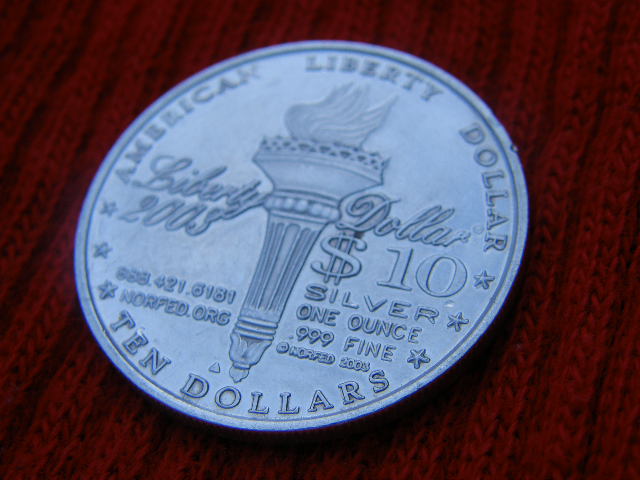 This "was" the problem I had been having. Got the gray card yesterday for $3.95, but my Mini Schnauzer puppy chewed it up. Going to get another card today and will post pics. Have some pics I did yesterday that are a great improvement from this one. All thanks to you guys and the great advice you have given me. Very frustrating this has been, but again, you guys got me through it. Thanks so much! Edited by schnauzer
04/02/2011 12:37 pm
|
|
Valued Member
United States
212 Posts |
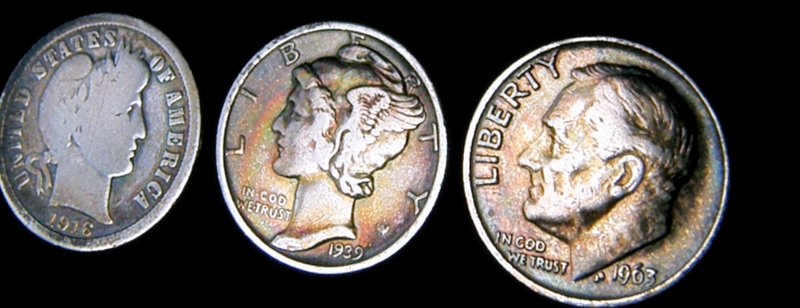 Picking up the correct color at least now and looking better. |
| |
Replies: 19 / Views: 3,908 |










 Posted 03/23/2011 10:24 pm


