| Author |
 Replies: 15 / Views: 982  |
|
|
CCF Advertiser
 United States
1318 Posts |
I just put up a 6 mm 0.16 gram coin and as always did my best with my decades old 12x Nikon Coolpix. I hold my arms around a pillar in my basement I lean on to steady myself as I photograph with like 5 incandescent lights. I am starting to look at photos others are doing and clearly they are using some great cell phone telephoto options just holding the coins on their fingertips. But, from my experience, lately my new phone is taking photos and enhancing them of my backyard or whatever when I did not ask for that and I just don't trust AI not to try to help me when I certainly don't want it's help. Just wanted to put that out there as I can't justify my way of photography much longer. Edited by louisvillekyshop
08/25/2026 9:06 pm
|
|
|
|
Moderator
United States
34576 Posts |
@lou, yes I get the feeling that my phone is also adding an unasked-for AI component to pics. I'm going to move your thread over to our photography subforum in case someone there has some ideas.
"If you climb a good tree, you get a push."
-----Ghanaian proverb
"The danger we all now face is distinguishing between what is authentic and what is performed."
-----King Adz
|
|
Moderator
United States
112373 Posts |
I use my cell to image all my coins. the photo below is my VERY simple setup. (I do hold onto the table top to keep me steady though) I set my phone camera to a 5x zoom setting and just hold the phone directly above the coin, allowing a bit of space around the coin so I can later rotate if needed then crop to the edges. 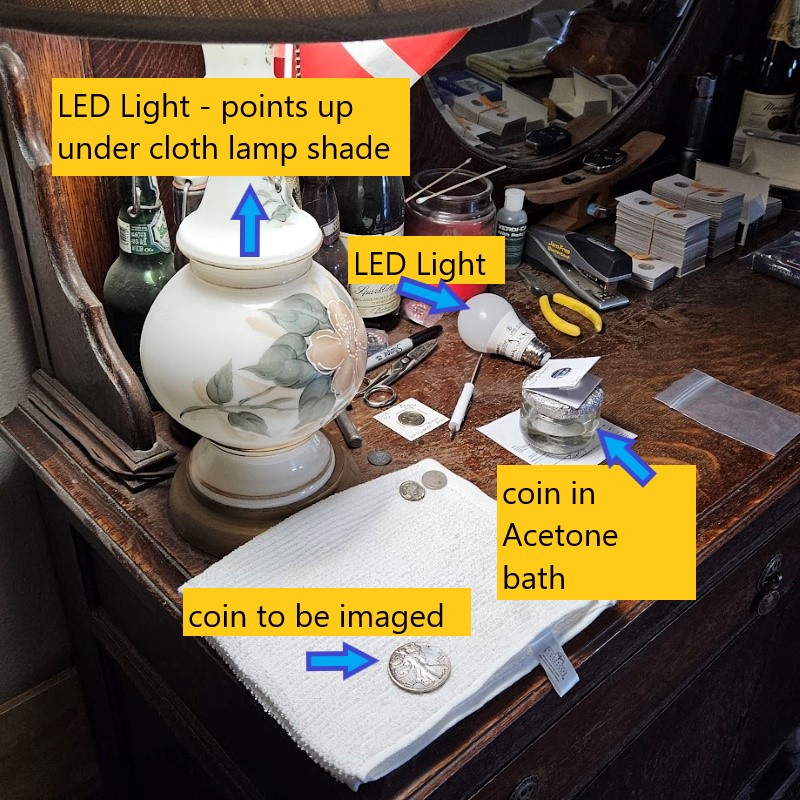 |
|
Pillar of the Community
United States
3688 Posts |
Rarely do I use my iPhone for taking pictures of my coins. I'm on the way overkill side of the equation using my Pentax K1 full frame DSLR on a tripod with a 90mm 1:1 macro lens. My lighting are strobes that are triggered by the shutter. For shots like this. You can enlarge it as well.   |
|
Bedrock of the Community
Canada
10186 Posts |
Great pics, can we see a pic if your setup, please.
|
|
Pillar of the Community
United States
3688 Posts |
Sorry, I just saw this. I'll get a picture of my setup sometime tomorrow.
|
|
Pillar of the Community
United States
3688 Posts |
Sorry this took longer than expected and please forgive my messy studio. There's been a lot going on in there over the past month. Here are two shots, one of my main setup and the second is of a setup I built for my phone for those instances where the phone makes more sense. Picture 1 (Main Setup)  On the first picture I actually stand the coin up against the black background and then take the shot straight on the picture. Picture 2 (Phone setup)  On the second picture there is a MagSafe phone mount attached to the top that allows my phone to hang over the edge and take a picture straight down on the coin laying flat. |
|
Bedrock of the Community
Canada
10186 Posts |
Very interesting layouts on both , thanks for posting.
|
|
Moderator
United States
199650 Posts |
Impressive!  |
|
Pillar of the Community
United States
3688 Posts |
|
|
Moderator
United States
112373 Posts |
Well, I suppose that is one way to get nice images  (very nice set up) |
|
Pillar of the Community
United States
3688 Posts |
Thanks Dearborn. My setup cost is not for the faint of heart but when it's your profession. |
|
Moderator
United States
112373 Posts |
well you are very welcome!  |
|
New Member
United States
3 Posts |
My first attempt with my Galaxy S23. Pointing down over edge of small book stack, single source 4k LED set back across coin. Manual settings. It could be a lot better but it will work for now. 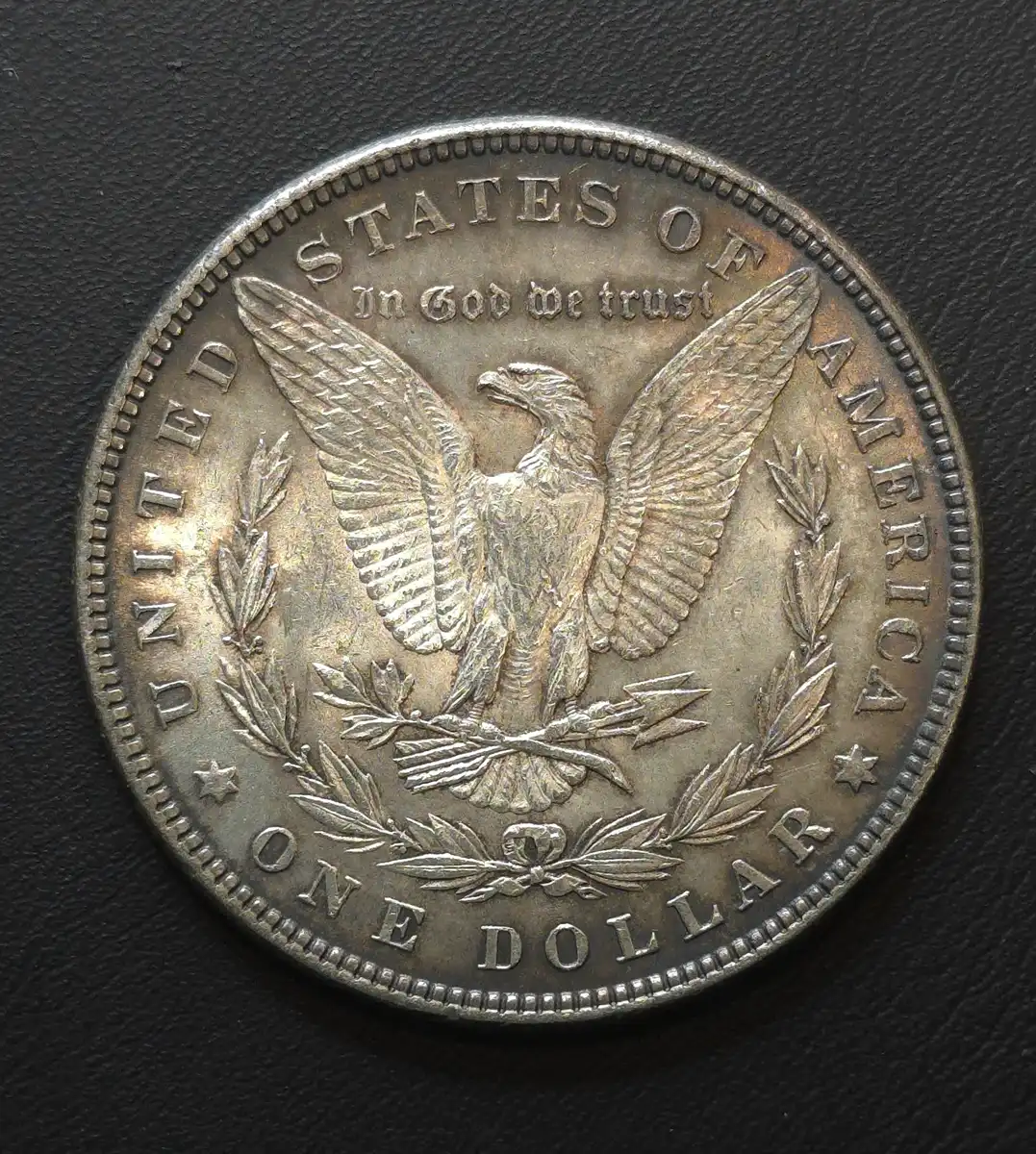 |
|
Pillar of the Community
United States
3688 Posts |
|
|
Valued Member
Canada
385 Posts |
I noticed this thread was active again and I thought I'd add a few of my thoughts.
I think the original post mentioned a concern about the AI capabilities of a phone unexpectedly enhancing pictures taken with the phone. I suspect this is caused by the settings for the phone and/or the camera app specifically. These days the default settings for the phone and apps tend to try to get the most out of the phone's capabilities including it's AI/smart features. I would check the settings to minimize any unwanted behaviour.
I use an iPhone 16 and a camera app called Yamera for my photos. Yamera has a premium version but I use the basic/free version. I'll call my setup inexpensive.
I'm not an expert photographer and I've only been photographing coins in earnest for a short time but I feel like I've learned a few things.
I've seen the results folks have posted who have different setups. There is no doubt that the more elaborate the setup and gear the better the pictures. Still, there are a few things that have a big impact on the results no matter what you use in my opinion.
Proper focus and good lighting are two important aspects of your setup. Other things that come into play are stabilizing the camera, the size of the coin/feature you are trying to capture, and the size of the coin/feature relative to the picture boundaries. Still others include image format (e.g., jpeg, etc), and methods/apps to post-process the image into the format you want for posting or archiving. These are a few.
Yamera has two camera modes, macro and non-macro. In non-macro mode I find having the camera about 6" from the coin is the ballpark for proper focus with my iPhone. In macro mode which I use for close-ups I've been using a distance of maybe 3". Proper lighting becomes a challenge here. Yamera also allows you to focus manually which can be helpful.
With lighting I try not to wash out the coin, and avoid shadows that are a pain to eliminate later.
For image composition I use a 1:1 (square) aspect ration and leave enough room around the coin to rotate later if needed to show the coin in the proper orientation.
I know there's more and there are other threads on here with more helpful insights and ideas but these are what I've found helpful for my situation.
|
| |
Replies: 15 / Views: 982 |
|







 Posted 08/25/2026 10:13 pm


 Uncirculated American Silver Eagles


