| Author |
 Replies: 19 / Views: 3,553 Replies: 19 / Views: 3,553 |
Page 2 of 2
|
|
|
|
Valued Member
 United States
132 Posts |
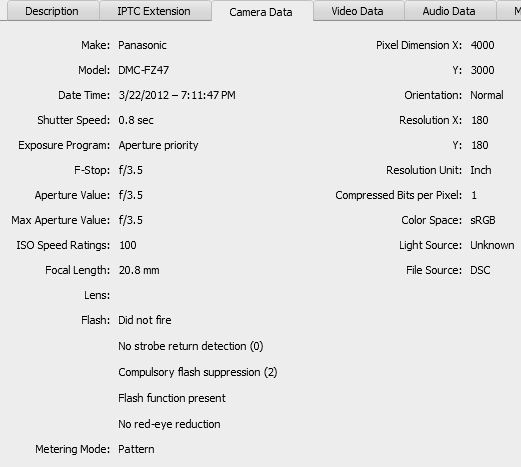
Yes, it's actually extremely frustrating getting it down. I guess I'm so used to a point and shoot its making my head want to explode. I've been messing around with it all night, and I'll post a few more. My conclusions are: The 6500k lights clearly are not efficient at lighting a coin. I dont like the way it looks, and they cannot be diffused easily. My fan light does a way better job, I'm guessing because the light is spread way more efficiently. I also note that I'm having better luck with the coin actually being farther away as I'm assuming this allows more light to come between the camera lens and the coin. My white balance hasnt been officially set, and I'm finding it a lot more difficult then I thought processing. I'm either too hot, too cold, no contrast, way too much. I will eventually have to get the extension and macro for this beast, but I will continue to mess around in the mean time. In terms of grading a coin, I'm not sure these are any better then a 14 mp point and shoot. I'll let the experts chime in on that one. 6500kI can take away a lot of contrast/sharpness, but still the results are not that desirable IMHO.  Fan light Fan light  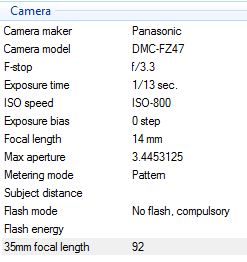 The fan photos all seem to have relatively the same info. |
|
Moderator
 United States
23522 Posts |
The thing which strikes me is how much compromise your camera is having to make in order to get the coin lit - exposure is way slow and ISO way high. With 2-60w CFL equivalents, you ought to be able to get 1/13 @ ISO 200 or less. That said, I'd be working in a direction of shorter exposure, if the ISO setting isn't introducing too much noise - you'll need to pixel-peep the background to see what kind of noise is being generated, but I'd sure like to see exposures faster than 1/100.
How are the lights mounted and directed?
I would be looking to autofocus in your shoes - the camera's viewfinder simply lacks the resolution to show you the coin focused sharply enough. I focus manually, but I've got the coin projected at full magnification on a 24", 19x12 monitor....
So. Settings: AF Macro. Zoomed fully out - EXIF data should indicate 4.5mm focal length for this camera. Use Aperture Priority for the moment, with the widest-possible (lowest numerically) aperture. "Cloudy" white balance should be the best match for 6500k lighting. Let it autofocus.
Don't expect far better results than the point-and-shoots I've played with. That's not why you buy a camera like this - you buy a camera like this for its' insane zoom and broad range of abilities including HD video. This is one you absolutely do not use "only" for macro photography, although down the road with the addition of a Macro lens add-on (the other reason you choose it over a P&S), you're going to be shooting stuff that's indistinguishable from dSLR work at the sizes we post here.
|
|
Valued Member
United States
132 Posts |
Well, I really appreciate your help Dave. I'm sure its extremely frustrating working with people who really dont know much about the subject. The lights were placed in every possible way honestly. 10 and 2, and every other clock combination. Far, close, next to the lenses, every angle I could bend them at as well. The problem with the lights is that the hood doesn't detach, and its a pretty wide hood. It tends to create certain hotspots regardless of the circumstance. I also lack the ability to view this on a monitor, as far as I know. The difference between the LCD, my PC monitor and my macbook pro are all a little off of each other. All I can continue to do is listen to experts, like yourself, and keep on reading what I can and experimenting. I'll go home tonight and work on the correct settings. I dont nearly expect to see the results you guys post, the price difference can tell you that. My generation isn't too familiar with the term "manual"! In the meantime, I'll stop complaining and keep everyone updated when I actually get a worthwhile shot. Your advice as always is much appreciated. P.s - Here's a link to a great site I found on coin photograpy: http://browncopper.com/photography.html-Dan Edited by TonedMo87
03/22/2012 1:16 pm
|
|
Valued Member
United States
132 Posts |
|
|
Valued Member
United States
132 Posts |
Well this weekend I broke down and bought 2 Jansjo's for 18 bucks a piece. I'm moving soon shortly anyways so why not more light? I've seem to have found the sweet spot on the camera, and I like what I'm seeing. From here on out it may be just the diffusion of the lights, and post processing. The photos below have not been edited in photoshop, just cropped. Let me know if these are any better.   Any better? -Dan |
|
Moderator
United States
23522 Posts |
Quote:
I've seem to have found the sweet spot on the camera, and I like what I'm seeing. From here on out it may be just the diffusion of the lights, and post processing. The photos below have not been edited in photoshop, just cropped. Let me know if these are any better. To say the least. What's the actual diameter of the coin, in pixels, before downsizing? |
|
Valued Member
United States
132 Posts |
Well, for cropping in photoshop I have it auto downsizing to 500x500 pixels for size reasons, which may or may not be a good thing. Without that rule, the coin is 1697 x 1690.
|
|
Moderator
United States
23522 Posts |
OK. Postprocess full-size - it makes any sharpening you might use far more subtle in its' effect. Downsize by percentage - 50% or 25% rather than forcing to a specific number, which requires the software to interpolate and potentially misplace pixels whereas percentage reductions are simple math.
Look into what settings you may have available for in-camera processing, sharpening and noise reduction, and disable them to the greatest extent possible. You want to do any or all of that in the computer where you have far more sophisticated hardware and software. Your last pair of images are clear enough so I think I'm seeing a little oversharpening in-camera. Wish it would shoot RAW.
|
|
Valued Member
United States
132 Posts |
Okay Dave, will do from now on. I've found that I like shooting -1 step under exposure, as I seem to like the images a little dark instead of overexposed. You're definitely right in the over-sharpening, I've had the sharpness and contrast +2, saturation at 0 and noise reduction at plus 2 for the majority of my shots. I'll drop them all and take some more and see how they turn out. I'm starting to take a liking to photography in general, not just with coins. I could see how this could become a great hobby as well, and could definitely see myself getting a decent DSLR down the road. Thanks again Dave, as you've been pretty much the only person to help me with this!
-Dan
Edited by TonedMo87
03/25/2012 10:15 pm
|
|
Pillar of the Community
United States
7842 Posts |
TonedMo87, how are you displaying your settings? Is this part of the camera programming? Mine falsh "briefly" after the image is taken on the display screen on my Canon SD790IS.
Edited by oih82w8
03/25/2012 9:29 pm
|
|
Pillar of the Community
United States
4051 Posts |
Latest shots look very good. You have the Jansjos at my personal favorite 10:30 and 13:30 positions that give the nice "X" luster pattern. Beyond SuperDave's excellent recommendations, my only addition is if you can possibly bring the lights up a little bit to get the highlights off the edges of the devices. I don't know if you have the working distance to do this or not but it would help with the overall presentation. But in general, you are there...Ray
|
|
Valued Member
United States
132 Posts |
On my camera I have a button push to show and edit my video settings, which show contrast, sharpness, saturation and noise reduction. Its part of my camera's operation, I'm not sure if that's on yours or not. In my playback mode, I also have the ability to display every aspect of that setting on the screen as well, which is really helpful. If you check out your advanced properties on windows it should also give you some idea of what you're using. For example: Mine will say "Hard" on both contrast and sharpness cause they're set so high.
-Dan
|
|
Valued Member
United States
132 Posts |
Thanks Ray. I have plenty of room to move the lights, and will work on doing that shortly. I have found the lights in that X pattern to be my favorite location as well. I'll update as soon as get new shots with the lights higher up.
-Dan
|
|
Valued Member
United States
132 Posts |
A couple shots after being processed, I'm having a little bit of difficulty getting it exact. I used lots of other peoples photos for reference, but still a learning curve itself on processing coins. I went more towards blue on the first one, which doesn't look as natural. 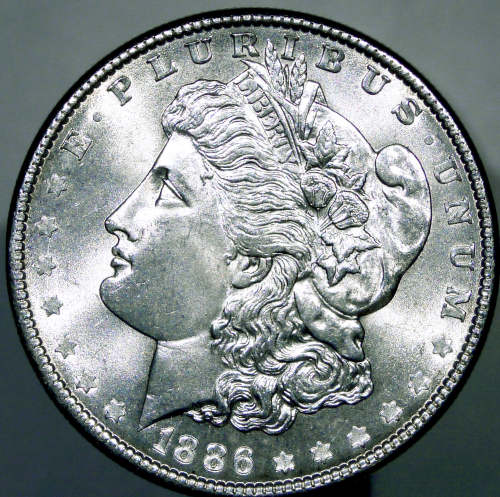 Went more towards yellow on this one, and I like the results better. Both were un-sharpened, upped the exposure and brightness and dropped the contrast a bit. 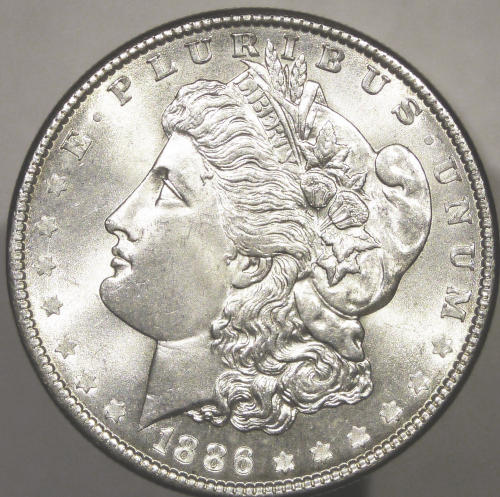 |
|
Valued Member
United States
132 Posts |
Well, the results are pretty much in. This is about roughly as good as I'm going to get, which IMHO isn't too bad considering what I have. Let me know if there's anything else I can do post processing that would be recommended. 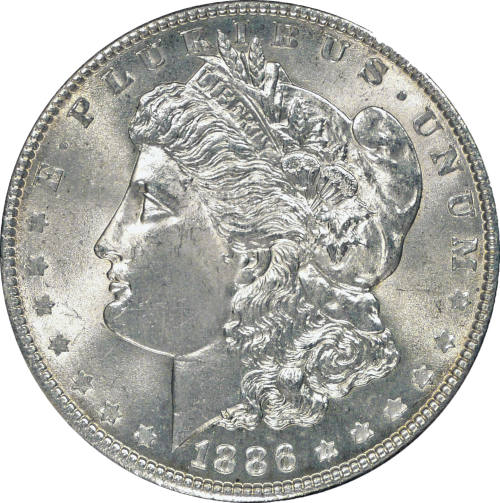 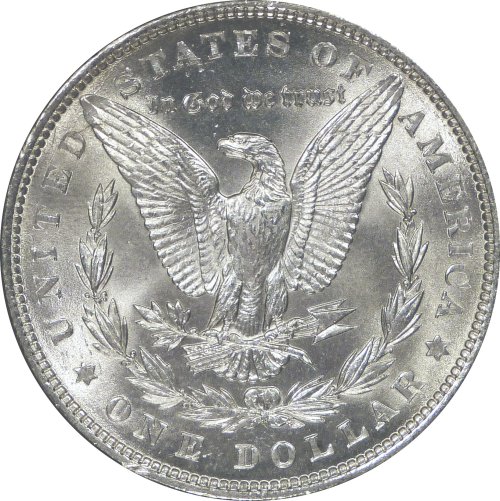 Below is a shot of my super high cost, high tech, not ghetto at all setup, with my super powered light diffusers.. ringing in a total cost of 0 dollars! 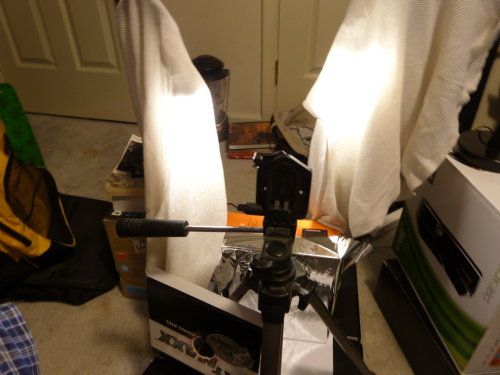 |
|
Page 2 of 2
|
Replies: 19 / Views: 3,553 |
Page 2 of 2
|






 First Page


 Posted 03/22/2012 11:15 am