Coin Community Family of Web Sites Join Thousands of Coin, Bullion, & Money Collectors
Royal Estate Auctions - $1 Coin AuctionsJoin Thousands of Coin, Bullion, & Money Collectors Specializing in Modern Numismatics Vancouvers #1 Coin and Paper Money Dealer 300,000 items to help build your collection! Royal Canadian Mint products, Canadian, Polish, American, and world coins and banknotes. Coin, Banknote and Medal Collectors's Online Mall


Username:
Password:
Save Password
Forgot your Password?


This page may contain links that result in small commissions to keep this free site up and running.

Welcome Guest! Registering and/or logging in will remove the anchor (bottom) ads. It's Free!

How To Take Pictures

To participate in the forum you must log in or register.
First Page  Showing last 15 replies.
Author Previous TopicReplies: 22 / Views: 4,710Next Topic Page 2 of 2
Valued Member
United States
116 Posts
 Posted 08/19/2014  10:48 am  Show Profile   Bookmark this reply Add rupp16 to your friends list
my lighting is fine I just cant zoom in enough to get a decent picture to ask you guys questoins
Valued Member
United States
234 Posts
 Posted 08/19/2014  11:00 am  Show Profile   Bookmark this reply Add ALP to your friends list
Maybe post a picture and we can better make suggestions?
Pillar of the Community
Canada
4944 Posts
 Posted 08/19/2014  1:27 pm  Show Profile   Bookmark this reply Add Canadian-Banknotes to your friends list
Post what you have. That way we can suggest what may need adjusting.
Valued Member
United States
116 Posts
 Posted 08/19/2014  7:38 pm  Show Profile   Bookmark this reply Add rupp16 to your friends list
How-To-Take-Pictures
Valued Member
United States
116 Posts
 Posted 08/19/2014  7:38 pm  Show Profile   Bookmark this reply Add rupp16 to your friends list
help how do I put pictures on
Valued Member
United States
116 Posts
 Posted 08/19/2014  7:41 pm  Show Profile   Bookmark this reply Add rupp16 to your friends list
can I post pictures off of my desktop
Valued Member
United States
234 Posts
 Posted 08/19/2014  7:54 pm  Show Profile   Bookmark this reply Add ALP to your friends list
When you click on "Reply to Topic" there is an option to upload a picture. They have to be under 100 kb. There is a free image optimizer that can help you resize your images. You should see the option for that when on the reply page. Note that you can't sue the quick reply function and upload a pic. You actually have to click on "Reply to Topic".
Valued Member
United States
116 Posts
 Posted 08/19/2014  8:00 pm  Show Profile   Bookmark this reply Add rupp16 to your friends list


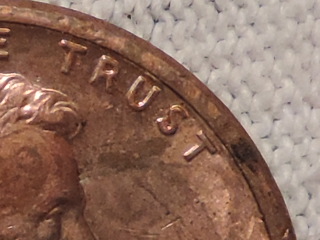
How-To-Take-Pictures heres a picture
Valued Member
United States
116 Posts
 Posted 08/19/2014  8:25 pm  Show Profile   Bookmark this reply Add rupp16 to your friends list
can someone help me please
Valued Member
United States
116 Posts
 Posted 08/19/2014  8:53 pm  Show Profile   Bookmark this reply Add rupp16 to your friends list
anyone on that can help
Pillar of the Community
Learn More...
United States
4038 Posts
 Posted 08/19/2014  9:53 pm  Show Profile   Bookmark this reply Add rmpsrpms to your friends list
Looks pretty good to me. You're trying to zoom in further? How much more magnification are you looking for? What you have now is approx 2:1 magnification. To do a lot more you will need additional optics. A lot of folks do high magnification shots shooting through a magnifying glass.
Contact me for photographic equipment or visit my home page at:
http://macrocoins.com
Valued Member
United States
116 Posts
 Posted 08/19/2014  10:37 pm  Show Profile   Bookmark this reply Add rupp16 to your friends list
Oaky through a magnifying glass
Pillar of the Community
Learn More...
United States
4038 Posts
 Posted 08/19/2014  11:01 pm  Show Profile   Bookmark this reply Add rmpsrpms to your friends list
You need to find a good magnifying glass or the image will not be very good. Hold the glass up near your eye and look at the coin naturally. Take note of the distance between the lens and the coin (Lc), and the lens and your eye (Le), and also measure the thickness of the magnifying glass (Lg). Set your camera on infinity focus (not macro!) and adjust the stand height to Lc+Le+Lg. Hold the lens at height Lc above the coin, and your camera should see pretty much what you see when looking through the magnifier. This is just a starting point. Adjust things around as needed to get the best shot.
Contact me for photographic equipment or visit my home page at:
http://macrocoins.com
Valued Member
United States
374 Posts
 Posted 08/20/2014  01:49 am  Show Profile   Bookmark this reply Add Bababooey to your friends list
If you want to get the whole coin you need to hold the camera back far enough so it can focus. Then crop the photo so the coin fills the whole photo. Cropping it will bring out the details. Those are best to post on this site. Folk seem to have good results with cell phones (iPhones in particular) as well.
Edited by Bababooey
08/20/2014 01:49 am
Valued Member
United States
116 Posts
 Posted 08/21/2014  08:52 am  Show Profile   Bookmark this reply Add rupp16 to your friends list
okay thanks
Page 2 of 2   Previous TopicReplies: 22 / Views: 4,710Next Topic Page 2 of 2
First Page  Showing last 15 replies.
To participate in the forum you must log in or register.


Disclaimer: While a tremendous amount of effort goes into ensuring the accuracy of the information contained in this site, Coin Community assumes no liability for errors. Copyright 2005 - 2026 Coin Community Family- all rights reserved worldwide. Use of any images or content on this website without prior written permission of Coin Community or the original lender is strictly prohibited.
Contact Us  |  Advertise Here  |  Privacy Policy / Terms of Use

Coin Community Forum © 2005 - 2026 Coin Community Forums
It took 0.35 seconds to rattle this change. Forums