| Author |
 Replies: 17 / Views: 3,573 Replies: 17 / Views: 3,573 |
Page 2 of 2
|
|
|
|
Bedrock of the Community
United States
14454 Posts |
well I know I have said it before and actually something similar was asked yesterday. I use a 3.2 MP JVC GC-QX3HD that I paid like 25 bucks (including shipping) on ebay a few years ago to take all my pictures with. I do not use any extra lenses or anything and even though I just got serious about my picture taking not to long ago I can now actually say I am happy with the pictures it takes for both whole coins and close up pictures to show certain attributes. As SuperDave said in this topic http://www.coincommunity.com/forum/...59214#463548 , its not really about the camera because any camera should be able to take adequate coin shots its how the user uses it and gets familiar with the camera to get the best shots. here are some shots taken with the camera to show what I am talking about 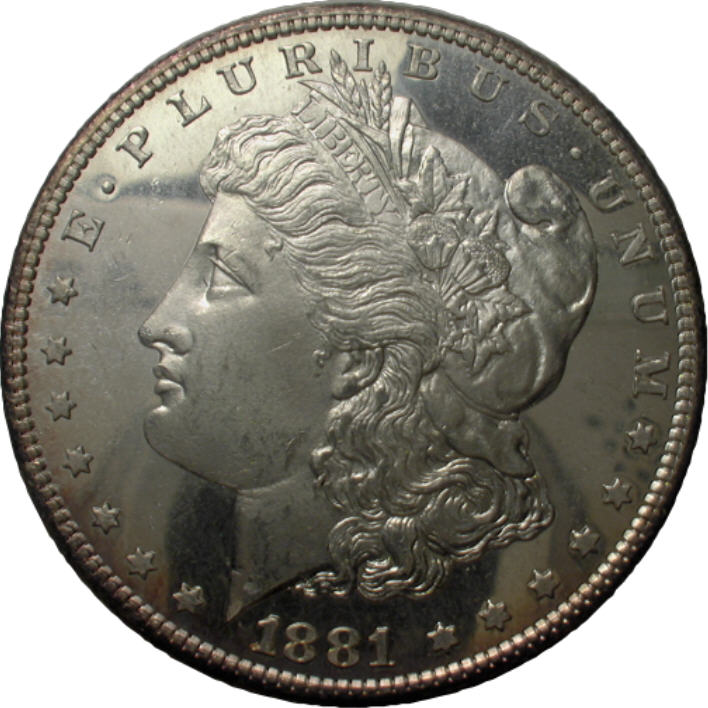  |
|
Pillar of the Community
United States
2254 Posts |
I would suggest going onto dpreview.com and searching chronologically. This is what I do when it comes to any kind of electronics for that matter. Find a good source that has unbiased reviews, and then look at reviews from two years ago or more. Considering technology changes at a ludicrous pace, and I'm not a person that needs every little feature or new thing, I can usually find a model that is 2-3 years old that was a top performer for a fraction of the original price. Write down a few and look on ebay for a good seller with a good used camera. I bought my entire home theater this way(using Audioreview.com mostly). New retail would have cost me about 5-6K. I think I bought everything used for about $1200 when it was all said and done. |
|
Pillar of the Community
 United States
717 Posts |
Bryan, you are very talented! Beautiful pictures!
|
|
Bedrock of the Community
United States
14454 Posts |
as I said in the other topic, I use this camera strictly for coins. Its only a 3.2MP camera and my phone has a higher resolution than that. If you are doing anything but coins then I don't know if 3.2MP would be good enough for that, I have another camera I use for everything else. But 3.2 is fine for shooting coins and if you take the time to learn the camera it is sufficient for taking coin pictures to post (I actually have to downsize the pictures even after they are cropped to fit on the forum). I paid $25.00 for this camera at least 7 or 8 years ago so if you look you can find a cheap camera that will do coins very nicely. I don't have any add on lenses and all I use is the built in macro setting and a small tripod when taking whole coin shots and when taking close up shots I hold it in hand with the same settings
|
|
Pillar of the Community
United States
731 Posts |
Hi yechi7 - I concur with Bryan1315's comments. And his shots look great! That said, I have a difficult time keeping my camera steady (caffeine shakes), and the angle such that the coin is photographed symmetrical. Even if I use a tripod, the camera still gets 'bumped' when I press the shutter button. Therefore, I chose to start using a flatbed scanner. No shakes and symmetrical shots. I use a Lexmark X5435. Here are some examples that were reduced to 400x400 pixels, so they could be uploaded to the forum. Later today I will post some higher-res shots of more intricate patterns to better illustrate. Thanks. 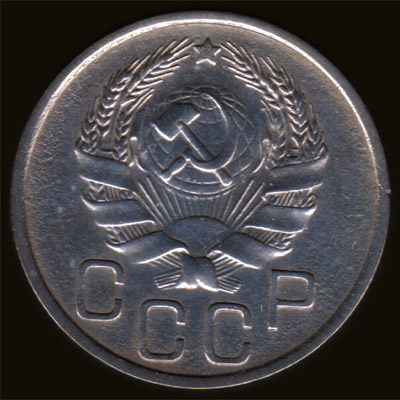 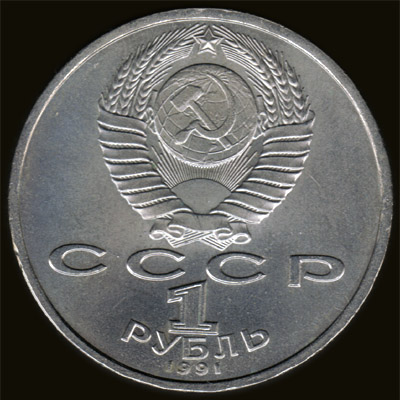 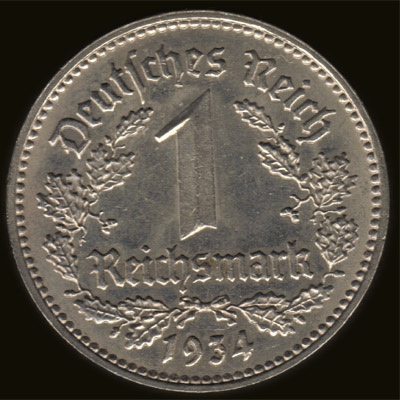 |
|
Moderator
 United States
23522 Posts |
Quote:
Even if I use a tripod, the camera still gets 'bumped' when I press the shutter button.
Prerequisites for shooting coins: 1) Macro mode, if it's a non-interchangeable-lens camera. 2) Tripod or other stable mount. 3) Delayed shutter so your finger isn't actuating the shutter. The lack of any of those three will leave you preferring a scanner. yechi7, what Canon is it that doesn't have a Macro mode? |
|
Pillar of the Community
United States
717 Posts |
SuperDave,
It's the Powershot S1 IS.
|
|
Moderator
United States
23522 Posts |
Quote:
It's the Powershot S1 IS I see. You're right - it does not have a dedicated Macro mode, but it is capable of focusing at 10cm from an object and one can use the zoom to achieve that distance "virtually." They don't call it "Macro," but achieving focus at 4" is macro. If it quacks, it's a duck.  It's definitely worth using for coin shots; play around with it using the techniques we've talked about here before looking for a new camera. In a low-end price range, I'd guess you won't do much better than the camera you already own. |
|
Valued Member
United States
141 Posts |
Cheeta, are you using a black back in front of the coin or compensating it in your software ?
|
|
Pillar of the Community
United States
717 Posts |
SuperDave, The problem that I have with the Canon Powershot S1 IS is because there is no Macro mode, when I get try to get a close-up, or even if I shoot from a distance & zoom, I can't get a good focus. Some samples:     |
|
Pillar of the Community
United States
2254 Posts |
Yechi, How far back must you be to get good focus? Using the Lincoln Cent in your first photo, back off the camera or focus until you achieve a clear picture. Then you should just be able to resize it to the same size as the image you posted. Is the problem you're having that it doesn't matter the distance, the focus is just not there? I just pulled this from dpreview. It seems they ran into the same situation. Quote:
Focus errors
The S1 IS suffers from more than its fair share of focus errors, particularly at the long end of the zoom, at close distances and when shooting in low light (where an autofocus illuminator would be invaluable). The small screen makes judging whether the focus has hit the right spot difficult, and you soon learn to zoom in on the playback image in situations where the focus is likely to struggle.
I took a look at the picture of the flower that they took, and when cropping the photo and digitally zooming in, it is pretty blurry. Hmmph. Considering this is coming from what I believe as a pretty trusted source, you may be better off finding something along the lines of a 5mp camera that has dedicated macro. I think even these(or slightly higher mp's) can be found for a pretty cheap price. |
|
Pillar of the Community
United States
731 Posts |
LuckyDime -> I'll explain the method that I use:
I use a flat black background sheet when scanning. I open the scanned JPG (at 2400 dpi) in PhotoShop and align the coin rims to grid in PhotoShop. I then use the Elliptical Marquee Tool with a 20px Feather to outline & select the coin and paste it onto a new canvas with a transparent background. I add a New Layer, then move the blank new layer behind the coin layer. I then use the Paint Bucket Tool to fill the blank layer with black.
This method, with the Feather, ensures that the coin is "untouched" and not "PhotoShop'd" while at the same time placing a pure black background behind.
|
|
Bedrock of the Community
United States
14454 Posts |
the only thing I don't like about scanners is it doesn't show luster. if you are just wanting to show some details then a scanner is fine but to grade by a scanner takes allot of practice. A scanner will also exaggerate details and marks and make them look worse than they actually look in hand
|
|
Pillar of the Community
United States
731 Posts |
For illustrative purposes only, a scanned coin in a flip someone sent me... I didn't bother taking it out... hence specks. I wouldn't use a photograph to specifically evaluate something that's high grade and/or MS; I wouldn't rely on a photo to determine such variances. That's just me... 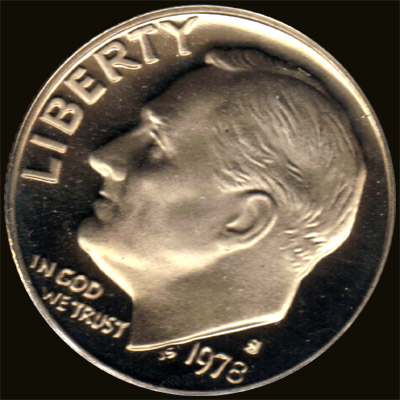 |
|
Pillar of the Community
United States
731 Posts |
yechi7 - I'm going to have to defer to the concurrence of the group that for presentation purposes, a camera would suit better. Strictly for coin database & documentation purposes, I plan to continue using my scanner. However, for anything demanding more, I'm going to defer to Bryan1315 et. al. and recommend using a camera. I 'fiddled' around today with my camera, and ended up making a temporary copy stand to shoot test coins. As for the quality obtained from using a camera, below please find a side-by-side comparison of my results between using my scanner and my camera. Good Luck! 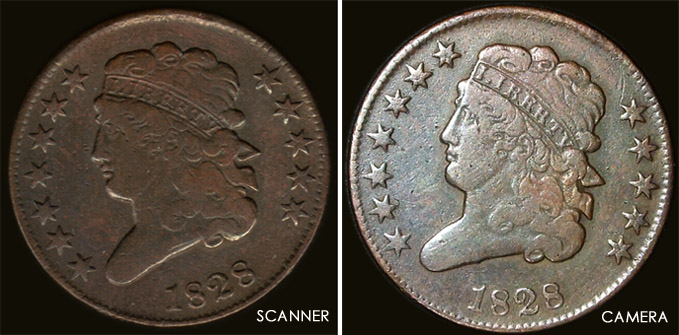 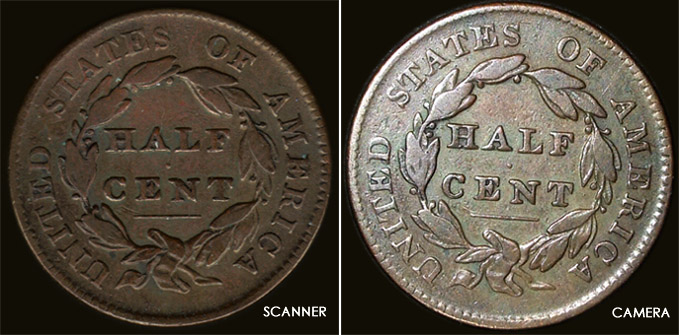 |
|
Page 2 of 2
|
Replies: 17 / Views: 3,573 |
Page 2 of 2
|





 First Page


 Posted 02/09/2010 08:30 am


