| Author |
 Replies: 30 / Views: 3,834 Replies: 30 / Views: 3,834 |
|
|
|
Bedrock of the Community
United States
12437 Posts |
You should be able to get awesome pics with that camera but it looks like you need some lighting adjustment as well. Technique has alot to do with the quality of the photo, I obtained this picture on a 4MP 3x optical zoom Nikon Coolpix 4600, a decidedly low level point-and-shoot camera but I also used the cameras timer, a copystand, and a 26W 5000k fluorescent spiral light  Edited by biokemist6
01/26/2010 9:38 pm
|
|
Moderator
 United States
23522 Posts |
OK. I pulled a random Cent from my pocket, threw it on my computer, set the camera on a tripod, eyeballed it somewhat vertical and shot it on a 2-second delay with whatever settings the camera had at the time. The setup looked like this: 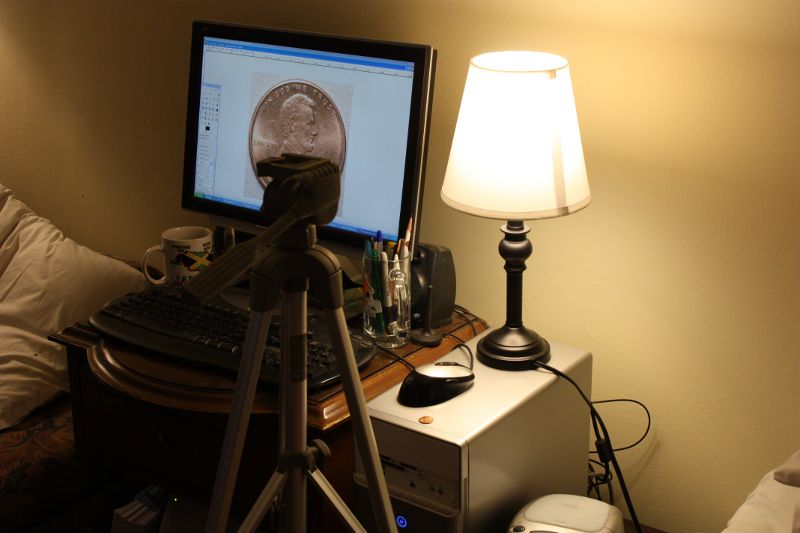 Here's the result, sharpened in the Gimp (you can see it on my monitor): 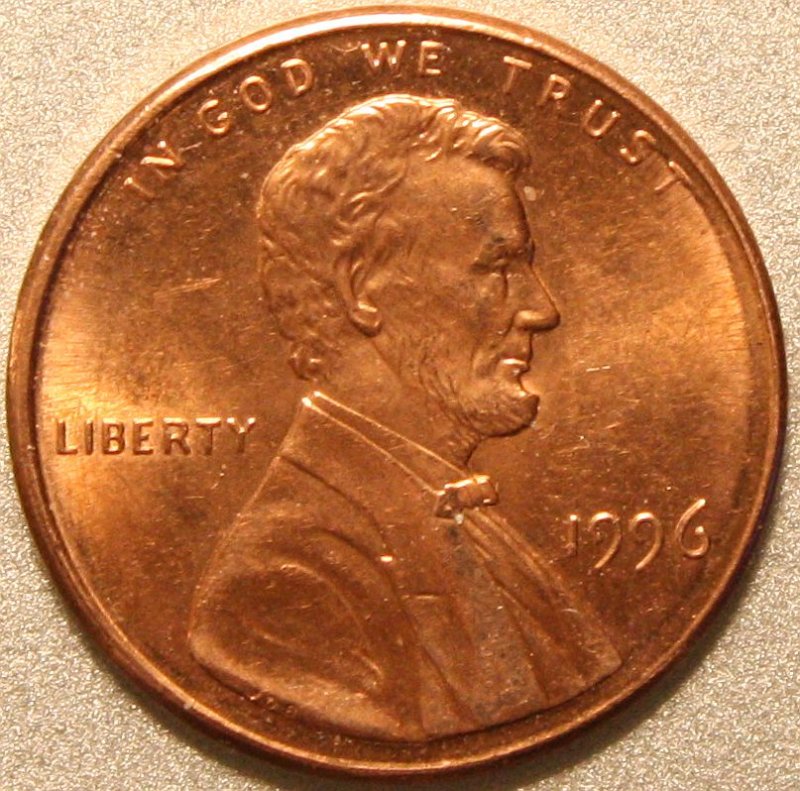 ISO800, 1/30@f/6.3, zoomed in at 55mm. Auto White Balance. One 60w (equivalent) CFL in the little lamp, another in a floor lamp about 4ft away. The lens front was around 8-10" from the coin. Just about as random as you can get. This, I think, proves the essential goodness of *any* dSLR with just about *any* lens. All we gotta do is figure out why yours won't match it. Quote:
I think I loose the capability to control those functions on auto-focus, but will give it a shot.
No. You must let the lens autofocus, and that happens in the lens - your camera settings do not affect it. |
|
Pillar of the Community
 United States
819 Posts |
When I take the pics they are usually over 4,000 pix both ways, I then crop to leave only the coin but it is still too many pixels, I then resize the photo, sometimes using Ifranview sometimes the EOS utility that came with the camera; trying both to see which is better. I resize so that it is as close to being under 500 pixels each way. Have also had to resize again to be under 90 mb. I don't think I am loosing any detail that I can't see in the original. I enlarge the original by 200% but can't see any greater detail, the more I enlarge the worse it gets. any suggestions appreciated, I am going to try again using the timer to reduce any furher camera shake that may be thee. thanxz bob
|
|
Moderator
United States
23522 Posts |
Quote:
When I take the pics they are usually over 4,000 pix both ways, That was my next question - whether you're using the maximum possible image size. The cent above is a 100% crop, full size from a 4000px image. In the Gimp, I size the coin to 800 pixels (CCF's Gallery image size limit; this coin was right on that already) and save it at 80% quality. The step down in quality - I don't know if/how your software does that - reduces the file size to about 200kb, which is easily usable on the Internet. I can reduce the quality of a full-size Morgan shot from my macro lens (2000px+ just for the coin) to a filesize that would work here, except nobody will host an image that big.  |
|
Pillar of the Community
United States
819 Posts |
WOW! those are some awesome shots! Thanxz for all the tips and info, will try put that in effect for several coins and post the results here. thanxz again, might be a day or so before I do it.
|
|
Pillar of the Community
United States
2669 Posts |
Quote:
I resize so that it is as close to being under 500 pixels each way. Have also had to resize again to be under 90 mb. I don't think I am loosing any detail that I can't see in the original. I enlarge the original by 200% but can't see any greater detail, the more I enlarge the worse it gets. Resizing HIGHER pixelates your photos and you lose detail. Try not resizing at all - crop to the edges of your coin and upload to Photobucket ( http://www.photobucket.com). Create an account, upload your large picture, and under the thumbnail of your picture it will show you the links to place here in the forum for the picture to appear. The one you want begins and ends with IMG - it will look something like this: [i mg]url-to-your-picture[/i mg] - copy that entire line into a post here and your picture should show up. |
|
Pillar of the Community
United States
819 Posts |
SuperDave
What, pray tell, is a "Gimp"?
another question: Why upload to photobucket when the can be uploaded from the computer directly to CCF and save one step in the process?
and one more: If I don't resize smaller the pics will not upload to CCF due to the restriction on pic size, so how do I get them on CCF without resizing?
Note, tried to program my camera to leave the mirror up, couldn't get a pic so I went back to the default settings and no it takes pics sometimes, sometimes it flashes w/o taking a pic, and some times a delayed pic somtimes a "Busy" sign on the LCD. Tried resetting defaults again but same luck. Going to have to figure out what's happening to make another stab at coin photos.
|
|
Bedrock of the Community
United States
12437 Posts |
Quote:
another question: Why upload to photobucket when the can be uploaded from the computer directly to CCF and save one step in the process?
and one more: If I don't resize smaller the pics will not upload to CCF due to the restriction on pic size, so how do I get them on CCF without resizing?
Two completely related questions- CCF uploads are limited to ~100kb while you can use a photo of any size uploaded to a hosting service like Photobucket. Why is that you ask? Uploaded photos are hosted by the CCF site(the size limit preserves site bandwidth) while something from Photobucket is only linked to the site, Photobucket is the one hosting it. The photo I posted is about 400kb in size and it is from Photobucket, it was only cropped with no resizing at all. GIMP is image editing freeware, I have never used it but SuperDave is a big fan Edited by biokemist6
01/28/2010 4:10 pm
|
|
Pillar of the Community
United States
819 Posts |
thanxz for the answers, using photobucket makes sense now, will try to upload the followng pic from there soon as I can. Here is my latest attempt, camera is acting funny on some shots, hope the electronics aren't going crazy...it is brand new.
on this coin look at the "86" and the LIB in "LIBERTY"
the coin appears to have a burnished "halo" around the outer edge making a convex appearance but it is not convex.\
|
|
Pillar of the Community
United States
819 Posts |
OOPS! hit the wrong button and posted before uploading the pic so I went to photobucket and uploaded to there but can't copy the img code to paste here because my toolbar disappeared and can't find a way to copy...will have to dig out my book and learn the manual input keys for "copy"
|
|
Moderator
United States
23522 Posts |
Quote:
GIMP is image editing freeware, I have never used it but SuperDave is a big fan I'm a big fan of "free." Basicbob, do you have your CCF Image Gallery yet? It's a membership perk, and although I don't know what the filesize limitation is, it's considerably more than 100k. The image size limitation is 800px, which is why I mentioned sizing all my stuff to that, but the reason I cut Quality is out of consideration to CCF's and members' bandwidth. I have stuff in my Gallery well over 500kb. |
|
Pillar of the Community
United States
819 Posts |
 Hope this works, think I have it right, the problem with the 8 and 6 seem to be there but the doubling on the LI of Liberty doesn't. |
|
Pillar of the Community
Canada
1248 Posts |
superdave,
we seen your set up, your pillow, your coffee mug..
WHERE is the beer bottle?
|
|
Moderator
United States
23522 Posts |
Quote:
WHERE is the beer bottle?
In the fridge, along with a bunch of its' brothers. You're hitting on all cylinders now, basicbob. How large is the original of that Cent? |
|
Pillar of the Community
United States
819 Posts |
about 1/2 inch. Still would like to make it bigger to show more of the doubling of the 8 and 6
I am getting much better results due to your input and others, thanxz
|
| |
Replies: 30 / Views: 3,834 |








 First Page


 Posted 01/27/2010 08:12 am


