| Author |
 Replies: 71 / Views: 9,445 Replies: 71 / Views: 9,445 |
|
|
|
|
Pillar of the Community
 United States
4051 Posts |
Ham...work was busy last 2 days and I missed your inputs on settings...
First, I should say that the image looks very lustrous to me! So IMO you have a good starting point.
The graininess may be due to the high level of sharpening being done in camera. You are using "Standard" style, with a sharpening level of "3". This is the camera default, and generally produces decent but not great results. Any level of sharpening in post processing will make the graininess worse.
I see you're doing exposure compensation, and this has eliminated most blown-out highlights. You have this setting correct for the shot. But with this level of compensation, the pic coming out of the camera must be pretty dark, and you're doing a lot of adjustment in post processing to brighten it, correct?
Your ISO, WB, metering, etc all look fine.
I'd recommend trying a couple different things:
1) Change the contrast subsetting to -2, -3, or even -4. This will balance the image a little better, and give you room for adjustments without blowing out highlights or crushing shadows.
2) Change to Neutral style. This turns off the aggressive contrast enhancements present in the Standard Style. Keep the default subsettings (0,0,0,0). This will give you a completely new starting point for the image, and may give you more flexibility in post processing to get what you are looking for. You may need to change the exposure compensation to -2/3 or -1/3 to keep the same level of highlights.
Usually, fewer lights is better for luster presentation. 2 lights at 90-deg (1:30 and 11:30) will excite a luster X on the coin. Fill-in with a well-diffused light somewhere between 3 and 9 depending on what areas are darkest.
Jansjos always need some level of diffusion to avoid "graininess" or "sparklies", so you should be diffusing the lights with tissue or vellum. For the fill-in light, use multiple layers.
Hope this helps and let's see any results!
|
|
Pillar of the Community
Canada
2784 Posts |
hamm the setting ray is telling you to change. I had the same issue with my canon eos 70d. when I made those changes that ray is telling you to do. I set my eos 70D that same way. it helped me out as well. see ray told me these are factory setting. once I corrected those setting. it made a big difference. hope this all helps. I would still do the firmware update as well.
|
|
Pillar of the Community
Canada
2784 Posts |
hamm that is and excellent photo fix the sharping. you will see a big difference.
|
|
Pillar of the Community
United States
1305 Posts |
Thanks for the information Ray and Rocky. Very good suggestions, and when I get the time, I'll give them a try. Ham.
|
|
Pillar of the Community
United States
1305 Posts |
Quote:
1) Change the contrast subsetting to -2, -3, or even -4. This will balance the image a little better, and give you room for adjustments without blowing out highlights or crushing shadows. I don't see where you change the contrast subsettings. Quote:
Jansjos always need some level of diffusion to avoid "graininess" or "sparklies", so you should be diffusing the lights with tissue or vellum. For the fill-in light, use multiple layers. What do you mean by fill-in light, use multiple layers. Thanks, Ray |
|
Pillar of the Community
United States
4051 Posts |
You change the subsettings where it says "Detail Set".
My suggestion was to use 2 Jansjos with some diffusion, but if there are dark areas on the coin that can't be recovered, then you can use another Jansjo with more diffusion to "fill-in" the dark areas. The light can come from somewhere between 3 and 9 oclock depending on where it fills-in the dark areas best.
Contact me for photographic equipment or visit my home page at: http://macrocoins.com |
|
Pillar of the Community
United States
1305 Posts |
|
|
Pillar of the Community
United States
1305 Posts |
Looks much better to me. How can I improve? Using 2 Jansjo's (positioned at 5 and 7) with some diffusion. 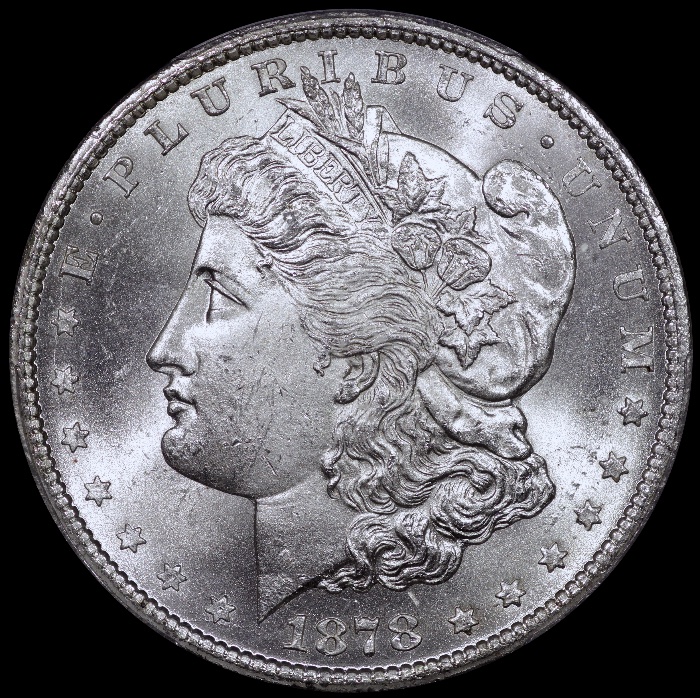 |
|
Pillar of the Community
United States
1305 Posts |
Shooting information. 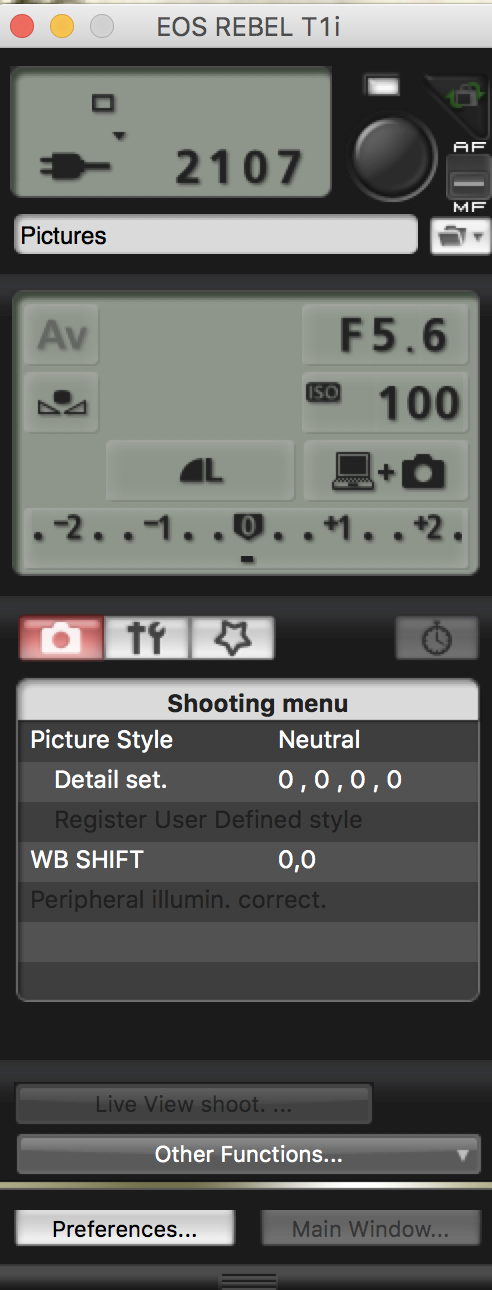 |
|
Pillar of the Community
United States
1305 Posts |
I need to clarity something. When positioning the coin, it is upside down on the copy stand. So actually the lights would be at about 2 and 10 in reference to Miss Liberty. One light at the U, and the other at P.
|
|
Pillar of the Community
Canada
2784 Posts |
great image hamm very well focused very well done.
|
|
Pillar of the Community
United States
1305 Posts |
I like these better. What say you? 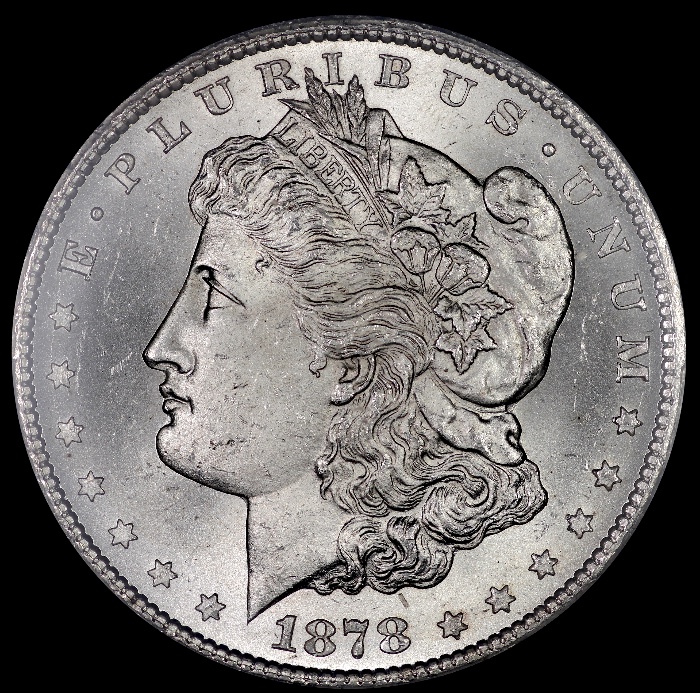 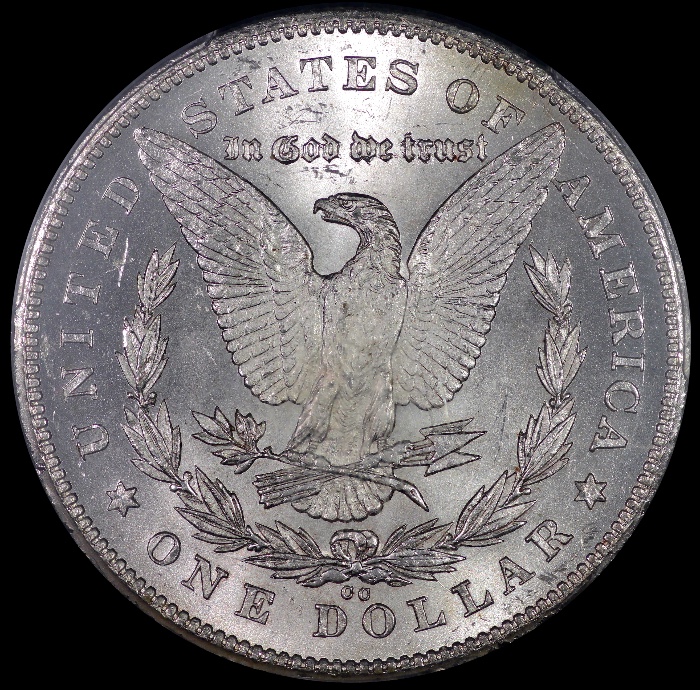 |
|
CCF Advertiser
United States
1533 Posts |
Lunapic. This is what I was looking for.
|
|
Pillar of the Community
United States
4051 Posts |
Looking good Ham! You may have either too much fill light, or perhaps your lights are a bit far apart, since the more "normal" Morgan pic is darker at the date and MM. I'd recommend adjusting the light positions so that fields behind the Date and MM are about as dark as the areas in front of face and behind head on obverse and near the NI of UNITED and RI of AMERICA on the reverse. Probably just bring your two lights a little closer together. Right now they appear to be at 10 and 2, but may give a little better contrast if they are at 10:30 and 1:30.
Contact me for photographic equipment or visit my home page at: http://macrocoins.com |
|
Pillar of the Community
United States
1305 Posts |
Ok, Ray. Will try your suggestions. Thanks.
|
|
|
Replies: 71 / Views: 9,445 |
|








 First Page
 Previous Page
 Posted 06/21/2017 10:12 am


