| Author |
 Replies: 16 / Views: 17,502 Replies: 16 / Views: 17,502 |
Page 2 of 2
|
|
|
|
Pillar of the Community
United States
1161 Posts |
great info as always coop!  |
|
Bedrock of the Community
United States
79753 Posts |
Very helpful thread Coop! You're much better than I am!  This was added to my bookmarks. Thank you very much for your time as always!  Errers and Varietys.
Edited by Errers and Varietys
08/06/2019 10:55 pm
|
|
Pillar of the Community
United States
1494 Posts |
Thanks, Coop! Great info for any collector!
|
|
Pillar of the Community
United States
1070 Posts |
Very informative post. Thank you!
|
|
Pillar of the Community
United States
520 Posts |
Thank you so much for that post!
|
|
Pillar of the Community
United States
7370 Posts |
After newbies introduce themselves and hit "post" this thread should pop-up on their screen....and Coop if you would have shown the difference of a scratch ( PMD) vs. die scratches, it could eliminate so many questions...just my 2 cents...Thanks Coop we all cherish your teachings... |
|
Valued Member
United States
194 Posts |
Glad you posted this coop! Hmmm I wonder what go it into your head to do that... ; ) thanks!
|
|
Bedrock of the Community
 United States
62064 Posts |
If you save images that will help you, you can add them to your educational files. Or you can copy the whole page and save it in Word, even the images. Just try to break it down into smaller sections and keep adding to the file gradually.
some may wonder how long it took me to prepare the thread. I use MS-Word, type in the information and add the addresses of the links and tags complete it, then re-read the whole thread again editing more/taking out adding the color tags, underline tags, bold tags and the italics tags. Took about one hour. When it was already to post, copy paste it on the forum in two steps. The body first, Copy, Paste, done. Then copy the line for the title and add a bit. Done. Easiest way to create a thread without taking too long or time out on the forum. Works great for me.
Edited by coop
08/07/2019 1:04 pm
|
|
Valued Member
United States
354 Posts |
This was very helpful here. I am fairly new... but watching the videos and have the books (which are not always helpful) I can only look to others who have the knowledge. I pray for your patience. Thanks
|
|
Valued Member
United States
151 Posts |
Thank you, coop! Any info on how to identify die dent vs. die gouge? Anything specific to their appearances that would differentiate them?
|
|
Pillar of the Community
United States
1204 Posts |
Great info Coop. Is it possible to stick these types of informational posts to the top of the forum? Would help alot.
|
|
Valued Member
United States
399 Posts |
Thank you coop! Nice explanation. Very informative and appreciated :)
|
|
Bedrock of the Community
United States
62064 Posts |
Well to tell the difference between a die dent and a die gouge, would probably be the the gouge would probably not be straight. On a die dent, these will be straight. The dent is from the outside edge of another die. Thus most like it will be straight. Depending on how far the die was dropped, the more damage we would expect to see on the victim die. Probably the strongest one I've seen was on that looked like a Cud, but was not taller than the rim: 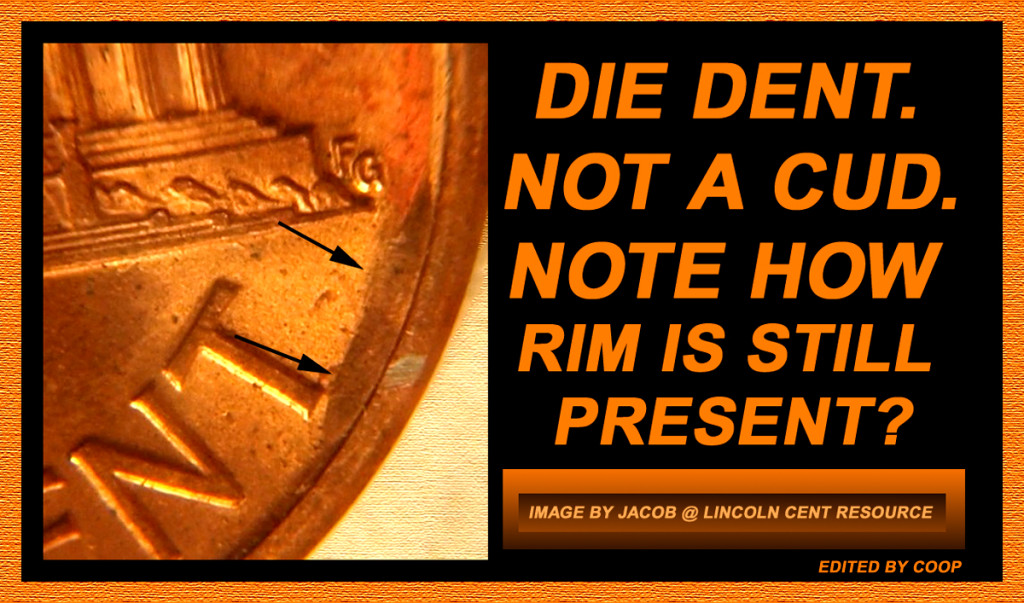 This one followed the edge of the die and is not exactly straight, but it is the probably from the die being dropped on the floor, thus rounding that edge over a bit. Not like a die that is dropped onto another die. The collision of one die hitting another die would look like on the die, like a bag mark on a coin, but on the die, it is an incuse mark and would leave a raised area on the coins. |
|
Pillar of the Community
Canada
3328 Posts |
|
|
Pillar of the Community
United States
2869 Posts |
|
|
Page 2 of 2
|
Replies: 16 / Views: 17,502 |
Page 2 of 2
|





 First Page


 Posted 08/06/2019 10:55 pm


