Coin Community Family of Web Sites Join Thousands of Coin, Bullion, & Money Collectors
Vancouvers #1 Coin and Paper Money Dealer Specializing in Modern Numismatics Royal Estate Auctions - $1 Coin Auctions300,000 items to help build your collection! Coin, Banknote and Medal Collectors's Online Mall Join Thousands of Coin, Bullion, & Money Collectors Royal Canadian Mint products, Canadian, Polish, American, and world coins and banknotes.


Username:
Password:
Save Password
Forgot your Password?


This page may contain links that result in small commissions to keep this free site up and running.

Welcome Guest! Registering and/or logging in will remove the anchor (bottom) ads. It's Free!

Help With Coin Photography, Most Of My Equipment Has Arrived

To participate in the forum you must log in or register.
Author Previous TopicReplies: 103 / Views: 10,367Next Topic
Page: of 7
Pillar of the Community
gymcoachdon's Avatar
United States
717 Posts
 Posted 05/22/2015  10:06 pm  Show Profile   Bookmark this reply Add gymcoachdon to your friends list Get a Link to this Reply
I have a question about Live view. When setting up for shots, the screen is much darker than the picture ends up. This makes it impossible to focus properly when set for the proper exposure. I assume this is because the program has no aperture information from the lens, but how do you guys work around it? I have been shining extra light, or opening the aperture up to focus, and then back to proper setting to take the picture. Is there a setting somewhere I'm missing?
Pillar of the Community
Learn More...
United States
4038 Posts
 Posted 05/22/2015  10:56 pm  Show Profile   Bookmark this reply Add rmpsrpms to your friends list Get a Link to this Reply
The Live View problem is odd. Are you on Av mode, or manual? I found a similar problem on my T2i in M mode, but in Av it does automatic exposure simulation and comes out just like on the screen.

As mcshilling says there are quite a few options for stands. Here are the ones I have worked with:

1) B&L A-Stand with hoop mount replaced by bellows mount. This is the stand you'll see pictured most often in my posts. I use this stand myself in my portable setup I take to shows and coin club meetings. The focusing mechanism is fine enough for use up to 10x magnification (2.4x1.5mm FOV). Very small desk footprint. Drawback is the small size limits use with longer lenses and larger coins and medals. Practical limit is Dollar/ASE size coins. Available in 1960's vintage grey finish with bronze bushings, 1970's vintage smooth black with phenolic bushings, or 1980's vintage krinkle black with phenolic bushings. Works best with either Vivitar Bellows or Pentax Auto Bellows and 75mm lenses for full-coin viewing.

2) As above but with hoop mount replaced by MZ7 riser. This is the "Santoku" stand Superdave uses. Has same height and coin size limitations as #1. Works best with "low rise" bellows like the Vivitar Triple Track.

Many accessories are available for the above two stands: Carrying box; XY table; original hoop ring for mounting StereoZoom microscope (slow process to swap with bellows mount or riser); Nicholaus Illuminator (for Santoku or hoop ring); Stereo/StereoZoom Pods and various associated accessories.

3) Round base boom stand. This is the stand that Dar put together. I use this stand myself on my desktop for Stereo microscope viewing. Requires a focus mount (B&L E-Mount or equivalent). Can swap focus mounts for different applications, such as one for photomacrography and one for stereo microscope. Focus mounts available in either grey or krinkle black. No limitation on type of riser height of bellows. Heavy so expensive shipping...

4) Leica Video Microscope stand. This is the stand mcshilling will be using. Larger, taller than the A-stand. Has fine focus XYZ stage for detail photography. Stage is removable for full-coin photography. No bellows mount. Instead this stand integrates the camera and optics onto an extension tube, and additional extensions and helicoid are added similar to the <$400 setup. Seem an excellent option for use as a live searching system using camera Live View on PC screen, but as yet unproven other than testing. The mount natively holds a MonoZoom7 so high magnification viewing/imaging is feasible. Due to length of built-in extension, 80-90mm lenses are recommended for full-coin viewing.

Contact me for photographic equipment or visit my home page at:
http://macrocoins.com
Pillar of the Community
gymcoachdon's Avatar
United States
717 Posts
 Posted 05/22/2015  11:06 pm  Show Profile   Bookmark this reply Add gymcoachdon to your friends list Get a Link to this Reply
Option one sounds like what I need. Small footprint? Could it sit on the corner of my desk, about 2 1/2 ft square?
I would love to get back into the live view and see what setting I was in, but the battery in the camera is out for recharging. (on the tripod that means removing, because of the quick release covering battery door, is the battery accessible while mounted to the microscope stand?)
Pillar of the Community
gymcoachdon's Avatar
United States
717 Posts
 Posted 05/22/2015  11:13 pm  Show Profile   Bookmark this reply Add gymcoachdon to your friends list Get a Link to this Reply
This is the only ebay listing for what seems to fit your description that I could find
http://www.ebay.com/itm/MICROSCOPE-...em43dcdb1a9c

Is that what I should be looking for? Or do you have something already modified?
Pillar of the Community
Learn More...
United States
4038 Posts
 Posted 05/22/2015  11:52 pm  Show Profile   Bookmark this reply Add rmpsrpms to your friends list Get a Link to this Reply
Yep, that's the stand #1. You can modify it similarly to how Wizzy did his in this post:

https://goccf.com/t/228546&whichpage=4

I can also supply a stand already modified, or can install the MZ7 riser like #2, which you can see in this post:

https://goccf.com/t/103741&SearchTerms=santoku

In fact I can supply the same stand and bellows (Vivitar Triple Track) as seen in that post. It will work well with the 75mm lens you already own, or the M5 objective. The stand is only about 6"x9" at the base so plenty of room left in your 2-1/2 foot square area!
Contact me for photographic equipment or visit my home page at:
http://macrocoins.com
Pillar of the Community
gymcoachdon's Avatar
United States
717 Posts
 Posted 05/23/2015  12:33 am  Show Profile   Bookmark this reply Add gymcoachdon to your friends list Get a Link to this Reply
I would be interested in the stand and bellows in the post. How should we proceed?
Pillar of the Community
Learn More...
United States
4038 Posts
 Posted 05/23/2015  01:18 am  Show Profile   Bookmark this reply Add rmpsrpms to your friends list Get a Link to this Reply
You can send me an email and we can work out the details. I tried emailing you but you have emails turned off in your profile.
Contact me for photographic equipment or visit my home page at:
http://macrocoins.com
Moderator
Learn More...
SsuperDdave's Avatar
United States
23522 Posts
 Posted 05/23/2015  08:30 am  Show Profile   Bookmark this reply Add SsuperDdave to your friends list Get a Link to this Reply
When I'm shooting full Manual I solve the brightness problem by arbitrarily increasing the ISO a couple steps for focusing. I never knew Aperture Priority gave an accurate image; that's enough right there to consider switching from Manual.
Pillar of the Community
Learn More...
United States
4038 Posts
 Posted 05/23/2015  10:12 am  Show Profile   Bookmark this reply Add rmpsrpms to your friends list Get a Link to this Reply
Actually I thought I was doing something wrong when I first got the Canon and in M the images didn't match. Av made the shot match the screen so that's what I went with and have been recommending.
Contact me for photographic equipment or visit my home page at:
http://macrocoins.com
Pillar of the Community
gymcoachdon's Avatar
United States
717 Posts
 Posted 05/23/2015  11:05 am  Show Profile   Bookmark this reply Add gymcoachdon to your friends list Get a Link to this Reply
When I get home from work, I will be excited to try that out. After I plant the flowers, mow, check the grill for propane...guess who is hosting the family get together tomorrow.
Pillar of the Community
gymcoachdon's Avatar
United States
717 Posts
 Posted 05/23/2015  2:59 pm  Show Profile   Bookmark this reply Add gymcoachdon to your friends list Get a Link to this Reply
I sent you an email Ray
Pillar of the Community
Learn More...
United States
4038 Posts
 Posted 05/23/2015  5:20 pm  Show Profile   Bookmark this reply Add rmpsrpms to your friends list Get a Link to this Reply
Don...sent you two emails, one early this AM and one after lunch. Is the email you have listed in your profile the correct one?
Contact me for photographic equipment or visit my home page at:
http://macrocoins.com
Pillar of the Community
gymcoachdon's Avatar
United States
717 Posts
 Posted 05/23/2015  10:16 pm  Show Profile   Bookmark this reply Add gymcoachdon to your friends list Get a Link to this Reply
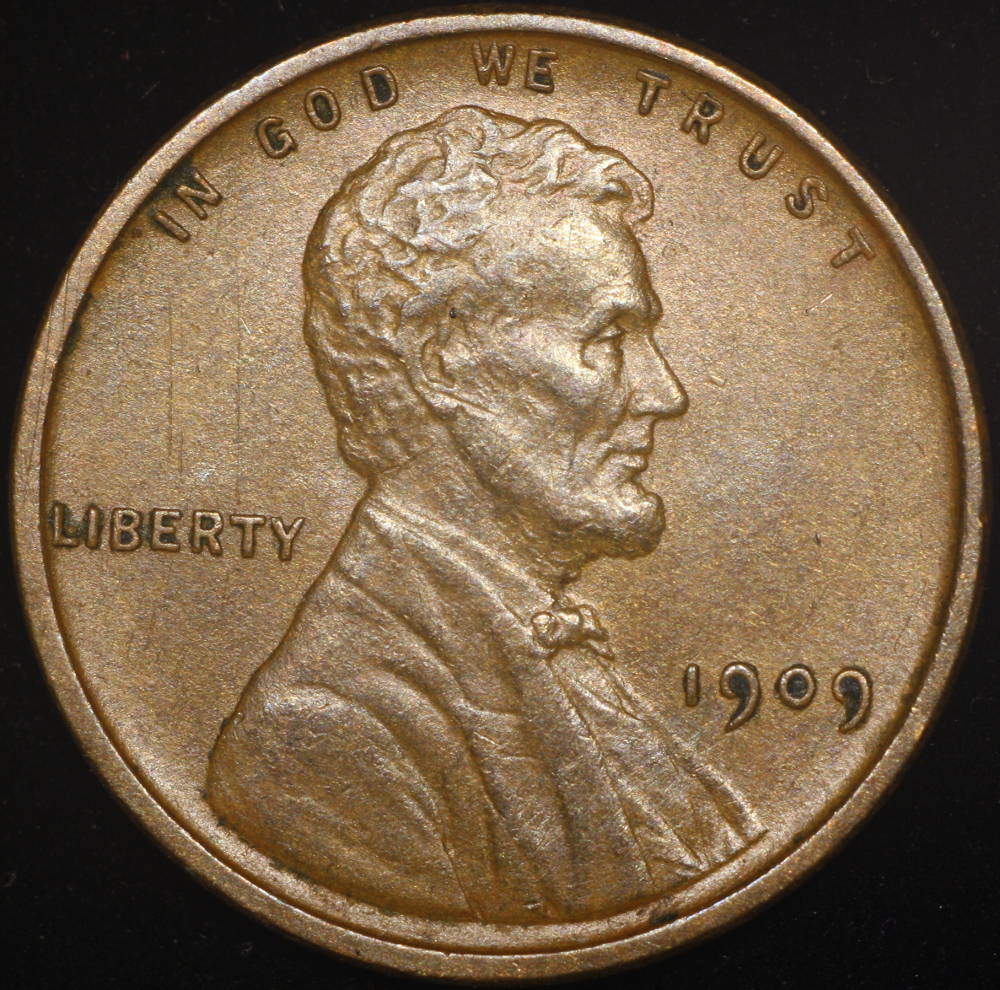
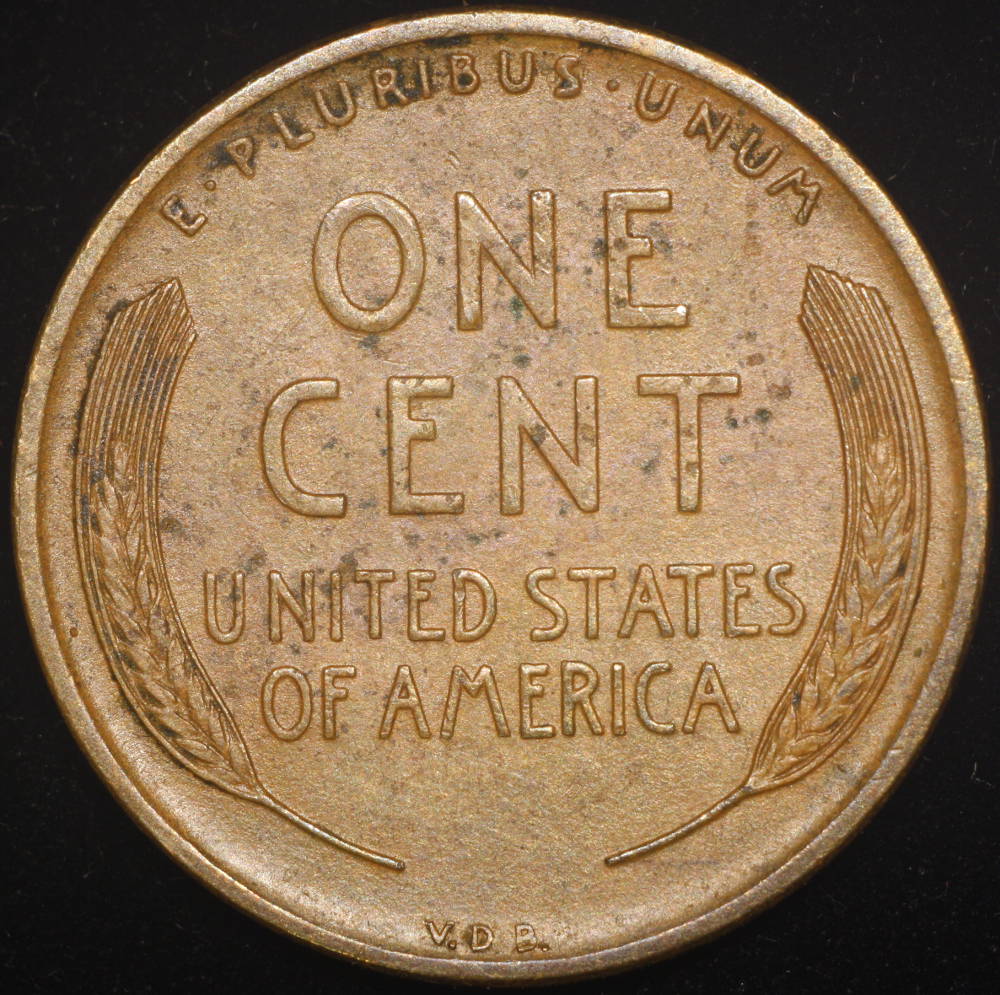
Ok, anyone else reading this later on, the camera needs to be set to aperture priority, then picture will look the same as what you see in live view. To do this you need to change this using the camera, you can't access it through the live view menus. (at least I didn't find a way)

I just set my rig up for cents, then took obverse and reverse pics of the earliest 8 coins in my Wheat cent collection. What a joy compared to trying to use the point and shoot, and the quality blows away the scanner I was using. My coin pictures look like the coin in hand, and once set up, the process is very quick to go from one coin to the next! Happy, happy, happy!

Next set of questions:
Is there a way to shut off the canon picture folder that pops up after each shot? I just close them immediately when batching through coins, so if it never popped up, that would be nice!
I am debating whether to make one image with the obverse and reverse, or to keep them as separate images. (I want to load these images to my google drive, so when at a show or at a coin shop, I can compare for possible upgrades)
I am learning to use the Gimp, would that process be done in that program? Make a template, then paste cropped into that? any guidance would be appreciated.

Again, thanks to all who have helped me so far, especially Dave and Ray, since most of what I have learned has come from them helping others, and me directly!
Pillar of the Community
gymcoachdon's Avatar
United States
717 Posts
 Posted 05/23/2015  10:33 pm  Show Profile   Bookmark this reply Add gymcoachdon to your friends list Get a Link to this Reply
Just because...here is the 1909 VDB from my collection.


Help-With-Coin-Photography,-Most-Of-My-Equipment-Has-Arrived

Help-With-Coin-Photography,-Most-Of-My-Equipment-Has-Arrived
Pillar of the Community
gymcoachdon's Avatar
United States
717 Posts
 Posted 05/24/2015  12:08 am  Show Profile   Bookmark this reply Add gymcoachdon to your friends list Get a Link to this Reply
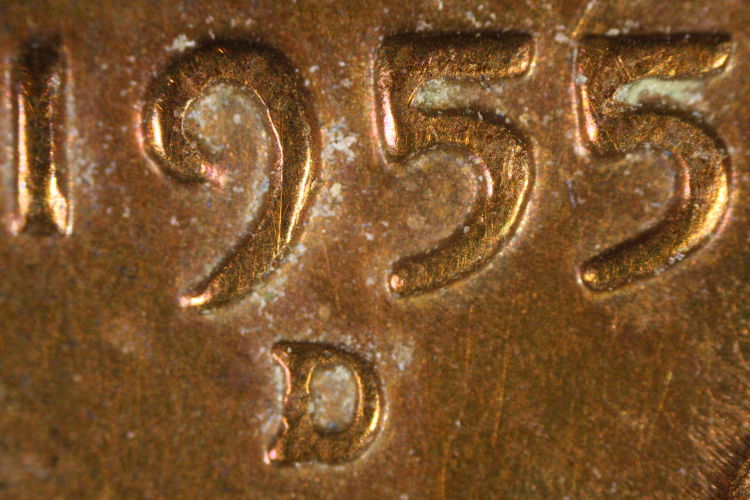
And my first picture with the microscope objective in place. Date and MM fill the sensor, wow.


Help-With-Coin-Photography,-Most-Of-My-Equipment-Has-Arrived
  Previous TopicReplies: 103 / Views: 10,367Next Topic
Page: of 7

To participate in the forum you must log in or register.


Disclaimer: While a tremendous amount of effort goes into ensuring the accuracy of the information contained in this site, Coin Community assumes no liability for errors. Copyright 2005 - 2026 Coin Community Family- all rights reserved worldwide. Use of any images or content on this website without prior written permission of Coin Community or the original lender is strictly prohibited.
Contact Us  |  Advertise Here  |  Privacy Policy / Terms of Use

Coin Community Forum © 2005 - 2026 Coin Community Forums
It took 0.33 seconds to rattle this change. Forums