| Author |
 Replies: 19 / Views: 3,218 Replies: 19 / Views: 3,218 |
Page 2 of 2
|
|
|
|
Valued Member
 United States
489 Posts |
Will try that later and post results.
|
|
Valued Member
United States
489 Posts |
|
|
Valued Member
United States
489 Posts |
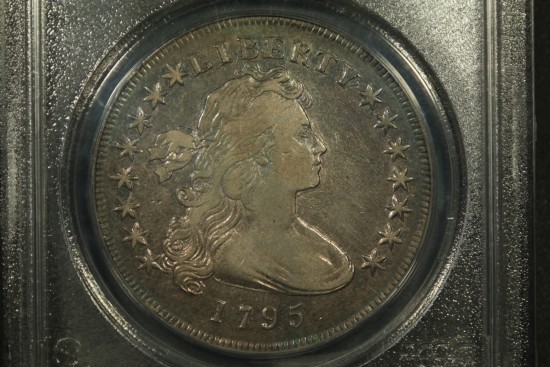
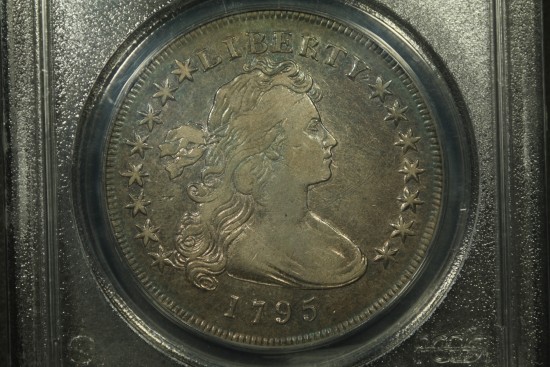
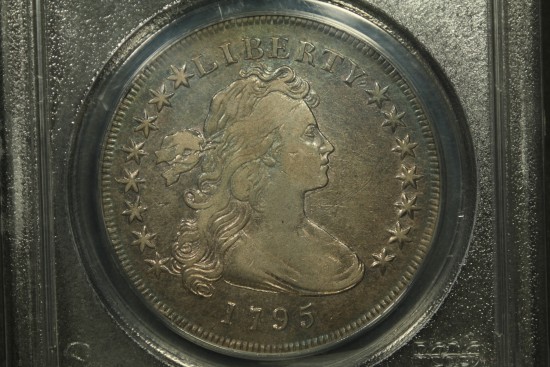
It appeared to me the detail was slightly sharper in the last shot which was the reason for my statement.
Ordered 2 jansjo lights tonight to see if they might make a difference. Should get them this weekend.
Thanks for the suggestions and assistance.
|
|
Pillar of the Community
United States
8534 Posts |
I think the Jansjo's will make a huge difference. I love your coin btw, just beautiful.
Oregon coin geek.....*** GO BEAVS ! ! ! ***
|
|
Pillar of the Community
 United States
4051 Posts |
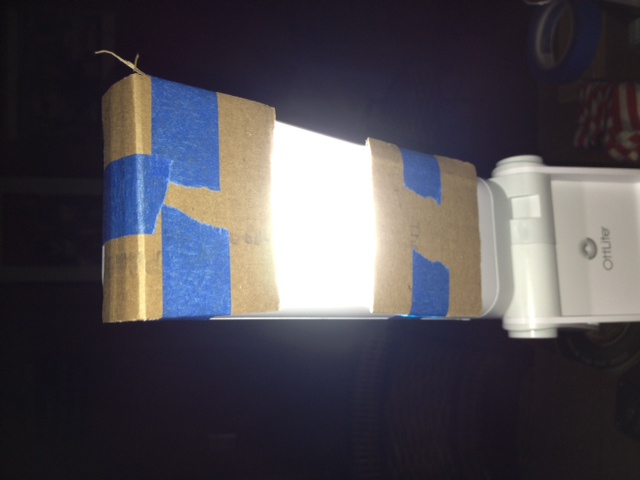
The Jansjos are the polar opposite of the Ott Lights. Jansjos are essentially focused, single-point sources while the Otts are highly-diffused, planar-area sources. Once you get the Jansjos you will need to figure out your diffusion strategy, because they will give you a much less uniform and far more contrasty presentation. But I prefer working from a point source and doing diffusion to limit hotspotting versus from a planar source and figuring out how to concentrate the light to achieve luster and contrast. The other advantage the Jansjos have is near-infinite flexibility in placement, which helps in optimizing shadow detail.
|
|
Moderator
United States
23522 Posts |
This is probably the time for you to start exploring the world of postprocessing. Aside the obvious features of cropping and sizing, contrast may be the easiest deficiency to improve in post. There isn't much to dislike in any of your shots, and fixing the contrast would be a matter of five seconds' work.
|
|
Pillar of the Community
United States
4132 Posts |
White balance is another thing that's easy to fix in post (particularly if you shoot raw), and will improve the overall look of your images a lot. Right now your photos have a yellow-green cast, and that could be corrected pretty easily.
I've gotten in the habit of taking a de-focused shot of a gray card once I've got my lights and exposure settings configured and before I start taking pictures of a group of coins. That gives me a reference white for a specific lighting setup and also makes for a bookmark between sets of shots in a folder with lots of images. I could (and often do) just use a preset for my most common lighting configurations, but it also serves as a double-check in case a light source starts drifting, or I make some other configuration change without realizing it.
|
|
Pillar of the Community
United States
4337 Posts |
I'm amazed at how you have to become an amateur photo bug to just get the right looking shots of coins...
|
|
Pillar of the Community
United States
4132 Posts |
One expensive hobby leads to another...
|
|
Valued Member
United States
489 Posts |
52Raymo- Looking forward to seeing if they make a difference. Thanks for the compliment. One of my favorites!
rmpsrpms- Need to re-read the threads CaptainFwiffo provided on the diffusion testing/tips by you both. Concentrating the Ott lights showed improvement to me so hopefully the jansjo will help kick it up a notch.
SsuperDdave- I'll work on it and post the results. With some of the prior shots upon adding tweaks and contrast the coin started to look unnatural or over processed, for lack of a better word. I'm sure inadequate lighting across the entire coin was part of the issue and detail was lost in processing along with operator error for the rest. Appreciate you chiming in with your insight. I need to spend some more time with post-production as suggested.
dsfreeworld- tell me about it! A lot more difficult than it looks for sure. I have a greater appreciation for all the coin shots I've admired.
CaptainFwiffo- I agree there is a yellow-green cast. IMO some of the tone coloring is being brought out a bit more in the recent shots. Referencing white between groups of shots sounds like a good idea. I've found it easy to reconfigure without even realizing it that is as well.
I'll play around with photoscape editing and repost. Thanks again for your input and assistance.
|
|
Valued Member
United States
489 Posts |
After auto-level setting and sharpen to last photo: 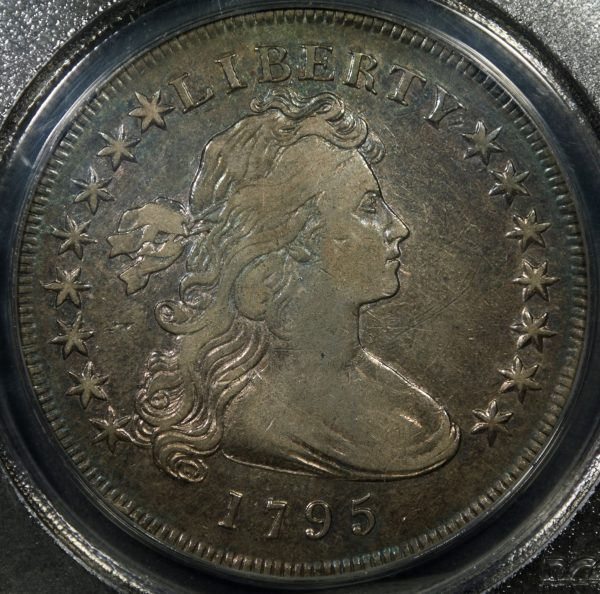 Looking better!? |
|
Pillar of the Community
United States
4051 Posts |
Here's your pic with a bit of gamma correction, a touch more contrast, and a touch more saturation: edited to add your original since my post pushed to page 2.   Contact me for photographic equipment or visit my home page at: http://macrocoins.comEdited by rmpsrpms
01/16/2013 12:06 am
|
|
Valued Member
United States
489 Posts |
Ray- Yours looks much better! I'm going to play around with it a little more later. It's going to take some practice.
|
|
Moderator
United States
23522 Posts |
Next thing to consider, Rayman311: Your equipment (and the look of the images I'm seeing here) certainly should be able to provide larger images to post - I'm guessing you're downsizing drastically to get postable filesizes. So, post a quick request in the Support forum for your CCF Member Gallery. You're eligible, and it will allow you a whole lot more latitude for sizing and file size. I aim for an 800-pixel diameter for my posting images, which is the largest the Gallery will permit. I crop really tight to the coin to make the most actual coin real estate visible, and the results are usually of easy grading quality. Saved as a .jpg at 80% Quality (in the Gimp), that makes each shot just over 200kb which is quite manageable. You have the equipment and the skills. Might as well flaunt them.  |
|
Valued Member
United States
489 Posts |
I will do that SsuperDdave! Thank you!
|
|
Page 2 of 2
|
Replies: 19 / Views: 3,218 |
Page 2 of 2
|






 First Page

 Posted 01/14/2013 10:06 pm