| Author |
 Replies: 26 / Views: 3,779 Replies: 26 / Views: 3,779 |
Page 2 of 2
|
|
|
|
Pillar of the Community
 Canada
9777 Posts |
|
|
Moderator
 United States
23522 Posts |
The 250D is actually a pretty decent add-on lens, and yes it would probably help. That said, you only need that one plus the Conversion Lens Adapter in the auction to make it work. The other stuff is extraneous to your needs. It will have an effect on your working distance - you'll need to be farther from the subject - and will probably work better at your camera's longer focal lengths (zoomed in).
Don't expect it to stay cheap. A 250D is $70+ brand new, and there are two of them in this lot. Almost assuredly money not worth spending, but if yo're a seller and can get the lot for $50, you've got a lot of components to flip for profit.
|
|
Pillar of the Community
 United States
4618 Posts |
Dave: I knew he didn't have it yet, my posting of the price from used for sale @ Amazon was to set a reasonable expectation of the price point. Free is good, he can learn a lot and then make an informed decision. But if the friend wanted 150, I wanted to be able to point out there would have been better choices at that level. I use a Nikon S9100 (available used for under 100$) for my run-of-the mill shots. For a P&S, it has an awesome macro mode. Does it do what I can do with a Canon T3i, 100mm macro lens, StackShot and Helion? No. But courtesy of a 50$ photobooth I built from Ikea parts and Sugru, it takes perfectly acceptable documentation and insurance and ebay type photos. With a much more straight forward workflow. The other point is that a 5 year old 12MP camera has a lot more working room (pixels) than a 12 year old 4MP cam. But are MP the be-all and end-all? Heck no. You can take great photos at 4MP and lousy ones at 12MP -----Burton 50+ year / Life / Emeritus ANA member (joined 12/1/1973) Life member: Numismatics International, CONECA Member: TNA, FtWCC, NETCC, EveryCountry (online) coin club Owned by three cats and a wife of 40+ years (joined 1983) Author: 3rd Edition of the Sample Slabs book, https://www.sampleslabs.info/ |
|
Moderator
United States
23522 Posts |
No problem at all with any of the points you made, BStrauss, this post or the last one. My specific recommendation in this case is because I've sat and drank beers with Mike and eaten his (excellent) grilling, and taken his measure as a person. I felt in his case, he'd probably like the idea of starting with the smaller camera and offered a recommendation tailored to the actual person as well as my own hands-on experience with the specific model he was getting. Then I was going to talk him into the bigger camera.  |
|
Pillar of the Community
Canada
9777 Posts |
Thanks for the help guys, I'm going to go Dave's root and see what this P&S will do.
I'm going to load the soft ware today and see what I can get out of it.
|
|
Pillar of the Community
United States
4085 Posts |
I get better pics from my A series Canon than I do from a later, technically "better" Canon point and shoot. It's pretty good without a lot of fuss in my experience.
|
|
Pillar of the Community
Canada
9777 Posts |
OK have been trying to get it to work with no luck, have the soft ware loaded, the camera plug into the USB port, have an image on the camera screen, when you turn the camera on and off the computer does that beep-beep sound to tell you, you have a connection, but the soft ware (Zoom Browser) comes up and says 'no camera detected '
Is there a stupid trick someone knows to fix this, the manual does not help. Or maybe the camera is shot.
|
|
Pillar of the Community
Canada
9777 Posts |
The computer does see the camera, but Zoon Browser will not and I did down load the latest version. This is a pic with not knowing what to set on the camera and than to my file place for pics , then to paint to get the right size, a lot of time doing this. Oh also hand held. 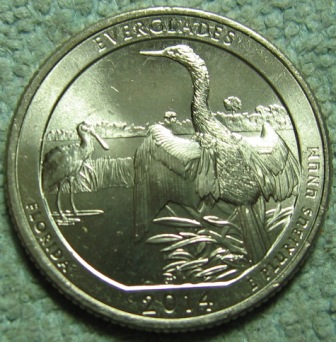 |
|
Pillar of the Community
United States
4618 Posts |
OK... stupid Canon time (as in Canon's software isn't BAD, but it just has places where it goes stupid). The manual, all 50+ MB of it is here: http://www.usa.canon.com/cusa/suppo...esAndManualsI think - I don't use Zoom since I live shoot - that all it actually does is import the pictures from the card. For my Canon dSLR, you have to connect the USB cable BEFORE you power on the camera. Also, I've found the connection direct to the camera is slower, so if you have a CF reader for your computer, it may be easier to extract the card and connect it directly. -----Burton 50+ year / Life / Emeritus ANA member (joined 12/1/1973) Life member: Numismatics International, CONECA Member: TNA, FtWCC, NETCC, EveryCountry (online) coin club Owned by three cats and a wife of 40+ years (joined 1983) Author: 3rd Edition of the Sample Slabs book, https://www.sampleslabs.info/ |
|
Pillar of the Community
Canada
9777 Posts |
Thanks Burton, I've done most of what you said, will try again tomorrow and if I don't get it to work I will be looking for another camera.
|
|
Pillar of the Community
United States
4618 Posts |
Do me a favor, download something better than paint (it does a lousy job of resizing). I recommend Paint.Net ( http://www.getpaint.net/index.html ) but there are several other free programs. -----Burton 50+ year / Life / Emeritus ANA member (joined 12/1/1973) Life member: Numismatics International, CONECA Member: TNA, FtWCC, NETCC, EveryCountry (online) coin club Owned by three cats and a wife of 40+ years (joined 1983) Author: 3rd Edition of the Sample Slabs book, https://www.sampleslabs.info/ |
|
Pillar of the Community
United States
4051 Posts |
I like Paint.net and use it for my overlays and animations.
Contact me for photographic equipment or visit my home page at: http://macrocoins.com |
|
Moderator
United States
23522 Posts |
Are you wanting to use Zoom Browser to shoot tethered - using the computer to control the whole shooting process - or just to transfer images?
If the former, here is probably the order in which you have to do it: Connect USB first. Camera power on second. Ignore the Windows popup for the moment, until the first time you get the camera to connect. Then start Zoom Browser, so during its' startup process it can "see" a camera connected to the system. Hopefully then you can proceed to Acquire Camera Settings, Connect to Camera, and Remote Shooting.
If your A80 works with remote shooting, and this is a big if which I don't have an answer for. It may not support remote shooting. I know the CHDK mod - the "hack" software people have written to unlock greater functionality in Canon cameras - cannot work with the A80.
If the latter and all you wish to do is transfer images, just connect the camera and use whatever Windows has in stock to bring pictures over.
|
|
Pillar of the Community
Canada
9777 Posts |
Quote:
using the computer to control the whole shooting process This is what I'm after, will try this again today. Thanks again Burton will get Paint.net |
|
Pillar of the Community
Canada
9777 Posts |
Well I just tried again and the computer see's the camera on F drive but Zoom does not, I tried starting different ways and nothing. I guess my friend will get his camera back.
I will work on camera and parts from the other tread over the summer, unless you have a different idea.
Thanks for the help.
|
|
Page 2 of 2
|
Replies: 26 / Views: 3,779 |
Page 2 of 2
|






 First Page


 Posted 05/01/2015 8:39 pm


