| Author |
 Replies: 76 / Views: 26,191 Replies: 76 / Views: 26,191 |
|
|
|
|
Pillar of the Community
United States
1571 Posts |
No need for a "sticky", just read SuperDaves' posts.
Dick
|
|
Pillar of the Community
United States
3076 Posts |
This is a great thread, does any one know, if the Cannon PowerShot Pro1 allow you to manually adjust these Idea's Dave has brought forth?
Or will the CHDK program work with this camera or is it too old? I hope not!!Thanks Dave for all of your Ideas.......
|
|
Pillar of the Community
United States
689 Posts |
where do you get the CHDK hack?
|
|
Pillar of the Community
United States
1571 Posts |
I don't recall where it can be gotten. It was mentioned in another thread, I believe, or, it might be in the ione re cheap digital SL cameras. I gave up on trying to get or use it, as my Powershot A590 IS does not have the software, to use it. Along with anither detail that my model has is that the TV image out, only lasts about a second, and a half. One cant make any adjustments that way. I, at least need more time. Otherwise, a great camera. I use it coupled with a stereo-zoom scope, and in conjunction with a second camera that fits in the eye-well. I get much l;arger images with it, and when I see what I want to shoot, then the canon does the job, Both are mounted on the scope, with prototype mounting. Looks weird, but it does do the job.
Dick
|
|
Moderator
  United States
23522 Posts |
|
|
Pillar of the Community
United States
1571 Posts |
If any of you have the Canon Powershot A590 IS, or similarly programmed, your camera will NOT work with the CHDK. This from "the horse's mouth", ie, factory.
|
|
Moderator
United States
23522 Posts |
Quote:
If any of you have the Canon Powershot A590 IS, or similarly programmed, your camera will NOT work with the CHDK. This from "the horse's mouth", ie, factory. CHDK disagrees.  http://chdk.wikia.com/wiki/A590IS http://chdk.wikia.com/wiki/A590IS |
|
Pillar of the Community
United States
1571 Posts |
superDave, thanks for letting me know they have been busy! I just checked thru some of the info, and will act on it soon. I have a very pressing problem, at the moment, but it is also being resolved. thanks again for alerting me. This is good news.
Dick
|
|
Pillar of the Community
United States
1571 Posts |
SuperDave, I went to the link, and downloaded a bunch of stuff, but I'm not sure how far I'll get. I may have to print out all text, and use my CCTV to rd it. Wish me luck, I could use some, lately!
Dick
|
|
Pillar of the Community
United States
584 Posts |
Super Dave you Rock! Excellent Job! You truly are an honorable person. Thank You
|
|
Pillar of the Community
United States
3540 Posts |
Thanks for taking the time to post the help on shutterbugging. Believe these two shots are proof of your help. Thanks SuperDave!   |
|
Valued Member
United States
111 Posts |
Hello, your information has been very helpful. I have a Sony Cybershot DSC-H9 with the capability of manually setting the aperature and shutter speeds. I still have to play around with it some, and go back and read about these settings again, but this is what I just took. Both pennies are still red, however, I just couldn't get them to show up as good as I'd like to. 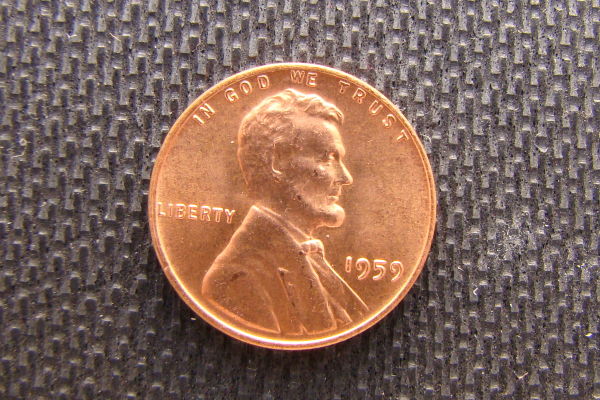 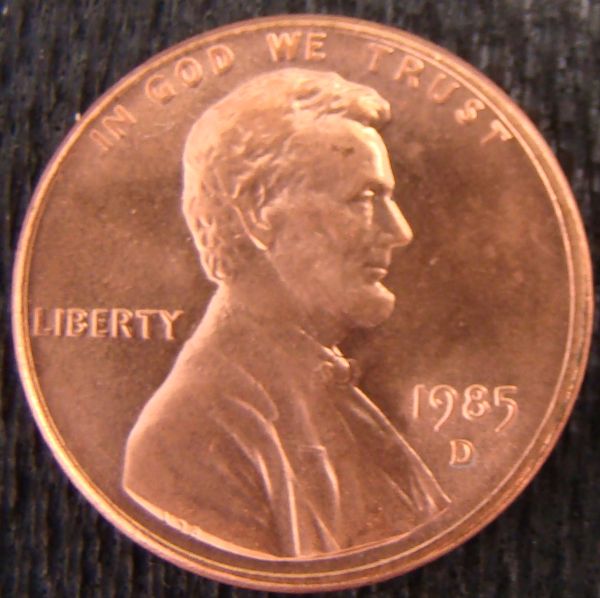 |
|
Pillar of the Community
United States
1571 Posts |
It has been a while since I was working with the US centas, but your pgoto looks pretty close, other than that you should use a tri-pod, or other support, fir the images, to avoid the slight blur. I ended up using a modified tri-pod that is able to support the camera, and "rigging", on a microscope.
I am no longer able to do much in settings due to vision problems, and I use the scope for almost every shot. It comes with the 'territory". hope this helps,
Dick
|
|
Valued Member
United States
111 Posts |
Hey, thanks for your reply. I actually got some suggestions from here about lighting. Someone said they used an opaque milk jug. I took a plastic opaque freezer container and cut it down some because I'd seen others said to point the camera about 4 inches away from the coin. Then I took a light source and placed a coffee filter (another suggestion from here)over the light. The opening I cut out on the bottom of the container was actually big enough to let the lens of the camera go through, and the rest of the camera was sitting on top. So, I'm not sure if I had any movement when I clicked the picture. Much more practicing to do. But, was happy with these results so far compared to how I was doing. it. Teena |
|
Pillar of the Community
United States
1571 Posts |
Teena, you have the right idea. Practice, and more practice! Hang in there! Good luck! Dick  |
|
|
Replies: 76 / Views: 26,191 |
|








 First Page
 Previous Page


 Posted 03/01/2010 12:19 am


