| Author |
 Replies: 28 / Views: 5,877 Replies: 28 / Views: 5,877 |
Page 2 of 2
|
|
|
|
Pillar of the Community
United States
1571 Posts |
shadow, maybe you will read this thread again, (as I have done), and see my question.
You scan your pictures to computer. doesn't this take up a lot of space on the HD? I have a computer that the VA gave me, for my vision , and it doesn't have that kind of space on it. Can I scan to a CD, or a zip-drive, (100MB)? That would make it easier to recover the series of images that have been taken, woould it not? I am about as new on the computers, as I am in photography, AND collecting, but I am learning, slowly. Thanks for your opinion,
Dick
|
|
Pillar of the Community
Canada
9780 Posts |
QuickSilver, what type of scanner are you useing?
|
|
Pillar of the Community
United Kingdom
1077 Posts |
It's an ancient Agfa Snapscan 1212u. I've had it for about 10 years. Agfa don't make scanners anymore but you can probably pick them up for peanuts on ebay. |
|
Pillar of the Community
United States
2669 Posts |
LD, pictures from both scanning and camera will take up room (sometimes a LOT of it). You could always store your pictures online after you are done processing them, then delete them from your hard drive - there are many free online picture storage/hosting places, like Flickr, Google Picasa, and Photobucket. They all have size limits, but if you ever run out of space at one, you could use another  The good thing about them is they are available if you happen to be at a different computer - you don't have to be sitting at your usual one to access a picture - plus you wouldn't have to fill your hard drive up. The bad thing is if your account is inactive for a while, the pictures get deleted. If your computer has a cd-burner, then yes, you could put them on a CD. Or your zip drive. Depending on the size of your resulting images, you could fit quite a few onto either one. Do you know how large your hard drive is? |
|
Pillar of the Community
United States
1882 Posts |
Quote:
You scan your pictures to computer. doesn't this take up a lot of space on the HD? Once you crop and resize each coin, they don't have to take a lot of space. The following pic is only 88K..it was taken with a camera, but there is no reason that the end result after scanning has to be necessarily larger. 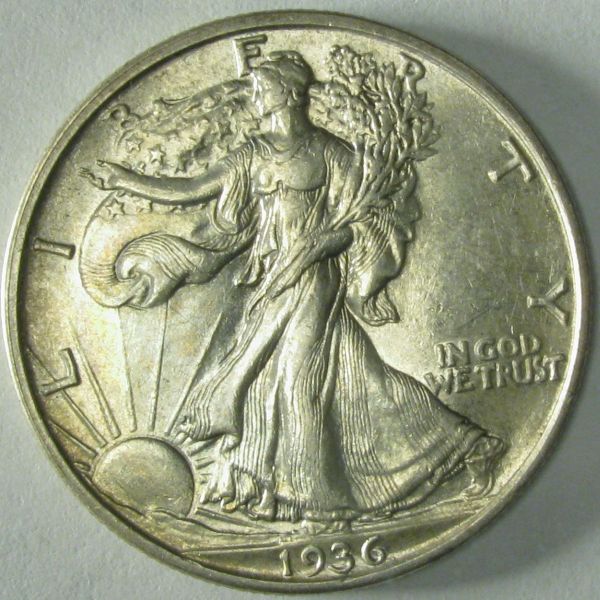 |
|
Pillar of the Community
United States
1571 Posts |
Xshift, thanks for the rteply. Re the computer,. There is neither a "burner, nor a zip drive. It is a Dell, that has been setup as an "Optiplex 755', whatever that is. it is for low-vision operators. It has an application called "Zoom-Text", which allows one to magnify the rtext so it can be read. It needs LOTS of screen space, so it comes with dual monitors.. I asked if I could "work on it", to speed it up. (it is slower than molasses in the Arctic. They said no, because it is maintained by the state, soooo. They did add 2GB of RAM. HD is loaded with software, and special programming, (a lot of which I have no idea as to whator why), anyway the HD is running out of space. I think it is 120GB. To control how much space it taken up with photos, I frequently strip "my documents\my pictures" down to zero, and start over. That seems to work.
I use phohotobucket for uploading to the forums, and have plenty of space there. I also try to keep a standard size of image, no bigger than 600X600mp. That way it doesn't have to use the max width on the page to see it all. I don't process the image after paking the photo, rather I use the magnification for showing details, and the image will only have that info. maybe there is a better way, but, so far It does the job. I usually send them to floppys. I get about 6 on each one, depending on the image size. I use the same thing for storing the RPM's, and RPD's.
Taking a different look at the image, using a scanner, I have mis-placed the info for my Canon scanner, (VA), and can't adjust the size. My camera is a Canon Powershot A590 IS, and works better now, becauseI am learning a bit more about it as I go along.
I do have another computer, which I built, and it does have a "burner", but no blank CD's. It lso has the zip drive, and I have about 15 , 100NB discs, and would like to obtain more. I use them also for images, but they are bit more difficult wi work with, due to size, as is the CDROM disc's. I have had to abandon the computer building, because of being legally blind, I can't see the pin cushions to plug inthe cabling, etc.No drivers license, either, so getting around is tough. When one has driven for over 70 years, it is hard to accept! Same reason I have also left the RPM's. I do see the RPD's, because I am able to see the variety, (except for the MPD's. I use a scope, and camera software to project an image onto a 20" CCTV screen, or a 27' TV screen. It isn't the easiest way, but it is all I have, so I try to make the best of it.
BTW, does anyone know what "Photoscape" is, and where I can download it from? I asked wheatguy, but I don't know if he will see the post.
Thanks for your replies,
Later: I located and downloaded Photoscape. Then tried it out. I couldn't believe how easy it is tio work with! It made my day!
Dick
Edited by livingdinasaur
05/14/2010 5:15 pm
|
|
Pillar of the Community
United States
2669 Posts |
LD, you can get photoscape here: http://www.photoscape.org/ps/main/download.php - I've never tried it so don't know how good it is. You could always get an external hard drive. They plug right into one of the USB ports, and would probably be a lot easier than messing with the CDs or zip drive. If you have an extra internal HD, you can get an enclosure for it to be used externally in the same way as a normal external drive. It sounds like you have a pretty good plan already for dealing with the pictures  If you can get 6 on a 1.44MB floppy, then it sounds like you have good low file sizes, too! |
|
Pillar of the Community
United States
2669 Posts |
Steve, that's a great picture at only 88k! That's the one thing I have trouble with is getting the file size down.
|
|
Valued Member
United States
376 Posts |
If any of us can do as well as Dick is doing at his age we will truly have been blessed. Every time I read one of his posts I'm amazed at how much he does with extremely limited vision. He's an inspiration to say the least!!
Dick I want to congratulate you on the on the upcoming birth of your Great-Great Grandson. God Bless you, Bill S.
|
|
Valued Member
United States
120 Posts |
I use scanners alot because I have horrible luck with cameras!  Anyways here I one of my scans. 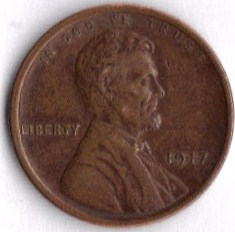 |
|
Valued Member
United States
300 Posts |
What do you think? Can you tell if this is a FBL Franklin? [URL="http://img695.imageshack.us/i/000016200.jpg/]  [/URL] Edited by L1011
05/16/2010 10:13 pm
|
|
Pillar of the Community
United States
1348 Posts |
I have a legit camera I feel. Its a canon s5is and I bought a macro lens for it. I must jsut be camera retarded. I get decent pictures, but I am hunting for extreme close-ups for die beaks and such. I guess I just can't learn fast enough
|
|
Valued Member
United States
380 Posts |
You should be focusing on equipment... A cheap camera isn't going to be able to give you the results that a dSLR with a macro lens will yield better results, of course you would then need to learn how to use the equipment!
Beautifully taken photos can be a great addition to your collection!
|
|
Pillar of the Community
United States
3552 Posts |
Quote:
I am hunting for extreme close-ups for die beaks w1a9, If you are anything like me, I always try to push the limit out of any photographic apparatus void of excessive capital expenditures. My initial attempt into the world of coin photography is well documented in the following CCF thread: https://goccf.com/t/88598I would not go as far as suggesting that my featured USB camera in this above thread is capable of 'extreme' closeups in the true sense of the meaning. However, these USB-derived closeup shots in the above referenced thread are acceptable and adequate enough to discern the differences between the commonly found coin errors and varieties. This thread also discusses lighting methods with related actual examples intended to preserve the original surface view of the coin during USB photography. On another note unlike the all-encompassing and traditional 'Cntrl Prnt Scrn' feature that produces the entire screen view, neither excessive file nor picture size has ever been a problem for me since my Windows 7 Snipping Tool allows me to encircle(or make a rectangle) only of just the desired screen section in only one easy step. Finally, I typically only scan(not USB camera related)colorful currencies using a higher 720 dpi scanner resolution setting which produces very lifelike results which are subsequently snipped with the Windows 7 Snipping Tool and then saved as an economically-sized .jpg file. fyi, mdpmedia |
|
Valued Member
Canada
293 Posts |
I just used my scanner for the first time after reading this thread, and it sure works nice. Could have saved myself many hours with different angles, etc. with my camera. thanks for the info.
|
|
Page 2 of 2
|
Replies: 28 / Views: 5,877 |
Page 2 of 2
|







 First Page


 Posted 05/14/2010 09:59 am





