| Author |
 Replies: 23 / Views: 3,363 Replies: 23 / Views: 3,363 |
Page 2 of 2
|
|
|
|
Pillar of the Community
 United States
613 Posts |
|
|
Pillar of the Community
United States
613 Posts |
|
|
Pillar of the Community
United States
613 Posts |
I'll try again tomorrow, getting sore eyes.
|
|
Bedrock of the Community
United States
11951 Posts |
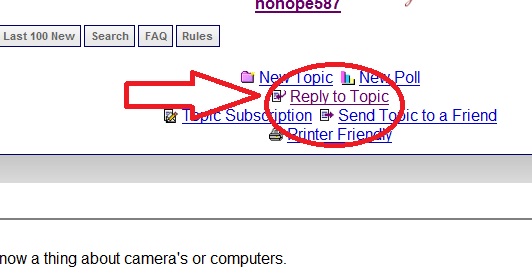
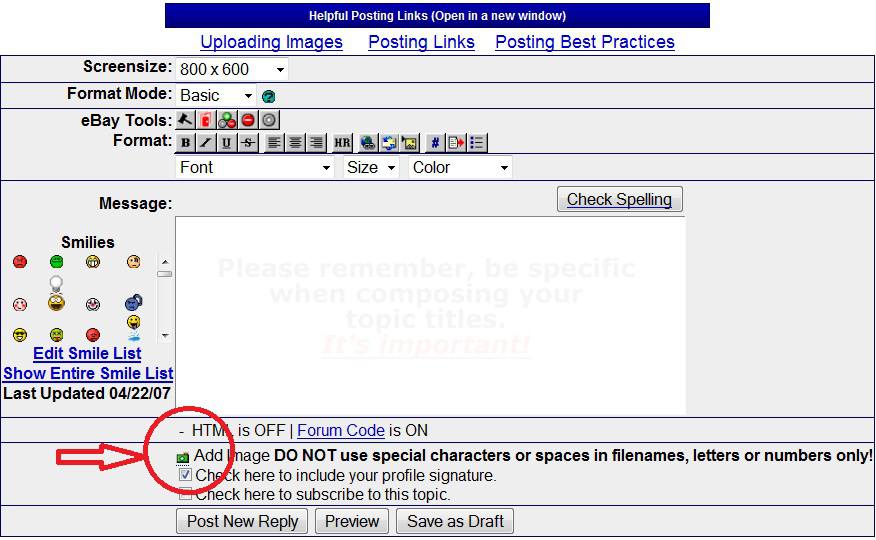
To see the icon zarboy is talking about you have to click the link "reply to topic", not the quick reply box.
|
|
Pillar of the Community
 United States
5953 Posts |
|
|
Bedrock of the Community
United States
14454 Posts |
you are going to have to shrink that image some for it to fit on the forum I am sure. so your best bet since you say you don't know allot about computers may be to set up a free online image hosting account (like photobucket) and load it there and then just copy image location and insert that link here with [img] [/img] tags around it. Like this: [img]Location of picture[/img]
|
|
Valued Member
South Africa
169 Posts |
Sorry razorear, I should have been more specific. I was also travelling yesterday from Canada to Scotland overnight and was offline for some hrs.
|
|
Pillar of the Community
United States
613 Posts |
Thanks, I believe that resizing is gonna be a must. My pic uploaded, but to where, who knows.lol
|
|
Pillar of the Community
United States
613 Posts |
OK, I opened a photobucket account and have a pic in an album there. How do I get the pic from photobucket to here?
|
|
Pillar of the Community
United States
717 Posts |
1) Open a free account at photobucket.com2) Left click on Upload Image; locate folder on your computer to find pic you want to upload. 3) Once uploaded, left click on the photo, then left click on "share" 4) Left click on "Get link code," left click on "IMG for bulletin boards & forums" "Full size" to highlight. 5) Right click for "copy" 6) Come to Coin Forum & right click & paste. It's sounds complicated but it's not. It takes a few seconds & the pic is now properly sized for the Forum. |
|
Valued Member
South Africa
169 Posts |
Razorear, I have sent you a PM.
|
|
Pillar of the Community
United States
613 Posts |
|
|
Pillar of the Community
United States
613 Posts |
Where oh where did my picture go.
|
|
Pillar of the Community
United States
1534 Posts |
When you see the photo in your account, there should be a little box on the lower left that has the different links for the HTML format, and various other codes. There's one titled IMG code, copy and paste that into your post, and the picture will magically appear.  |
|
Pillar of the Community
United States
2669 Posts |
Try hovering over the uploaded photo if the links are not under it to start with. Click in the last box (the one that starts with IMG). It should automatically copy the link to your clipboard which you can paste (CTRL+V) into a reply here. If it doesn't, press CTRL+C after highlighting the link text, then paste here.  |
|
Page 2 of 2
|
Replies: 23 / Views: 3,363 |
Page 2 of 2
|







 First Page

 Posted 11/06/2010 6:41 pm