



Coin Community Family of Web Sites Join Thousands of Coin, Bullion, & Money Collectors
300,000 items to help build your collection! Coin, Banknote and Medal Collectors's Online Mall Vancouvers #1 Coin and Paper Money Dealer Royal Estate Auctions - $1 Coin AuctionsSpecializing in Modern Numismatics Join Thousands of Coin, Bullion, & Money Collectors Royal Canadian Mint products, Canadian, Polish, American, and world coins and banknotes.


Username:
Password:
Save Password
Forgot your Password?


This page may contain links that result in small commissions to keep this free site up and running.

Welcome Guest! Registering and/or logging in will remove the anchor (bottom) ads. It's Free!

Nice Coin Rotation Technique.

To participate in the forum you must log in or register.
Author Previous TopicReplies: 4 / Views: 1,466Next Topic  
Rest in Peace
wert's Avatar
1988 Posts
 Posted 04/22/2012  5:19 pm Show Profile   Bookmark this topic Add wert to your friends list Get a Link to this Message Number of Subscribers
Hi guys

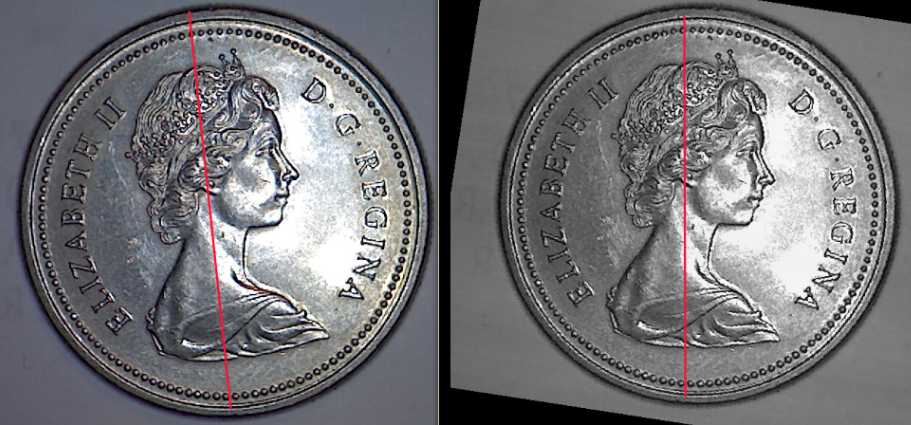
The program I use called Gwyddion which I showed in an earlier post, has the capabilities of recognizing a tilted coin...It can adjust the coin to dead centre really fast...The coin on the left was tilted and the results are shown on the coin on the right.

Not world breaking news, but it works.


Nice-Coin-Rotation-Technique.
Pillar of the Community
CaptainFwiffo's Avatar
United States
4132 Posts
 Posted 04/22/2012  5:32 pm  Show Profile   Bookmark this reply Add CaptainFwiffo to your friends list Get a Link to this Reply
Photoshop can do this as well. Use the measurement tool to place a measurement line directly through a horizontal or vertical element of the design. Then choose "Image -> Transform -> Arbitrary Rotation" and it will automatically fill in the exact right amount to make the measured line level or plumb.
Rest in Peace
wert's Avatar
1988 Posts
 Posted 04/22/2012  5:43 pm  Show Profile   Bookmark this reply Add wert to your friends list Get a Link to this Reply
Hi CaptainFwiffo

The only reason I suggest people use the programs I post in this forum is that Photoshop costs $$$, and Gwyddion is free...

For those who do not have a lot of money, it is a good idea...Gwyddion will do the same as Photoshop but with 2 clicks.
Pillar of the Community
Peter THOMAS's Avatar
Australia
2830 Posts
 Posted 04/22/2012  8:12 pm  Show Profile   Bookmark this reply Add Peter THOMAS to your friends list Get a Link to this Reply
I'm impressed. Australians get excited about our 2001 Dollar. Enthusiasts collect differing rotations, and a few have made up "clockfaces", with rotations of 30, 60, 90, etc to 330 degrees. One collector has now moved onto putting together a "half-past" clockface of 15, 45, 75, etc 345 degrees. He made a protractor, into which a coin is inserted with H.M. correctly oriented, then your turn it over, and read off the rotation of the reverse.

I'm still looking for my first rotated dollar, so I haven't had need of any of these methods of measurement ...
and I've almost given up hope.
Rest in Peace
wert's Avatar
1988 Posts
 Posted 04/22/2012  8:18 pm  Show Profile   Bookmark this reply Add wert to your friends list Get a Link to this Reply
Hi Peter THOMAS...I looked up your 2001 dollar...Nice looking coin and there seems to be a lot of detail on the Queen's head..Or am I seeing things
  Previous TopicReplies: 4 / Views: 1,466Next Topic  

To participate in the forum you must log in or register.


Disclaimer: While a tremendous amount of effort goes into ensuring the accuracy of the information contained in this site, Coin Community assumes no liability for errors. Copyright 2005 - 2026 Coin Community Family- all rights reserved worldwide. Use of any images or content on this website without prior written permission of Coin Community or the original lender is strictly prohibited.
Contact Us  |  Advertise Here  |  Privacy Policy / Terms of Use

Coin Community Forum © 2005 - 2026 Coin Community Forums
It took 0.19 seconds to rattle this change. Forums