| Author |
 Replies: 45 / Views: 6,838 Replies: 45 / Views: 6,838 |
|
|
|
Pillar of the Community
 Canada
4944 Posts |
|
|
Pillar of the Community
United States
5825 Posts |
IMO start with the book.
This is the one I use and I believe is the best on the market:
Numismatic Photography / 2nd Edition by Mark Goodman
|
|
Pillar of the Community
Canada
4944 Posts |
Thanks, I will look into that.
|
|
Pillar of the Community
Canada
4944 Posts |
Since I am still waiting for a couple parts for my new camera (Rebel XS), I started playing around with my iPhone and Jansjos. Here's the extremely basic set-up I was referring to in my original post. The Jansjos are the only addition.   I will post a set of pictures with the new set up. |
|
Pillar of the Community
Canada
4944 Posts |
The white balance was way off, and I had to use the auto adjust on GIMP (It didn't work so well. That's supposed to be a white background).  My white balancing needs some work, but other than that what could I fix? Pictures done with iPhone 4S.   |
|
Pillar of the Community
Canada
4944 Posts |
I think I may just about have Proof Coins down using my phone. I also taped a piece of regular white paper over the Jansjos to diffuse the light a bit. Before Diffusion  After Diffusion  I also took these quickly, It is hard to work with a slabbed coin in such a small amount of vertical space (See Set-Up picture a couple posts up). The reverse is a bit darker then I would like.   I will try diffusing the light with the Morgan in the post above (I need to charge my phone). Edited by Canadian-Banknotes
12/25/2013 4:50 pm
|
|
Moderator
 United States
23522 Posts |
Not a bad shot.  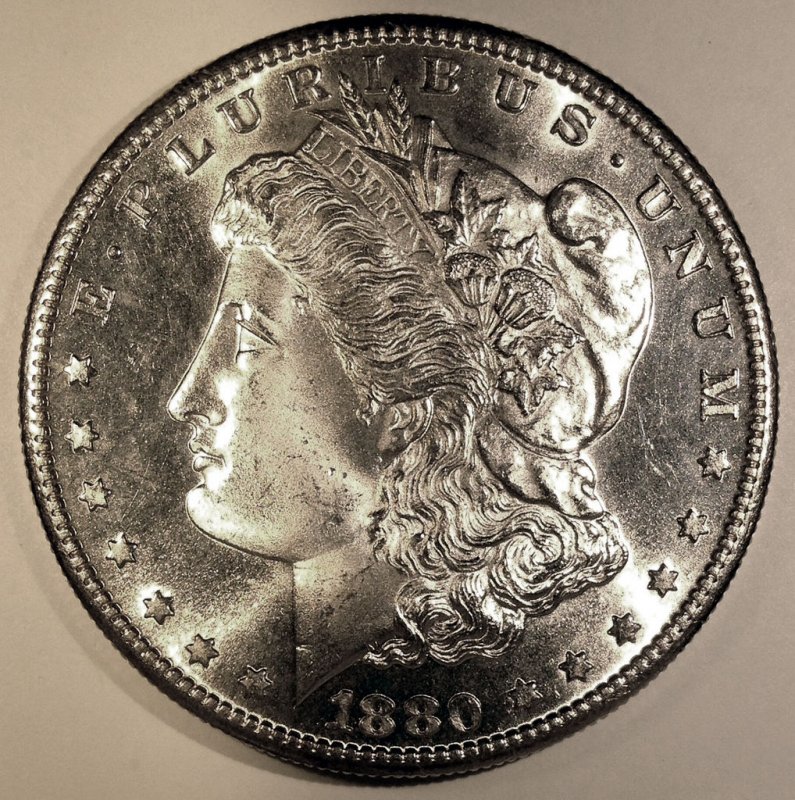 In the Gimp, Colors -> Hue-Saturation, then select the Yellow and Red channels individually/separately, and reduce each as appropriate. You'll normally lessen the Yellow saturation about twice the level of the red. I Sharpened it slightly (20%) as well. Maybe a little angular difference between the lights? They seem a tad close; you want to get something that appears nearly 90 degrees on the coin. Not very bad at all for a camera phone.  |
|
Pillar of the Community
Canada
4944 Posts |
Could you explain what you mean by Angular Difference between lights? Thanks Edited by Canadian-Banknotes
12/25/2013 5:32 pm
|
|
Pillar of the Community
Canada
4944 Posts |
Quote:
In the Gimp, Colors -> Hue-Saturation, then select the Yellow and Red channels individually/separately, and reduce each as appropriate. You'll normally lessen the Yellow saturation about twice the level of the red. Thanks Dave, I think I may have figured out how to change the channels without making the images look too blotchy. It may need a bit more tweaking though, see how the bottom right corner (Obverse image) has that patchy look. I'm not sure what the black dots are by the date on the Obverse, and MM on the Reverse. They are not on the coin. (Could it be from the lighting, when the picture was taken? Those spots were relatively dark on the original)   Edited by Canadian-Banknotes
12/25/2013 5:34 pm
|
|
Moderator
United States
23522 Posts |
The black spots, I think, are areas where the camera saw insufficient light for any detail at all, and it just arbitrarily chose to call them "black."
What I was getting at about the lights was to move them slightly farther apart on "the clock," with the idea being to increase the angle formed by the streaks of brightest illumination. Push them outward slightly, as well, so you have them at a little bit of an angle to the coin instead of straight down as I see in your pic of the setup.
This may not be a solution, just something to try.
|
|
Pillar of the Community
Canada
4944 Posts |
Thanks Dave, I will give that a try in a while and post the results.
Do you think I should diffuse the light, like in my pictures above (Proof Quarter, and 78s Morgan)? Or just leave it, and correct the white balance later on.
|
|
Moderator
United States
23522 Posts |
I'm guessing the iPhone doesn't have a White Balance adjustment? Either way, I'm beginning to like these Jansjos better a little diffused, regardless of the help it gives you with color. The last two - Morgan especially - were still a tiny bit off towards the yellow end of the spectrum even with diffusion, and could use a bit of correction.
|
|
Pillar of the Community
Canada
4944 Posts |
Edited by Canadian-Banknotes
12/26/2013 12:10 pm
|
|
Valued Member
Canada
478 Posts |
I suggest you wait until your new rig arrives! :)
|
|
Pillar of the Community
Canada
4944 Posts |
Yeah, I am waiting for some stuff from Hong Kong.
I figured I would play around with my phone until then.
Edited by Canadian-Banknotes
12/26/2013 2:27 pm
|
| |
Replies: 45 / Views: 6,838 |








 First Page


 Posted 10/27/2013 10:02 am


