Coin Community Family of Web Sites Join Thousands of Coin, Bullion, & Money Collectors
Coin, Banknote and Medal Collectors's Online Mall Shop for APMEX Bullion on eBay!300,000 items to help build your collection! Specializing in Modern Numismatics Vancouvers #1 Coin and Paper Money Dealer Join Thousands of Coin, Bullion, & Money Collectors Royal Canadian Mint products, Canadian, Polish, American, and world coins and banknotes.


Username:
Password:
Save Password
Forgot your Password?


This page may contain links that result in small commissions to keep this free site up and running.

Welcome Guest! Registering and/or logging in will remove the anchor (bottom) ads. It's Free!

$20 Reverse Is Really Dark - Printing Error?

To participate in the forum you must log in or register.
Author Previous TopicReplies: 1 / Views: 1,448Next Topic  
New Member

United States
1 Posts
 Posted 12/19/2013  10:38 am Show Profile   Bookmark this topic Add agentbud to your friends list Get a Link to this Message Number of Subscribers
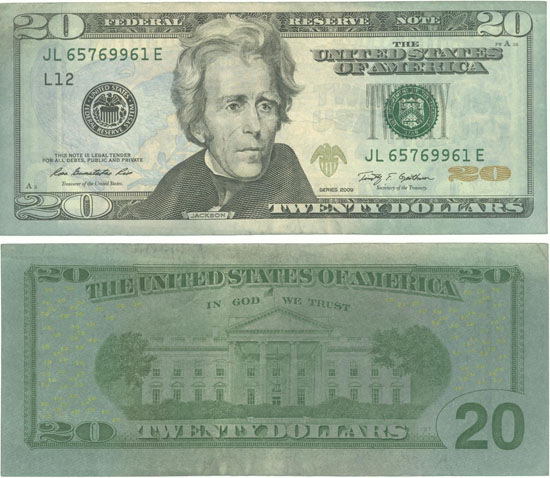
See image below. The reverse side of this 2009 $20 is really dark but I do not know if this is something that happened after the bill was in circulation or if it is a printing error. The scan does not do it justice. It is really dark, almost a dark blue-green color covering the entire reverse. There is also some darkening on the obverse at the outer edges. Also note that the security strip on the left side of the obverse can be clearly seen as a white stripe. This is not due to the scanner bulb shining through. It looks that way normally. The ink coloring of the blue eagle is really faded where that stripe is located which is normally not the case on other $20 bills I have looked at. Are these printing errors and if so, does it have any value?

$20-Reverse-Is-Really-Dark---Printing-Error?
Pillar of the Community
Broken-Coin's Avatar
United States
1812 Posts
 Posted 12/21/2013  11:43 am  Show Profile   Bookmark this reply Add Broken-Coin to your friends list Get a Link to this Reply


I'm just curious if you place a darker color sheet of paper over the note on the scanner, if the note will darken up! (I've done this on some scans)
  Previous TopicReplies: 1 / Views: 1,448Next Topic  

To participate in the forum you must log in or register.


Disclaimer: While a tremendous amount of effort goes into ensuring the accuracy of the information contained in this site, Coin Community assumes no liability for errors. Copyright 2005 - 2026 Coin Community Family- all rights reserved worldwide. Use of any images or content on this website without prior written permission of Coin Community or the original lender is strictly prohibited.
Contact Us  |  Advertise Here  |  Privacy Policy / Terms of Use

Coin Community Forum © 2005 - 2026 Coin Community Forums
It took 0.19 seconds to rattle this change. Forums