Coin Community Family of Web Sites Join Thousands of Coin, Bullion, & Money Collectors
Coin, Banknote and Medal Collectors's Online Mall Shop for APMEX Bullion on eBay!Join Thousands of Coin, Bullion, & Money Collectors 300,000 items to help build your collection! Specializing in Modern Numismatics Vancouvers #1 Coin and Paper Money Dealer Royal Canadian Mint products, Canadian, Polish, American, and world coins and banknotes.


Username:
Password:
Save Password
Forgot your Password?


This page may contain links that result in small commissions to keep this free site up and running.

Welcome Guest! Registering and/or logging in will remove the anchor (bottom) ads. It's Free!

Scanners?

To participate in the forum you must log in or register.
Author Previous TopicReplies: 8 / Views: 3,395Next Topic  
Pillar of the Community

United States
2600 Posts
 Posted 09/02/2007  10:57 am Show Profile   Bookmark this topic Add Jim1953 to your friends list Get a Link to this Message Number of Subscribers
Do many of us use a scanner to post images of coins? I do not have the ability to leave my camera setup all the time which preempts me from adding pics to some posts. Sometimes I just do not have the time to setup and a scanner seems like a reasonable option when in a hurry. Anyway, just curious what your experience has been.
Jim
Moderator
Learn More...
SsuperDdave's Avatar
United States
23522 Posts
 Posted 09/02/2007  11:42 am  Show Profile   Bookmark this reply Add SsuperDdave to your friends list Get a Link to this Reply
Some people use scanners to good effect - Ageka comes to mind, but he has a good scanner and great skill. Clear scanned pictures are an excellent indicator of physical condition, but don't properly represent color and luster. There's nothing wrong with posting scanned pics for study here - just be aware that we'll have to ask your opinion of luster, and probably which side of the AU/MS border the coin is on.

With those caveats, I am just as happy looking at scanned pics as at snapped ones.
Pillar of the Community
United States
2600 Posts
 Posted 09/02/2007  12:58 pm  Show Profile   Bookmark this reply Add Jim1953 to your friends list Get a Link to this Reply
Thx, Dave.
Pillar of the Community
ageka's Avatar
Belgium
2078 Posts
 Posted 09/02/2007  2:19 pm  Show Profile   Bookmark this reply Add ageka to your friends list Get a Link to this Reply
Dave
As you are aware I have been struggling for weeks now buying a dualcore supercomputer and a digital reflex camera Canon 30D
and I worked 8 years with colorcomputers in Cie lab mode

First my 9 year old secondhand photoscanner still outperforms my camera

Some observations I arrived at is that the scanner does in-scanner adjustments and then transfers to a propriatary photomanagement system iphoto plus and then I crop and save as bitmap files which I used to view on a crt ( cathode ray canon ) monitor to enjoy or photograde
Well it took me 2 weeks for the 19" TFT LCD external monitor to come even close to the lustre I took for granted . I told my wife the crt stays as stand by and I told my laptop it had no truebright screen and that the desktop matte was its only monitor

Second I spend the last two days to understand bitmaps versus RGB 24 bits which is the standard photoshop will work in (3x8 bits)
Now that I understand I went and put photoshop on Cie lab and I understand the histograms .I also understand that like in math you save in 3x16 bits to avoid rounding off complications .

Camera wise I concluded I will need to put the camera in RAW mode ; get the real Kelvin temperature of full spectrum lights and then experiment with the quantity and placement of the lights
Also it was a mistake to put the camera on spot measurement which is only 3.5% central when I want to show a screenshot with box etc in the shot .

I used three coins side by side to calibrate my monitor
because I know what they looked like on the crt

Pillar of the Community
ageka's Avatar
Belgium
2078 Posts
 Posted 09/02/2007  2:32 pm  Show Profile   Bookmark this reply Add ageka to your friends list Get a Link to this Reply
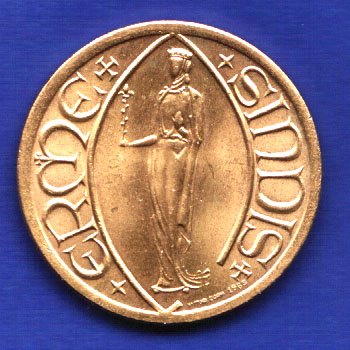
First I want you to meet Ermesinde
Very reddish gold at 300 dpi
MS64 like


Scanners?
Pillar of the Community
ageka's Avatar
Belgium
2078 Posts
 Posted 09/02/2007  2:39 pm  Show Profile   Bookmark this reply Add ageka to your friends list Get a Link to this Reply
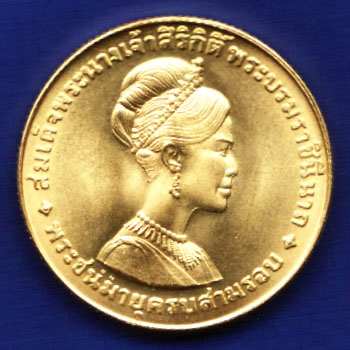
Now meet Sirikit
Very yellowish gold and easily an MS67


Scanners?
Pillar of the Community
ageka's Avatar
Belgium
2078 Posts
 Posted 09/02/2007  2:46 pm  Show Profile   Bookmark this reply Add ageka to your friends list Get a Link to this Reply
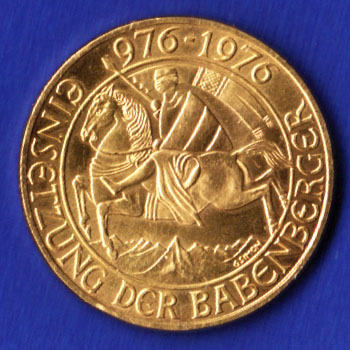
And finally the Babenberger
MS64 orange gold
If your LCD gives you these tones congratulations cause it took me two weeks to get those right and only at the top of the screen with the right inclination of my five wheeled chair
Something an old fashioned crt with phospor coating did automatically


Scanners?
Pillar of the Community
United States
1231 Posts
 Posted 09/02/2007  6:09 pm  Show Profile   Bookmark this reply Add onejinx to your friends list Get a Link to this Reply
I'm glad my screen gave me those colors. When I got this laptop in May, I upgraded the basic screen that Dell offers and got the Ultrasharp Truelife wide-screen. And to me it makes a huge difference. I seem to get a better color array then I do no the desktop with a basic LCD
Pillar of the Community
ageka's Avatar
Belgium
2078 Posts
 Posted 09/03/2007  11:20 am  Show Profile   Bookmark this reply Add ageka to your friends list Get a Link to this Reply
Well actually after days of reading I understand that every LCD screen as a native resolution ; so if you bougth the wrong screen you are done for
Mine is an anusual 1140:900 I think called a 16 over 10 format
The laptop is the best gleaming truebright and desk is a philips190wv matte
After realising that left right movement and forwards backwards movement change the colors dramatically ( something a crt does not do) the philips 19" screen was perfect
I have not bothered to calibrate the Toshiba 17" laptop screen with the program that is provided somewhere . I just told the software there are not two screens but only the desktop screen .I put a wirelelss Logitech mouse and keyboard on and am now debugging programs.

One of my programs iphoto plus which I reinstalled in win98 mode closes down everytime I push the save as in the menu and also does not see scan sizes . Lucky for me it still goes full blue and full green when I request it
  Previous TopicReplies: 8 / Views: 3,395Next Topic  

To participate in the forum you must log in or register.


Disclaimer: While a tremendous amount of effort goes into ensuring the accuracy of the information contained in this site, Coin Community assumes no liability for errors. Copyright 2005 - 2026 Coin Community Family- all rights reserved worldwide. Use of any images or content on this website without prior written permission of Coin Community or the original lender is strictly prohibited.
Contact Us  |  Advertise Here  |  Privacy Policy / Terms of Use

Coin Community Forum © 2005 - 2026 Coin Community Forums
It took 0.32 seconds to rattle this change. Forums