| Author |
 Replies: 15 / Views: 2,271 Replies: 15 / Views: 2,271 |
|
|
Pillar of the Community
United States
715 Posts |
So I'm trying and trying to get some better lighting.  People who just have P+S cameras have no idea how much work can go into a good shot, which of course, I never realized until now. I can better appreciate a really excellent picture way more than I ever could have before. This is a coin that I posted pics of earlier in the "under $400" thread. These are some new pics where I tried to get the lighting to capture the luster a little better (still not thrilled with my results) and also better color. I did color correct to -5 on orange hue, which made it appear more like it looks in hand. There's a little hotness in a few places along with a shadowy forehead; but overall I think these are better pictures than I'd taken before. Comments and suggestions are much appreciated as I continue to work at this new practice. Thank you. =D 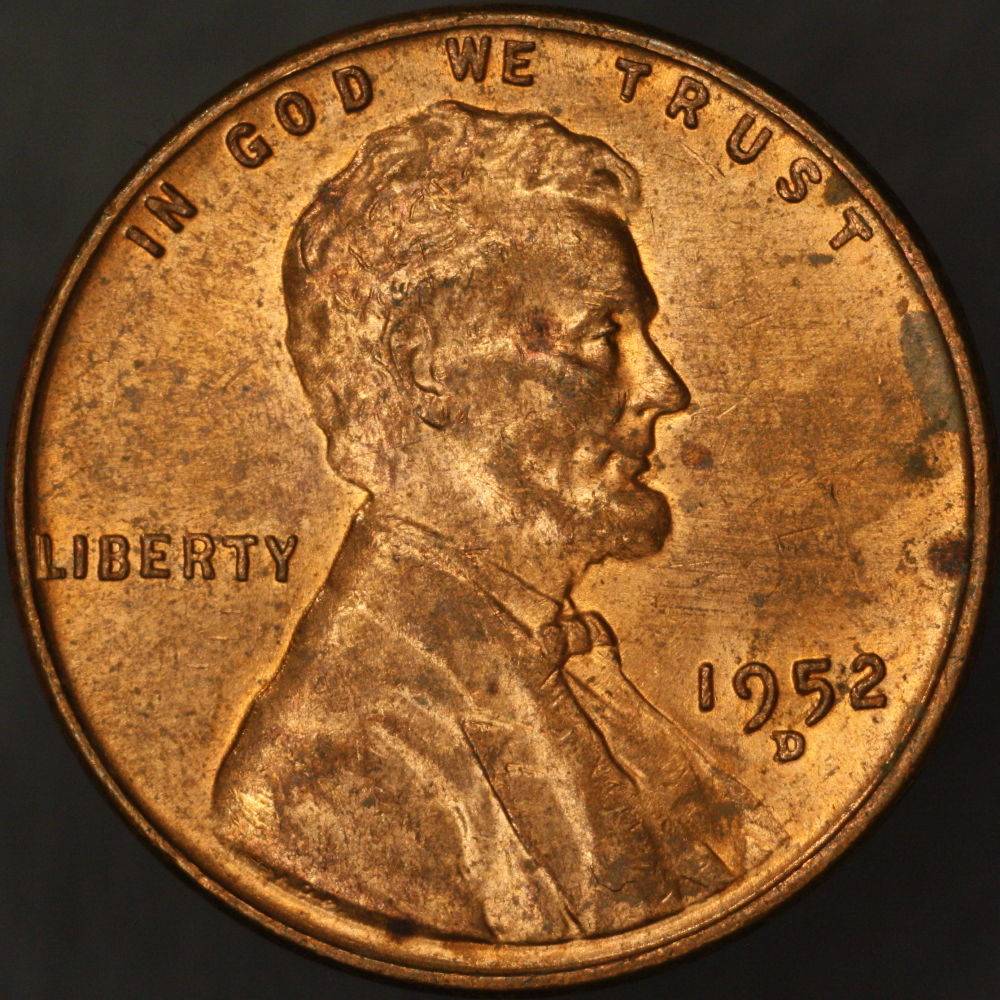 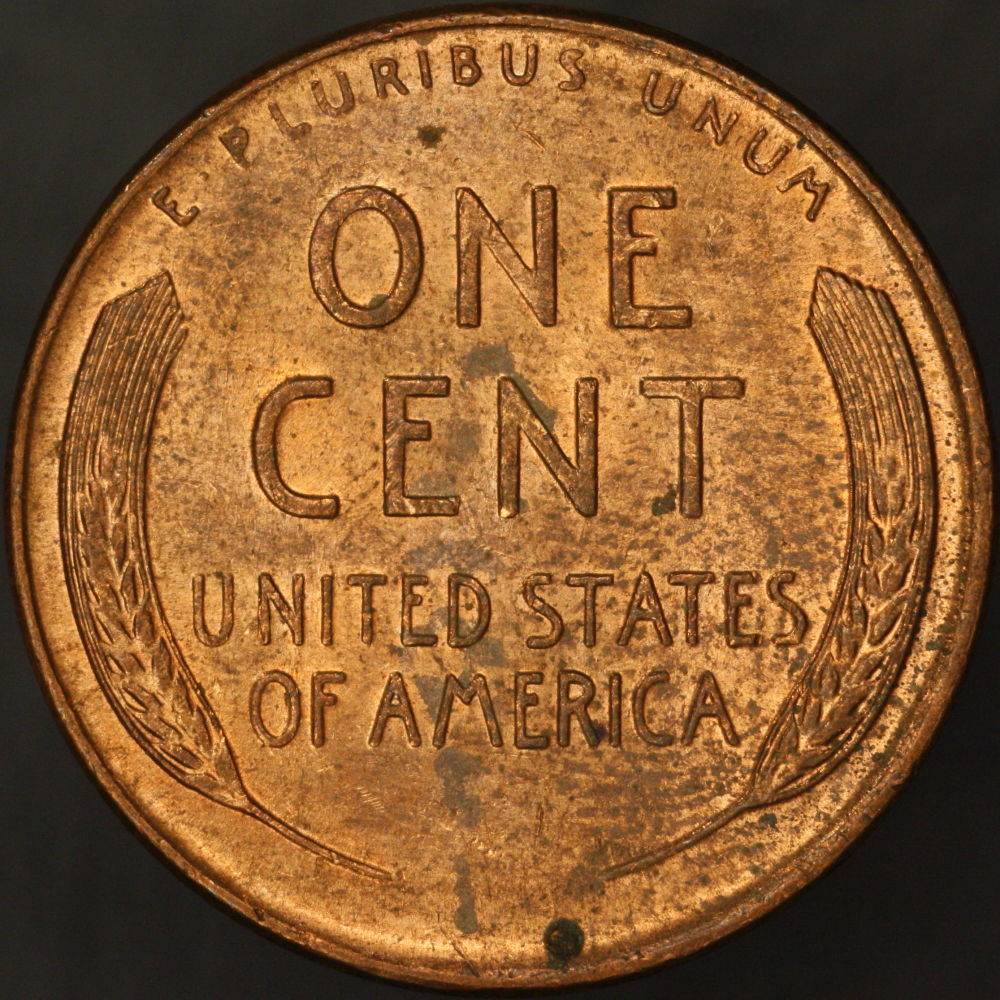 |
|
|
|
Rest in Peace
10197 Posts |
I really like the clarity of your pix, when I enlarge to check they stay sharp and don't pixelate so bad as mine do. Ever determine if this is DDO plus RPM? Your color isn't bad at all on that one, for my it's age!  |
|
Pillar of the Community
United States
2403 Posts |
They look great! Great detail.
Don't forget as you adjust your lighting you need to adjust your white balance. This might help with showing luster better.
|
|
Pillar of the Community
 United States
715 Posts |
Thanks for the quick replies!
Crazy -- I actually haven't confirmed either yet. Clearly it's an RPM at least, but I'll check more closely in a few minutes.
MC -- I actually don't know how to adjust white balance. Can you tell me what the process is?
Edit: No doubled die, and I'm still lacking confidence in which RPM this is, but I'm leaning towards 1MM-002. The broken punch looks close and the upper split serif looks right, along with the mint mark placement. Die scratch behind the T of CENT is evident, but not seeing the die crack on the forehead, nor the die gouge above LIBERTY. Might be my eyes, perhaps, or a little earlier die state I guess. I was initially thinking it was D/D/D, but I guess it's not.
Edited by Oijogja
05/05/2017 9:21 pm
|
|
Pillar of the Community
United States
715 Posts |
Well this is silly, I hadn't been saving my pictures in raw format so there was a lot of stuff the editing program wouldn't even let me adjust. Even more to learn than I thought.
|
|
Valued Member
United States
441 Posts |
Can you list step by step what your work process is when you want a pic of a coin? Use the cent that you used for this post. Curious to see what your steps are.
|
|
Pillar of the Community
United States
715 Posts |
Okay, it goes something like this.
Choose lens and extensions based on whole coin vs detail shot. Make sure these are securely attached to camera.
Turn on camera.
Go into live shooting on the computer.
Adjust height of platform to get coin or detail roughly in frame and within range of fine tune focusing. Attempt to get coin mostly aligned properly.
Adjust lighting to get preliminary lighting.
Check to see that camera is level (mine likes to swivel).
Readjust lighting to minimize glare and shadows while preserving detail. This generally involves much experimenting with angles, bouncing light for indirect illumination, and diffusion. So far, diffusion hasn't been very successful for me, but I'll continue to experiment.
Play with exposure level and f-stop if it seems like the light placement is adequate but light level is off.
Recheck levelness of lens to subject.
Go into zoom mode on the computer if taking a picture of a whole coin face.
As carefully as possible, very slowly and very slightly adjust focus until I feel good about the sharpness. This usually takes a while because I need to rest my elbow on the table to stabilize my arm enough not to disturb the camera position too much while I turn the helicoid. However, because I'm resting my elbow on the table, it changes the distance from coin to lens a slight but noticeable bit (actually, it's extreme when using the Plan4), so I have to gingerly retreat from the camera and then go back to readjust again and again until it's where it really needs to be. This includes a final check to see that I haven't upset the lens level while adjusting focus.
Exit zoom mode, and as long as everything looks good in the live mode preview, finally snap a picture.
If it's a whole coin, I flip the coin, recenter and align it, check focus via zoom mode, make adjustments as necessary (generally not necessary), and snap the other pic.
If I was doing a detail shot, I may make extremely fine focus adjustments and take a bunch of photos to capture various depths of field so I can run them through the focus stacking program.
Adjust photos to the best of my ability in post.
|
|
Pillar of the Community
United States
9395 Posts |
Nice results. It sounds like you need an improved focusing setup, to make things easier. One possibility is a Z-focusing stage, or a microscope focusing stage (what I use). The helicoid (or bellows) would first be used to establish the magnification, and then the focusing stage does the final focus (without disturbing the camera level).
|
|
Pillar of the Community
United States
715 Posts |
I am with you, there's a lot of rechecking that I feel like should be more like "set it and forget it". I'm not sure what a good microscope stage would be as far as the upgrade, though.
|
|
Pillar of the Community
United States
2403 Posts |
Quote:
MC -- I actually don't know how to adjust white balance. Can you tell me what the process is? What kind of camera are you using? I use a Canon T3. I also use a program called GIMP 2.8. It is freeware. This has an auto white balance on it for post shot white balancing. Here is your obverse picture after running it through GIMP. Just did the Auto White Balance correction. Does this look more like what it does in hand? 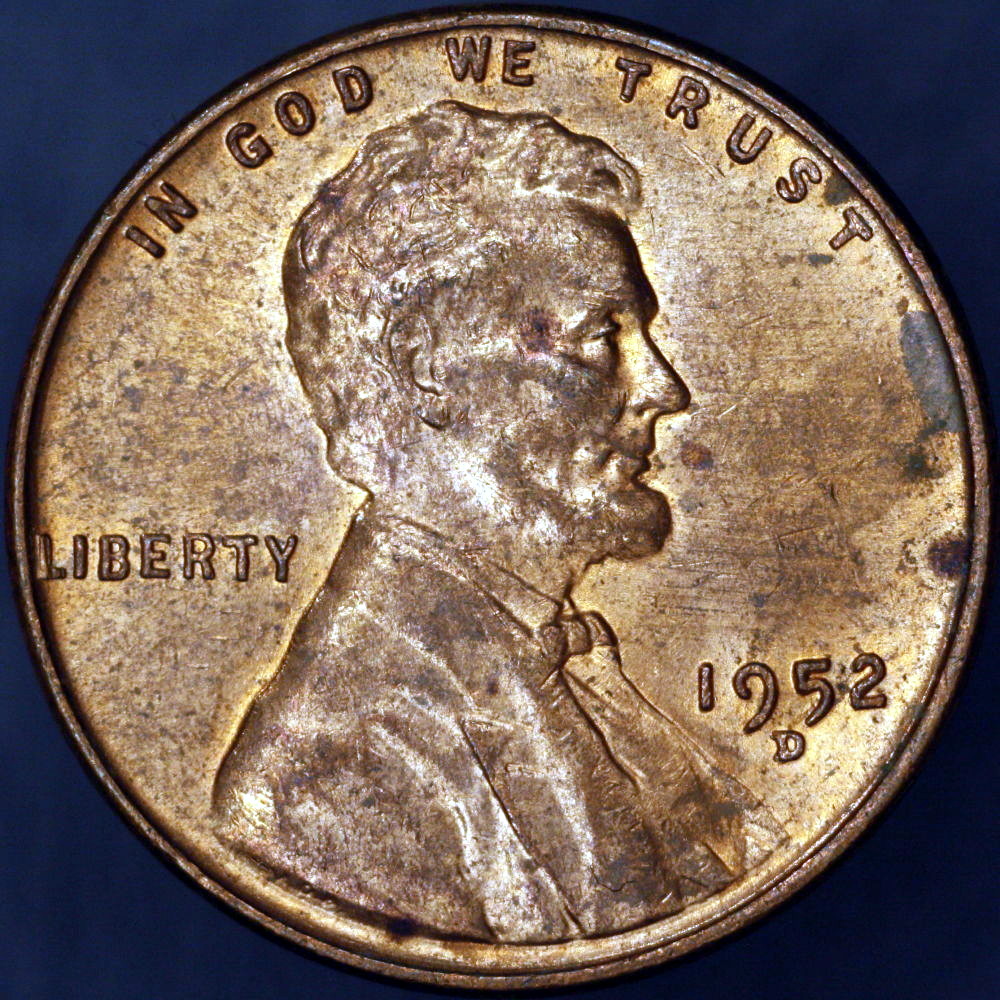 Edited by MontCollector
05/05/2017 10:28 pm
|
|
Pillar of the Community
United States
715 Posts |
My camera is a Canon Rebel EOS. The picture run through GIMP looks a little brighter or whiter or maybe yellower? than when I look at it in hand.
|
|
Pillar of the Community
United States
2403 Posts |
Quote:
My camera is a Canon Rebel EOS There are a lot of online tutorials for setting up your WB on these cameras. Just do a search for setting up a custom white balance for your model number. I.E. Canon EOS Rebel T3, T5 or what ever yours is. Several should pop up. Try adjusting this before you adjust any colors in editing. Might be surprised how much difference it can make. Edit: I would also suggest you use a light grey background when shooting copper colored coins. This also seems to help. Edited by MontCollector
05/05/2017 11:11 pm
|
|
Pillar of the Community
 United States
4050 Posts |
You have some "crushed blacks" that you can probably fix with camera settings. Since you're outputting jpeg, you need to ensure the full dynamic range of the RAW files is properly mapped to the jpeg image. You're probably already doing the EV compensation to eliminate over-exposure, which will cause you problems on the dark end of things. To fix that, reduce your contrast setting. This will brighten the darker areas, and allow you to recover those crushed blacks.
Contact me for photographic equipment or visit my home page at: http://macrocoins.com |
|
Pillar of the Community
United States
715 Posts |
So I took yet another stab at photographing this coin. I promise to eventually stop boring everyone with the same coin over and over, but I hope it's illustrative of the differences that a final photo can show with different lighting and post-processing. 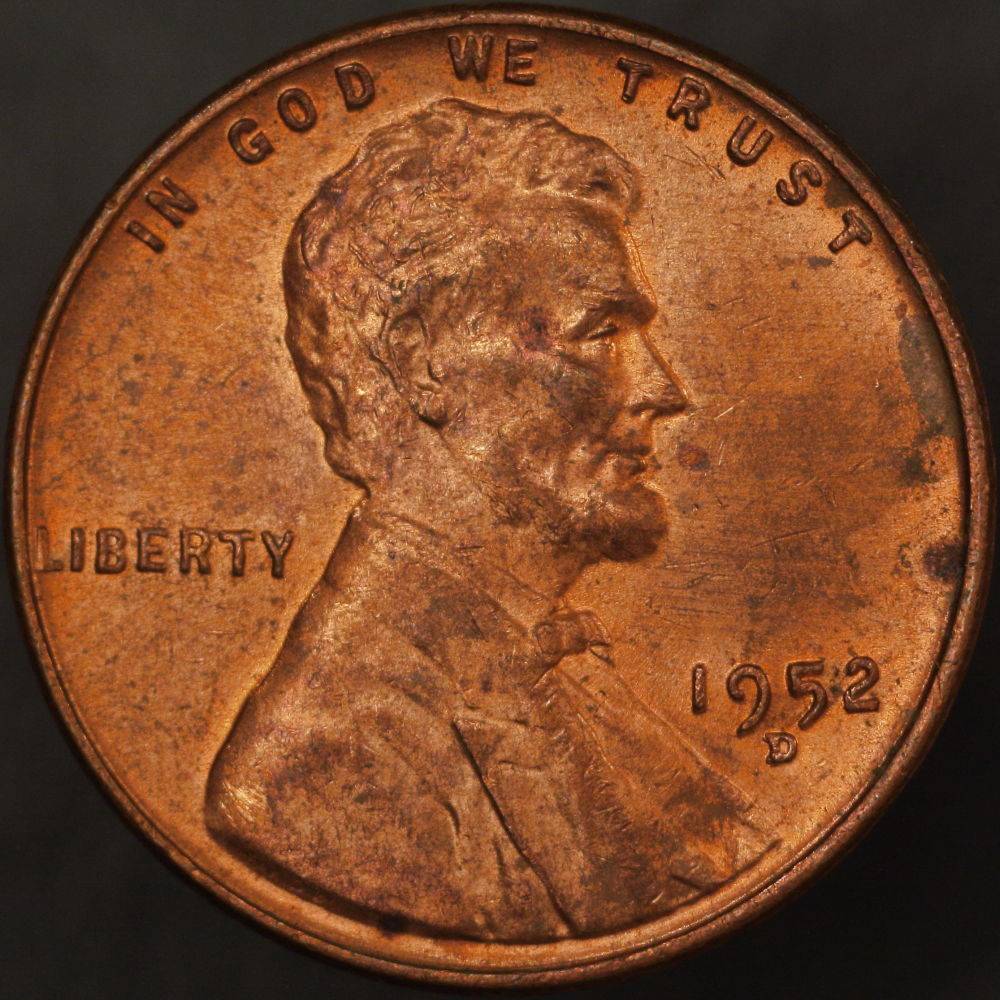 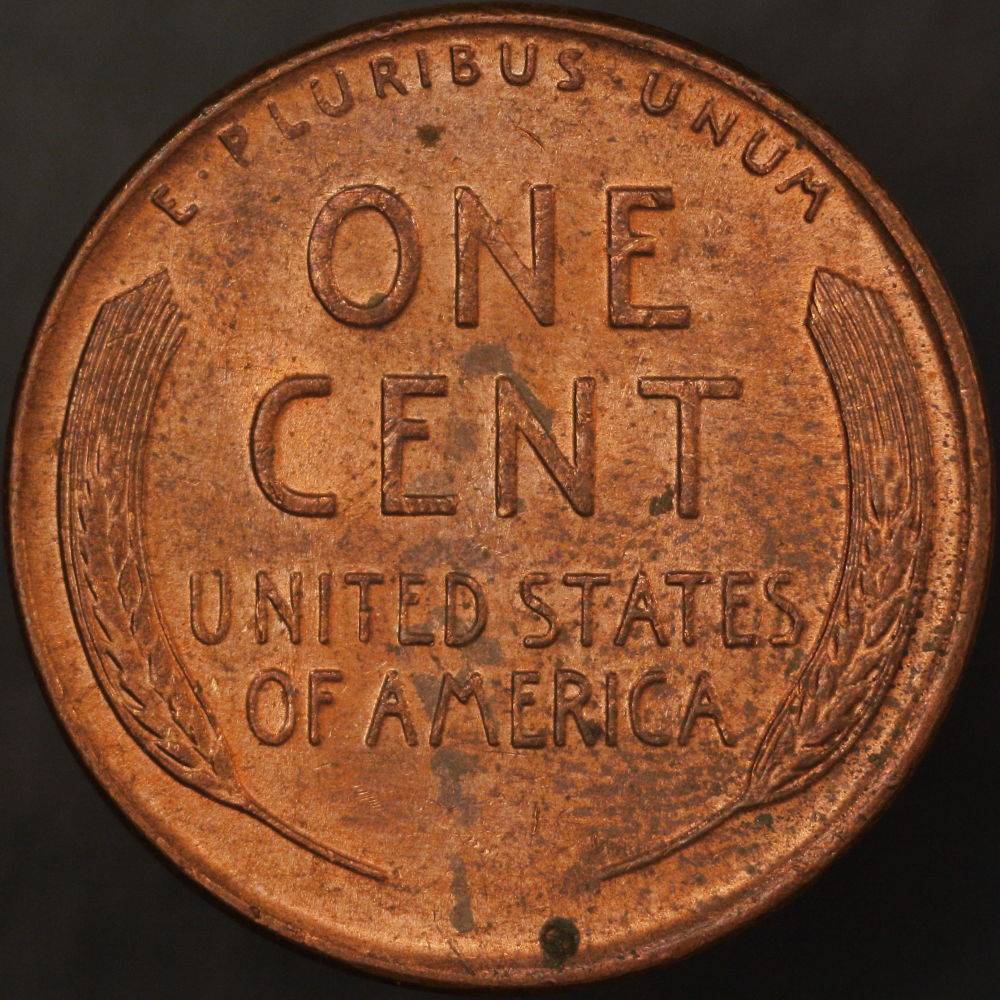 Ultimately, I think the previous pictures (in which the forehead was in shadow) was due to light coverage. I tried adjusting contrast in conjunction with exposure, but couldn't find a way to correct for this without just changing the lighting. This might be lack of experience/familiarity, though. I have also noticed that my perception of color on my computer monitor is different depending on the angle at which I am oriented to it. Nonetheless, I think I've done a halfway decent job of approximating the red-brown color of the coin, at least when I view the coin right next to my image. There's no substitute for the dynamic luster of a coin in hand, but maybe some of you have some suggestions on how much this coin appears to have luster based on the photograph and what I might do to work more in if you feel it's subdued. I realize this may be impossible to say without being able to see the coin in person. I'd say it has AU55 to AU58 luster in hand, by which I mean three quarters (55) to nearly full luster (58). Edit: After taking a break, I looked back at these images and felt they were too orange. I've reworked the color to try to get them to be more peach/pink. 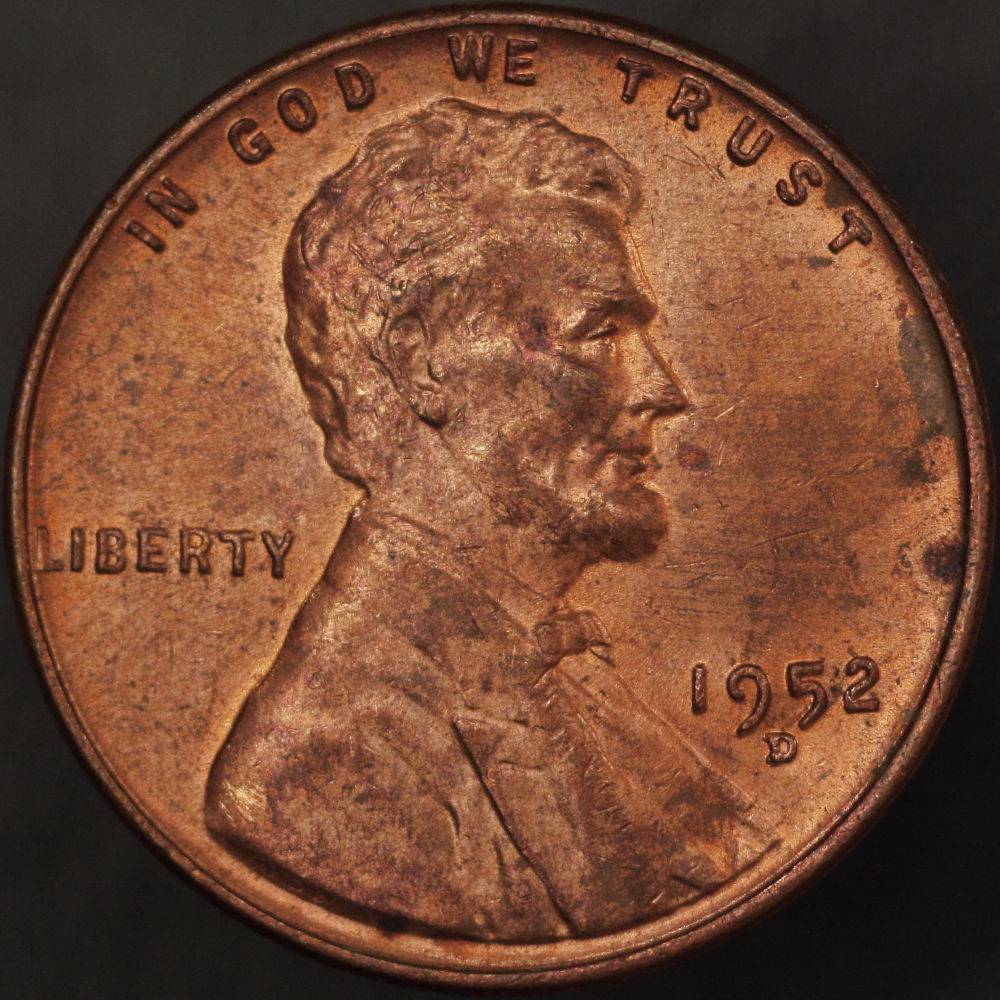 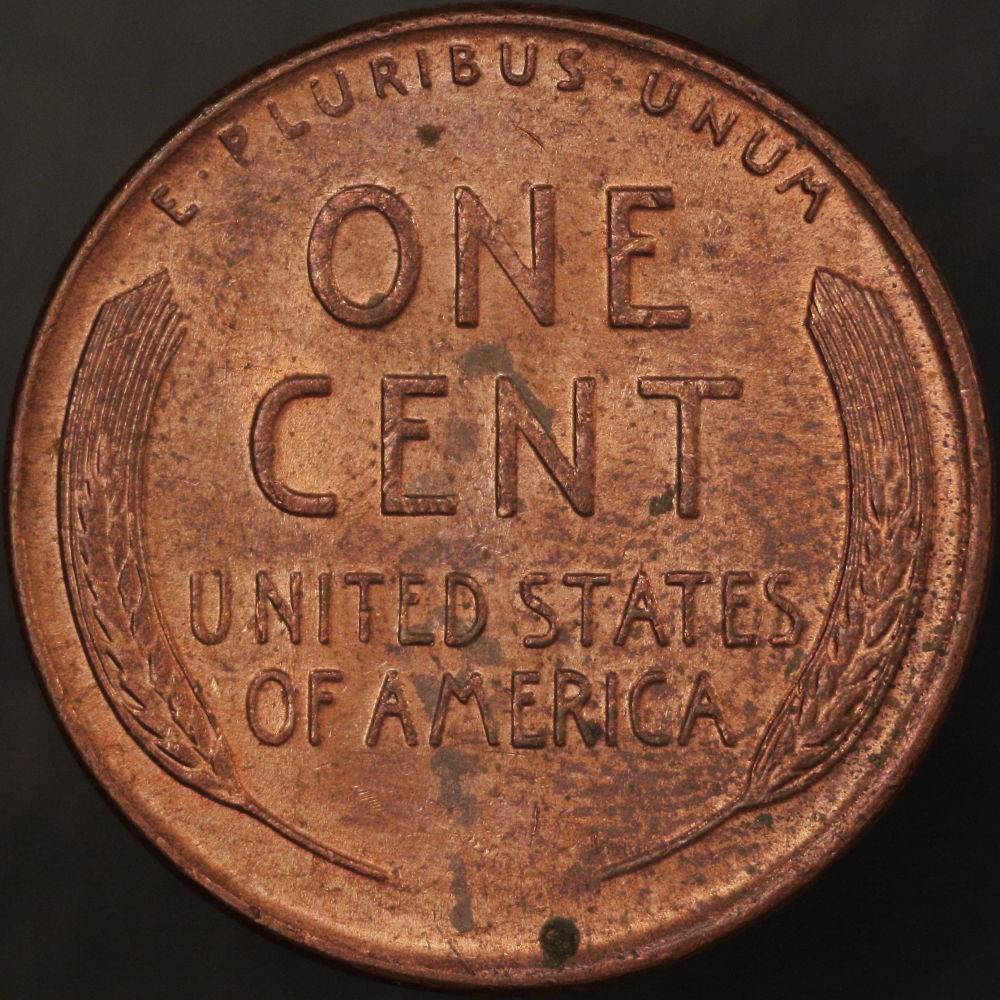 Edited by Oijogja
05/06/2017 6:37 pm
|
|
Pillar of the Community
United States
4050 Posts |
I still see some focusing softness on the left around LIBERTY. If you are taking care to level the camera, but still having these issues, you are probably at too large an aperture. For publishing at 1000x1000 as you are doing, you can tolerate a smaller aperture. I am also not fond of the highlighting I'm seeing on the forehead. It appears you mitigated the forehead shadows by adding more lighting, or a reflector, but it is probably too much IMO. At least reduce this lighting so that the formerly shadowed areas are not highlighted. Finally, the image looks a bit dark. You are not over-exposing on R, but you may need to compensate the overall image a bit more. Only you can tell if this matches the coin brightness well, but working in isolation I'd suggest adjusting the image to look like this:  Contact me for photographic equipment or visit my home page at: http://macrocoins.com |
|
Pillar of the Community
United States
715 Posts |
I will give it another shot when I get a good chunk of time to concentrate on it. I might need to look you up for a microscope stand with these persistent leveling problems.
|
| |
Replies: 15 / Views: 2,271 |
|









 Posted 05/05/2017 8:34 pm


