Coin Community Family of Web Sites Join Thousands of Coin, Bullion, & Money Collectors
Specializing in Modern Numismatics Vancouvers #1 Coin and Paper Money Dealer Royal Estate Auctions - $1 Coin Auctions300,000 items to help build your collection! Royal Canadian Mint products, Canadian, Polish, American, and world coins and banknotes. Join Thousands of Coin, Bullion, & Money Collectors Coin, Banknote and Medal Collectors's Online Mall


Username:
Password:
Save Password
Forgot your Password?


This page may contain links that result in small commissions to keep this free site up and running.

Welcome Guest! Registering and/or logging in will remove the anchor (bottom) ads. It's Free!

Inserting Images- Avtar And/Or Coin Images

To participate in the forum you must log in or register.
Author Previous TopicReplies: 7 / Views: 1,776Next Topic  
Valued Member
habiru001's Avatar
United States
236 Posts
 Posted 03/22/2006  8:24 pm Show Profile   Bookmark this topic Add habiru001 to your friends list Get a Link to this Message Number of Subscribers
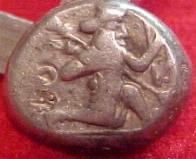
I usually can navigate- but I have been unable to insert an image- I want to insert the oldest coin (Of a living person at the time) Also I would like to insert the image for my avatar. I am programmed into the browser idea like on Ebay- but I am stumped- I will appreciate your help- tell me where to click etc; Habiru001- Call me Dewey --I just may have found the way on this post- but how about for avitar - This is the image of King Darius- I have a couple of these-coins -one for my son. Some numismatic scholars belive this is first attempt (approx 550 BC) to have a live person on a coin- However so far as a portrait goes Ptolemy 1st would win- Of course their are older depictions of ancient coins- but for living persons is what I am dealing with here

Image: Inserting-Images--Avtar-And/Or-Coin-Images Darius.jpg
32.01 KB
Forum Dad
Learn More...
bobby131313's Avatar
United States
24165 Posts
 Posted 03/22/2006  8:43 pm  Show Profile   Bookmark this reply Add bobby131313 to your friends list Get a Link to this Reply


Hey Dewey,

Susan will take care of your avatar tomorrow. That's not something you can do yourself.

You can check this tutorial to see how to make images show up in your post. Once you get the hang of it it's a piece of cake.
Valued Member
habiru001's Avatar
United States
236 Posts
 Posted 03/22/2006  9:25 pm  Show Profile   Bookmark this reply Add habiru001 to your friends list Get a Link to this Reply
Hi Forum Dad- Thanks for putting me at ease-I will watch for Susan's email. habiru001
Pillar of the Community
United States
1203 Posts
 Posted 03/23/2006  11:09 am  Show Profile   Bookmark this reply Add OldDan to your friends list Get a Link to this Reply
Hi Dewey, by the time you read this post I'm betting you have figured out how to posts all the pics you have spoken of. As for the rest of them, our forum Mom Susan will take care of that little task.

Good to have you one the forum.
Forum Mom
Learn More...
Susanlynn9's Avatar
United States
5877 Posts
 Posted 03/23/2006  11:28 am  Show Profile   Bookmark this reply Add Susanlynn9 to your friends list Get a Link to this Reply
All done.
Valued Member
habiru001's Avatar
United States
236 Posts
 Posted 03/23/2006  10:38 pm  Show Profile   Bookmark this reply Add habiru001 to your friends list Get a Link to this Reply
Well Dan, I did figure it out-so far as images go- but learned later that avatar images must be done by Susan- and she has since placed my Pilgrim as my avatar.
Forum Mom
Learn More...
Susanlynn9's Avatar
United States
5877 Posts
 Posted 03/24/2006  08:32 am  Show Profile   Bookmark this reply Add Susanlynn9 to your friends list Get a Link to this Reply
Dewey,

You can change it to the denarius just by selecting habiru0011 in the avatar box. You can switch back and forth.
Valued Member
demonboy279's Avatar
United States
346 Posts
 Posted 03/24/2006  6:13 pm  Show Profile   Bookmark this reply Add demonboy279 to your friends list Get a Link to this Reply
Dewey just a tip. Go to the links section in the U.S. board and theres a thread there about easy picture posting. It has links to 2 different sites to help with picture posting. you upload copy and paste and your done. :) hope this helps
  Previous TopicReplies: 7 / Views: 1,776Next Topic  

To participate in the forum you must log in or register.


Disclaimer: While a tremendous amount of effort goes into ensuring the accuracy of the information contained in this site, Coin Community assumes no liability for errors. Copyright 2005 - 2026 Coin Community Family- all rights reserved worldwide. Use of any images or content on this website without prior written permission of Coin Community or the original lender is strictly prohibited.
Contact Us  |  Advertise Here  |  Privacy Policy / Terms of Use

Coin Community Forum © 2005 - 2026 Coin Community Forums
It took 0.26 seconds to rattle this change. Forums