Coin Community Family of Web Sites
300,000 items to help build your collection! Shop for APMEX Bullion on eBay!Royal Canadian Mint products, Canadian, Polish, American, and world coins and banknotes. Vancouvers #1 Coin and Paper Money Dealer Coin, Banknote and Medal Collectors's Online Mall Specializing in Modern Numismatics Shop CCF Members on eBay!


Username:
Password:
Save Password
Forgot your Password?


This page may contain links that result in small commissions to keep this free site up and running.

Welcome Guest! Registering and/or logging in will remove the anchor (bottom) ads. It's Free!

Changing File Names So Pictures Don't Erase And Take The Place Of Other Pictures.

To participate in the forum you must log in or register.
Author Previous TopicReplies: 10 / Views: 400Next Topic  
Bedrock of the Community
Learn More...
Marv65's Avatar
United States
10472 Posts
 Posted 01/27/2026  03:33 am Show Profile   Bookmark this topic Add Marv65 to your friends list Get a Link to this Message Number of Subscribers
I see where pictures that have the same file name replace each other and members will say something like "You have to change the file names". Can anybody tell me how exactly how to do that?
I had that happen to me the other night and couldn't figure out how fix it so I just deleted the picture and posted a different one.
Forum Dad
Learn More...
bobby131313's Avatar
United States
24147 Posts
 Posted 01/27/2026  05:39 am  Show Profile   Bookmark this reply Add bobby131313 to your friends list Get a Link to this Reply
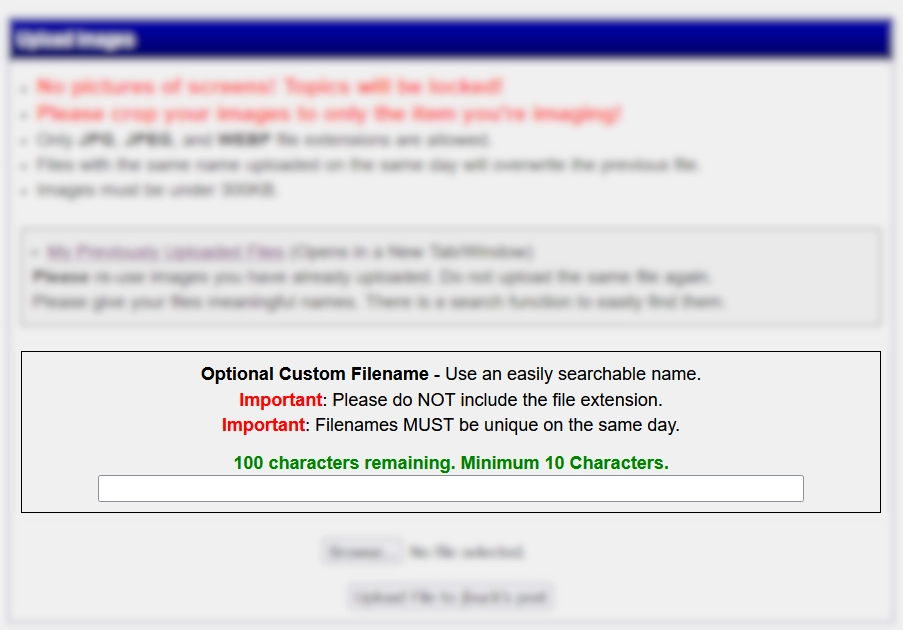
You can change the file name right on the upload form. Easy peasy. Make them something searchable for later.
Moderator
Learn More...
jbuck's Avatar
United States
187446 Posts
Bedrock of the Community
Learn More...
HondoB's Avatar
United States
24878 Posts
 Posted 01/27/2026  08:31 am  Show Profile   Bookmark this reply Add HondoB to your friends list Get a Link to this Reply
If you're using a PC: when you select the file for upload, right-click on the file and a pop-up menu appears. Scroll down and select "Rename". After renaming, make sure that the newly-renamed file is the one selected for upload.
Inordinately fascinated by bits of metal with strange markings and figures
Bedrock of the Community
Learn More...
Marv65's Avatar
United States
10472 Posts
 Posted 01/27/2026  6:21 pm  Show Profile   Bookmark this reply Add Marv65 to your friends list Get a Link to this Reply

Quote:
If you're using a PC

Oh yes, 95% of the time on a PC.

Thank you everybody for the information!
Forum Dad
Learn More...
bobby131313's Avatar
United States
24147 Posts
 Posted 01/27/2026  7:53 pm  Show Profile   Bookmark this reply Add bobby131313 to your friends list Get a Link to this Reply

Quote:
If you're using a PC: when you select the file for upload, right-click on the file and a pop-up menu appears. Scroll down and select "Rename". After renaming, make sure that the newly-renamed file is the one selected for upload.


There's no need for all that; there's a field to rename the image right on the upload form that works on all platforms. Just select the image, type in the new name, and hit upload. I couldn't have made it any easier.
Bedrock of the Community
Learn More...
Marv65's Avatar
United States
10472 Posts
 Posted 01/27/2026  7:54 pm  Show Profile   Bookmark this reply Add Marv65 to your friends list Get a Link to this Reply

Quote:
Just select the image, type in the new name, and hit upload. I couldn't have made it any easier.


Bedrock of the Community
Learn More...
HondoB's Avatar
United States
24878 Posts
 Posted 01/27/2026  8:40 pm  Show Profile   Bookmark this reply Add HondoB to your friends list Get a Link to this Reply

Quote:
I couldn't have made it any easier.

Duh! I is a dummy.
Inordinately fascinated by bits of metal with strange markings and figures
Pillar of the Community
triggersmob's Avatar
Australia
9352 Posts
 Posted 01/28/2026  7:02 pm  Show Profile   Bookmark this reply Add triggersmob to your friends list Get a Link to this Reply
From memory that only happens if you post them on the same day. You can use the same file name if you post on a latter day.
I have also noticed the system doesn't like file names ending in full stop (period).
Bedrock of the Community
Learn More...
HondoB's Avatar
United States
24878 Posts
 Posted 01/28/2026  7:08 pm  Show Profile   Bookmark this reply Add HondoB to your friends list Get a Link to this Reply

Quote:
there's a field to rename the image right on the upload form that works on all platforms

I didn't realize that was an input box - I thought it was just a box-shaped divider.
Inordinately fascinated by bits of metal with strange markings and figures
Forum Dad
Learn More...
bobby131313's Avatar
United States
24147 Posts
 Posted 01/28/2026  9:41 pm  Show Profile   Bookmark this reply Add bobby131313 to your friends list Get a Link to this Reply
  Previous TopicReplies: 10 / Views: 400Next Topic  

To participate in the forum you must log in or register.


Disclaimer: While a tremendous amount of effort goes into ensuring the accuracy of the information contained in this site, Coin Community assumes no liability for errors. Copyright 2005 - 2026 Coin Community Family- all rights reserved worldwide. Use of any images or content on this website without prior written permission of Coin Community or the original lender is strictly prohibited.
Contact Us  |  Advertise Here  |  Privacy Policy / Terms of Use

Coin Community Forum © 2005 - 2026 Coin Community Forums
It took 0.31 seconds to rattle this change. Forums