| Author |
 Replies: 14 / Views: 1,990 Replies: 14 / Views: 1,990 |
|
|
Valued Member
United States
420 Posts |
before I try taking pictures of any of my "good" wheats, I thought I would grab a couple out of my change jar... just to see how my camera handles close shots - of course I need a different background, but they look decent to me, what do you think? 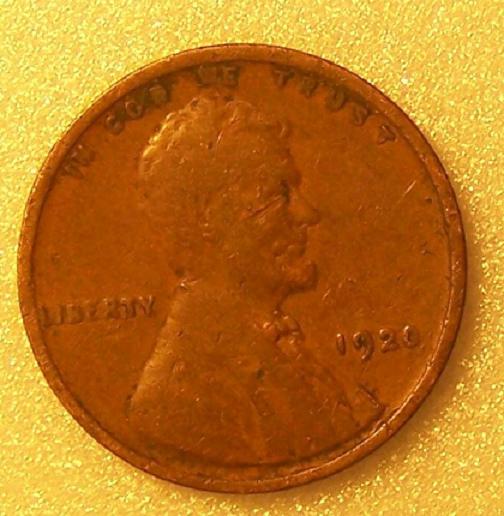 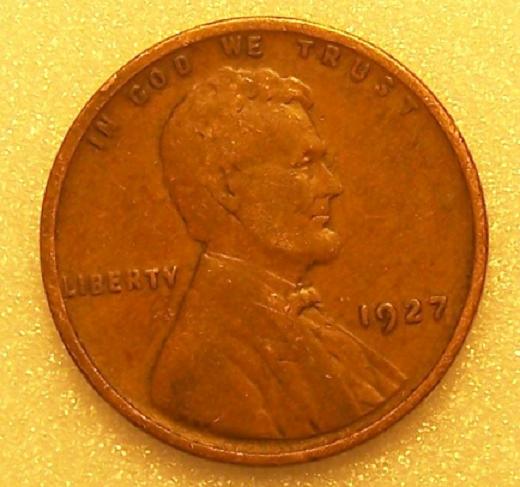 |
|
|
|
Pillar of the Community
United States
2661 Posts |
 to the forum! Your pics look good to me. What camera are you using? |
|
Valued Member
 United States
420 Posts |
Thank you Tim,
it's a Kodak Z710 7.1mp 10X optical that I picked up on *bay for 50 bucks a couple months back .... didn't make any adjustments to it other than using the "flower" setting, I did have to resize pics WAY down to fit them here, and did lose some detail
really that was just a down-n-dirty makeshift setup I did in about 5 min last night, I know I can do better.. I think i'll build a copy stand when I have the time, that alone will help ( from what I've read )
Edited by twincam_04
05/09/2010 12:59 pm
|
|
Pillar of the Community
United States
1534 Posts |
Nice shots. I suggest you download Photoscape. It's a great and very fun free photo editing program which really makes pics better. Here are your pics with a black background and combined sideways.  |
|
Valued Member
United States
420 Posts |
thanks, i'll look into it , my only concern would be losing edge detail by masking off to change the background color, and if you stay far enough away from the edge, getting a halo effect
|
|
Pillar of the Community
United States
1534 Posts |
Well you need to crop it perfectly, so that the background will change yet the edge detail will still be there. It's pretty simple, although I've cropped a coin too tightly before.
|
|
Valued Member
United States
420 Posts |
i will look tomorrow , right now I'm beating my head into the wall trying to figure out where I put some coins I got in the mail last week, was wanting to take pics of them .. my dog helps me rearrange my room at times.. maybe I should ask her
|
|
Pillar of the Community
United States
1173 Posts |
Looks pretty good...but I'd suggest using a neutral background. That bright yellow (or any other bright color) will play havoc with getting the true color of the coin. You can photoshop the image back to "true color" but that takes time and effort, while a white, black or light gray background is an easy one-time fix.
|
|
Valued Member
United States
420 Posts |
i have found some white cotton pads at work that look like they will do great, I tried black ( t-shirt) and it blew out all detail with any lighting I tried- i'll keep taking pics, practice practice practice ... I also know my light source isn't the best, will be different types as I take more pics
been really busy, then went out of town, other projects going on ( '57 Harley is one ) but I'm planning on building a copy stand here within a couple weeks that I know will help
i did a few quick pics when I got in from work this morning, maybe you can take a look at those from the error threads and see what you think... search my name for posts?
|
|
Moderator
 United States
23522 Posts |
Honestly, I lean more toward darker backgrounds than lighter, unless the coin itself is exceptionally dark. Lighter backgrounds tend to reflect light back into the lens, costing you contrast in the final image. It's especially pronounced with silver.
Try a series with the same coin, using both dark and light backgrounds, and see what you think. No color in the background, ever, of course.
|
|
Pillar of the Community
United States
870 Posts |
Quote:
No color in the background, ever, of course. That's interesting! I like to have a color to ensure that my white balance and exposure remain reasonably consistent so that the coin's color is shown consistently... |
|
Moderator
United States
23522 Posts |
Given the conditions under which you'll be showing the pics - no two viewers have the same color vision, and no two monitor gamut settings are the same - it's a heck of a lot easier to adjust a stark white or black background and get your white balance right that way. With that, the coin's color will take care of itself.
There's a reason why camera manufacturers specify a white or gray background for custom white balance settings.
|
|
Valued Member
United States
420 Posts |
thanks for the suggestions, I will be playing/testing all of these things as time goes by and i'll keep coming back to this topic so I can refresh my memory
you guys are GREAT!!
thank you
|
|
Moderator
United States
23522 Posts |
You've got that exactly right, twincam - play. Certain things about coin photography are always true, but there's still room for differing styles and no two cameras behave exactly the same. Take pictures. Lots of pictures. My shutter count was in the thousands before I learned anything.
|
|
Valued Member
United States
420 Posts |
playing with cameras has always been fun for me- coins will be something new, and a challenge I can already see will be interesting to figure out ( plus you don't have to tell them to sit still and smile )
i have been out of coin collecting for years, and photography... finding this site was a real blessing for me .
thank you to the ones who started it, and all you great people who come here and and share your knowledge - I'm learning new stuff every day :-)
|
| |
Replies: 14 / Views: 1,990 |
|










 Posted 05/09/2010 12:58 pm


