| Author |
 Replies: 11 / Views: 3,954 Replies: 11 / Views: 3,954 |
|
|
Valued Member
United States
110 Posts |
has anyone found any good computer programs (or preferably iPhone apps) that does good job of keeping track of your collection? I don't want something that wants 48 pieces of information of each coin, but something that could print out a quick and easy list of coins I have and coins I need for my date/mintmark collections of US coins. Thanks for any help |
|
|
|
New Member
United States
41 Posts |
I have a droid, I downloaded a notepad app and made checklists in the notepad. Works great, less paperwork
Memorials, wheats, states etc.
Lori
|
|
Pillar of the Community
United States
2120 Posts |
Yea, you could always get an Excell reader/editor. Thats what I did and sync'd it with my spreadsheet I keep at home. that way they are always up to date.
|
|
Valued Member
United States
106 Posts |
I use Bento for both the iPhone & iPad. I highly recommend it. Bento allows you to create custom databases and sync them with the desktop client or use as standalone DB and never use the desktop client. I created my collection on the desktop client and then imported it to my phone. It's a bit pricey for both the desktop and the mobile apps but totally worth it. I also have the following apps on my iPhone related to coins: Ampex's "Gold Silver" SilverPanda Coins Photograde The screenshot is from Bento and is an entry in my collection. 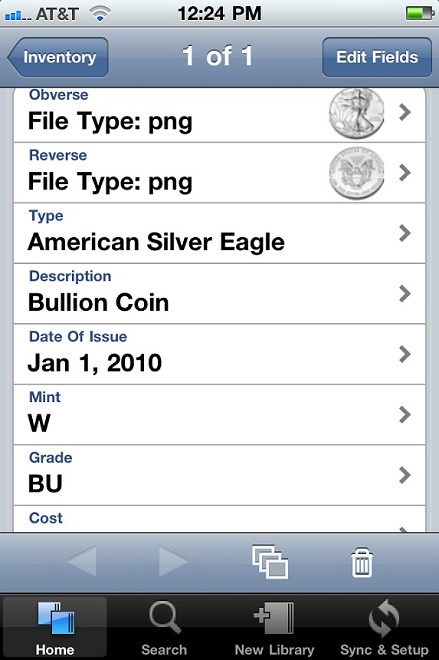 |
|
Pillar of the Community
United States
539 Posts |
so has anyone found a free app that works on the iphone that can read a simple spreadsheet. I've tried a couple of the free ones and they just won't load the darn sheet. it is 320Kb
|
|
Valued Member
 United States
110 Posts |
Thanks everyone. bento looks interesting, and I'll see if I can get some time on it tonight.
|
|
Moderator
 United States
194816 Posts |
Quote:
so has anyone found a free app that works on the iphone that can read a simple spreadsheet. I've tried a couple of the free ones and they just won't load the darn sheet. it is 320Kb On my iPod touch I used an app called Files lite by Olive Toast. It did okay with spreadsheets (zooming was less than smooth), but I found it worked pretty good with PDF. Since moving to the Droid I have settled on using PDF. I convert my spreadsheets into PDF (as simple as printing) whenever I update them. |
|
New Member
United States
3 Posts |
How about a simple FREE program? Any suggestions?
|
|
Valued Member
United States
106 Posts |
For a simple free alternative use Dropbox. you signup for a Dropbox account upload your documents (anything really) and then download the app to your iDevice of choice. You can read excel spreadsheets easily with the built in viewer. Did I mention all of that is FREE. https://www.dropbox.com/I use it all the time for work and never thought to use it for coin collecting. |
|
Valued Member
United States
106 Posts |
|
|
New Member
United States
7 Posts |
There is an app for Android called "Coin Scanner" I think that lets you scan the barcode of a slabbed coin and tells you what it is worth, lowest sale prices and the highest, I guess. Not sure if they have an iPhone app - I have an android. You can scan coins right off of ebay actions before you bid! Well, I do anyway . . . I use that DropBox on my computer, so you bet I will be grabbing that right now! |
|
New Member
United States
25 Posts |
This was really helpful, Coin Scanner and dropbox were fantastic suggestions, unfortunately I now have no escape, it is all coins all the time!
|
| |
Replies: 11 / Views: 3,954 |
|





 Posted 08/02/2010 11:57 am





