Coin Community Family of Web Sites Join Thousands of Coin, Bullion, & Money Collectors
Join Thousands of Coin, Bullion, & Money Collectors Vancouvers #1 Coin and Paper Money Dealer 300,000 items to help build your collection! Coin, Banknote and Medal Collectors's Online Mall Shop for APMEX Bullion on eBay!Royal Canadian Mint products, Canadian, Polish, American, and world coins and banknotes. Specializing in Modern Numismatics


Username:
Password:
Save Password
Forgot your Password?


This page may contain links that result in small commissions to keep this free site up and running.

Welcome Guest! Registering and/or logging in will remove the anchor (bottom) ads. It's Free!

How Do I Zoom In On The "S" / Make It Bigger?

To participate in the forum you must log in or register.
Author Previous TopicReplies: 7 / Views: 1,754Next Topic  
Pillar of the Community
weerdsteev's Avatar
United States
1291 Posts
 Posted 10/20/2010  9:41 pm Show Profile   Bookmark this topic Add weerdsteev to your friends list Get a Link to this Message Number of Subscribers
Here's a photo I just posted in another thread. It's decent quality but I really wanted to make that "S" mintmark bigger. WAY bigger. I took the photo of the coin from two inches away. If I get any closer I'll block the light.

I can crop the "S", but that doesn't make it any bigger when I post it here on the forum.

I'm using a Canon Powershot A2000IS at 10 Megapixels.

So, what's the trick? How do I get a bigger shot of that "S" that's NOT distorted or all pixel-ly?

How-Do-I-Zoom-In-On-The-
Pillar of the Community
Namachieli's Avatar
United States
2120 Posts
 Posted 10/20/2010  10:49 pm  Show Profile   Bookmark this reply Add Namachieli to your friends list Get a Link to this Reply
PM sent
New Member
nocomment's Avatar
United States
36 Posts
 Posted 10/20/2010  11:34 pm  Show Profile   Bookmark this reply Add nocomment to your friends list Get a Link to this Reply
I will sometimes just to get a super detailed shot is take a 10x to 30x eye loup or any decent magnification piece and put that on the camera lens and back up the camera zoom all the way and then just kinda work with it..see how much camera zoom you can use without making the pic turn into junk..also use your finger or two as like a little step latter for the lens so the light will still get in... yup thats what I do..hope it helps!

o'ya and just crop out the black edges if needed..

later!
Edited by nocomment
10/20/2010 11:35 pm
Bedrock of the Community
Bryan1315's Avatar
United States
14454 Posts
 Posted 10/21/2010  12:49 am  Show Profile   Bookmark this reply Add Bryan1315 to your friends list Get a Link to this Reply
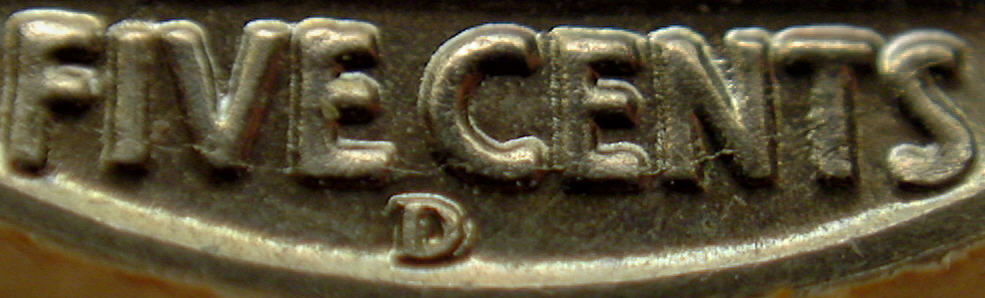
I would take the uncropped original picture and then crop the "S" and then if you have to resize it to be as big as you want. With a 10MP camera you should be able to get some good close ups because I use a 3.2 MP camera and this is what I end up with
This picture is only 60k
How-Do-I-Zoom-In-On-The-
Pillar of the Community
yechi7's Avatar
United States
717 Posts
 Posted 10/21/2010  01:18 am  Show Profile   Bookmark this reply Add yechi7 to your friends list Get a Link to this Reply
Here are some pix of a 1995 Doubled Die Lincoln Cent I took with a QX5 Digital USB Microscope ($100) at the 60X setting. It does 10X, 60X and 200X. You can search the forum with QX5 to see others people's pix.

How-Do-I-Zoom-In-On-The-


How-Do-I-Zoom-In-On-The-


Here is a 1909 S RPM Lincoln Cent:

How-Do-I-Zoom-In-On-The-


A link on where to buy:
http://www.compuvisor.com/qx5diblmi...gXgQod6xViAQ


Edited by yechi7
10/21/2010 01:20 am
Bedrock of the Community
Bryan1315's Avatar
United States
14454 Posts
 Posted 10/21/2010  06:05 am  Show Profile   Bookmark this reply Add Bryan1315 to your friends list Get a Link to this Reply
I think the 10MP camera should be able to do just fine for posting on a coin forum without having to buy more hardware unless you just want something else easy like a microscope. I think you just need to mess with the camera and lighting to get the settings to where it will work for you
Pillar of the Community
weerdsteev's Avatar
United States
1291 Posts
 Posted 10/21/2010  7:00 pm  Show Profile   Bookmark this reply Add weerdsteev to your friends list Get a Link to this Reply
Bryan1315: PM sent
Pillar of the Community
weerdsteev's Avatar
United States
1291 Posts
 Posted 10/21/2010  7:27 pm  Show Profile   Bookmark this reply Add weerdsteev to your friends list Get a Link to this Reply
All: Thanks for your help! A light bulb suddenly went on in my head and I went to the software program I use to upload photos from my camera to the PC (Image Expert by Sierra Imaging) and there it was...! A "resize" option! Duh. I've only been using this software for about 10 years. Holy obliviousity, Batman!
  Previous TopicReplies: 7 / Views: 1,754Next Topic  

To participate in the forum you must log in or register.


Disclaimer: While a tremendous amount of effort goes into ensuring the accuracy of the information contained in this site, Coin Community assumes no liability for errors. Copyright 2005 - 2026 Coin Community Family- all rights reserved worldwide. Use of any images or content on this website without prior written permission of Coin Community or the original lender is strictly prohibited.
Contact Us  |  Advertise Here  |  Privacy Policy / Terms of Use

Coin Community Forum © 2005 - 2026 Coin Community Forums
It took 0.27 seconds to rattle this change. Forums