Coin Community Family of Web Sites Join Thousands of Coin, Bullion, & Money Collectors
Specializing in Modern Numismatics Vancouvers #1 Coin and Paper Money Dealer Join Thousands of Coin, Bullion, & Money Collectors Coin, Banknote and Medal Collectors's Online Mall 300,000 items to help build your collection! Royal Estate Auctions - $1 Coin AuctionsRoyal Canadian Mint products, Canadian, Polish, American, and world coins and banknotes.


Username:
Password:
Save Password
Forgot your Password?


This page may contain links that result in small commissions to keep this free site up and running.

Welcome Guest! Registering and/or logging in will remove the anchor (bottom) ads. It's Free!

Guidance For Macro Photography Specifically For Coins?

To participate in the forum you must log in or register.
First Page  Showing last 15 replies.
Author Previous TopicReplies: 26 / Views: 3,507Next Topic Page 2 of 2
Valued Member
United States
69 Posts
 Posted 08/22/2013  08:36 am  Show Profile   Bookmark this reply Add jake1050 to your friends list
SsuperDdave

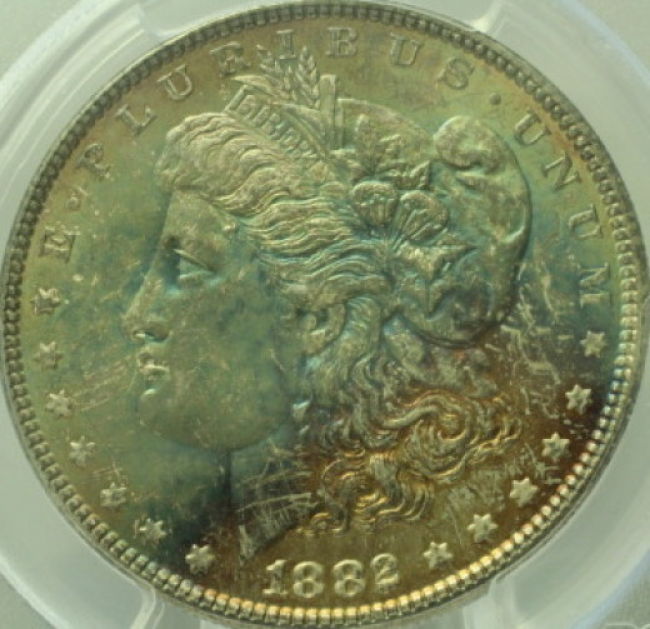
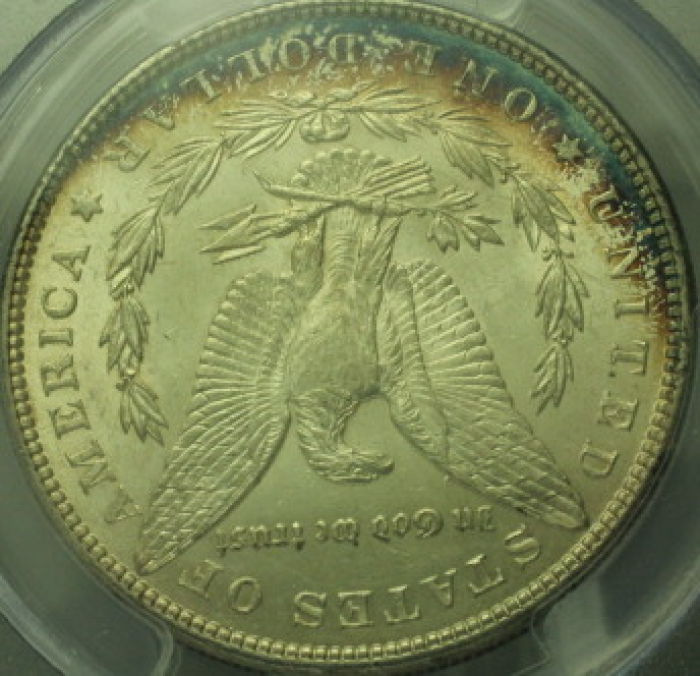
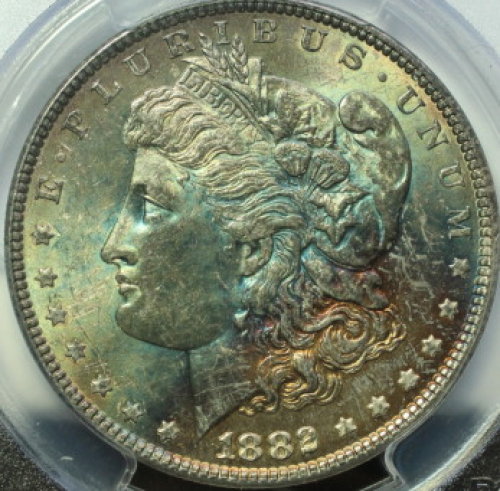
OK I can get 5 inches from a Morgan. I used AV and TV settings I think AV with a high aperture works best. Now how do I choose the lighting? Am I adjusting for the primary color? When do you use less light and more light or are we talking the ‘kind' of light used for getting the correct colors? I just read that using tinfoil in hand is helpful- have you tried this? I am going to set up the tripod so that I can take pictures vertically and see what happens. Here is the last photos again it looks better/brighter in hand. The reverse is a brighter white and I am not sure why it's not 100% focused?

Thanks again.


Guidance-For-Macro-Photography-Specifically-For-Coins?

Guidance-For-Macro-Photography-Specifically-For-Coins?
Moderator
Learn More...
United States
23522 Posts
 Posted 08/22/2013  11:06 am  Show Profile   Bookmark this reply Add SsuperDdave to your friends list
OK, today's topics:

1) Concentrate on getting that EXIF data, so we can tell what your aperture, exposure and ISO settings were. If you're familiar with Windows file management, all you have to do is right-click on the image file, choose "Properties" and then "Details" from that context menu, and that gives you the EXIF data.

2) Until we go fully Manual in operation, use Av Mode, set the Aperture at f/8, and leave it there. This aperture is (generally) the best setting to offer enough depth of field without getting into diffraction (worry about that term later). A larger (numerically smaller) aperture will let more light in, allowing lower ISO and faster exposures (both of which are good things), but at the cost of depth of field so the whole surface of the coin might not be in focus. Use a 2-second delay for your shooting, so you aren't physically contacting the camera when it snaps the shot.

3) Learn how to do a custom White Balance setting with your camera. This will involve taking a picture of (this is the way I do it, there are other ways) a stack of printer paper, and then essentially telling the camera, "this is white, correct things so this looks white to you." That setting is unique to the specific lighting you're using at the moment, and if you change any of the lighting you have to change the White Balance.

4) Post what you're using for lighting. Here at CCF, we're big fans of the Jansjo LED gooseneck lamp sold at Ikea for $10; we generally use them in pairs, set at 10:00 and 2:00 and shining as directly downward on the coin as possible. We like them because they're cheap and infinitely adjustable.

5) Get these and the vertical setup configured before we worry about making any other adjustments, and consider trying manual focus with the coin on the camera's rear screen.

I'm available until about 4PM today. At that point, I'm headed for work and will be spending 37-1/2 of the next 64 hours on the clock with 4 hours' sleep between shifts. No telling if I'll be capable of posting Sunday after the dust settles, without sleep, so don't be worried if I don't show up until Sunday night. There are others following the thread who will likely be helping in my absence.

Oh, one more thing: always orient the coin vertically to the camera, so whatever face you're shooting is straight up and down.
Valued Member
United States
69 Posts
 Posted 08/22/2013  11:12 am  Show Profile   Bookmark this reply Add jake1050 to your friends list
SsuperDdave

can't thank you enough!
Moderator
Learn More...
United States
23522 Posts
 Posted 08/22/2013  11:21 am  Show Profile   Bookmark this reply Add SsuperDdave to your friends list
This is what we're here for. You've stumbled into one of the hotbeds of coin photography on the Internet; we've a pretty fanatical core of people dedicated to the art. This could just as easily be rmpsrpms, CaptainFwiffo, brg5658, westcoin or any number of other members as it is me offering the help.

We're doing things with technique here (thanks mostly to rmpsrpms) which are bringing coin photography to a new level of affordability and quality. Once we've got you proficient with your current rig, we're going to spend (if you're willing, of course) a sum of your money somewhat less than that 50mm lens costs new, and put you into the top 5% of all coin shooters anywhere with the new equipment.
Valued Member
United States
69 Posts
 Posted 08/22/2013  11:24 am  Show Profile   Bookmark this reply Add jake1050 to your friends list
I can't wait! I just got the vertical setup...taking first shots now...
Valued Member
United States
69 Posts
 Posted 08/22/2013  11:39 am  Show Profile   Bookmark this reply Add jake1050 to your friends list
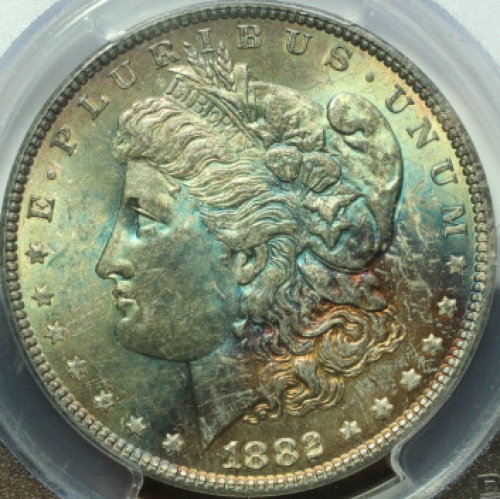
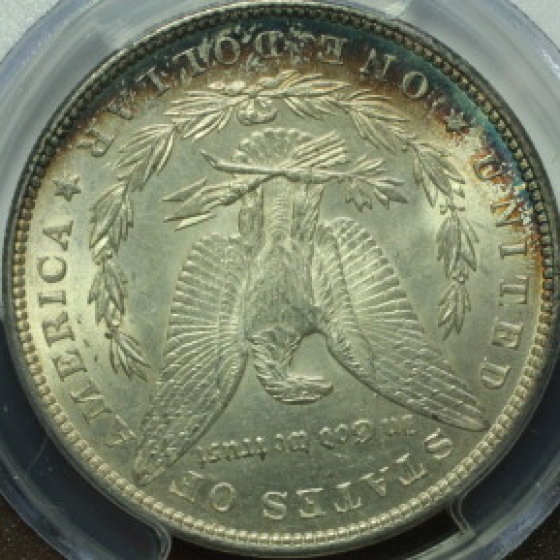
OK- same coin vertical white light and natural through window. I think these are a bit better- you?

Guidance-For-Macro-Photography-Specifically-For-Coins?

Guidance-For-Macro-Photography-Specifically-For-Coins?
Moderator
Learn More...
United States
23522 Posts
 Posted 08/22/2013  12:23 pm  Show Profile   Bookmark this reply Add SsuperDdave to your friends list
Much better. This is a tough coin to work with, though - the toning complicates color rendition. Further, if you're using "white" light from above and sunlight in combination, it's also complicating the situation.

One of the ways of measuring light is by "Color Temperature," expressed degrees Kelvin just the same way they do the color of a star. Typical incandescent indoor light can range between 2800-4000k, and normal sunlight is between 5000-6000k depending on time of day and cloud conditions. It really inhibits a camera's ability to properly correct for color when it has to deal with multiple light sources of differing temperature. That's why we advocate all light sources being identical.

The specific color temperature one uses as a light source isn't relevant, despite those who hold fast on recommending only "daylight" bulbs or some specific lamp because of its' temperature. An effective custom White Balance makes that irrelevant. But the necessity to use single-temperature light sources exists, and it's a step on the road to creating the best images you can.

Still waiting on EXIF data.
Valued Member
United States
69 Posts
 Posted 08/22/2013  12:26 pm  Show Profile   Bookmark this reply Add jake1050 to your friends list
Does this one look better for the color?

Guidance-For-Macro-Photography-Specifically-For-Coins?
Moderator
Learn More...
United States
23522 Posts
 Posted 08/22/2013  1:18 pm  Show Profile   Bookmark this reply Add SsuperDdave to your friends list

Quote:
Does this one look better for the color?


I have no idea, nor will I ever know. You're the one with the coin in front of you - you have to make that determination.

The purpose of what we're doing here is to equip you with a technique with zero dependence on luck, something consistently repeatable across all types of coins and all levels of luster, which allows you to set a coin under your lens and know you're getting it right within the first two or three clicks of the shutter. To that end, we have to move on a logical, step-by-step fashion, one thing at a time. Master one skill, then move on to the next.
Valued Member
United States
69 Posts
 Posted 08/25/2013  07:28 am  Show Profile   Bookmark this reply Add jake1050 to your friends list
I have a Canon EOS Rebel T3i

Can someone tell me how to 'teach' the camera what 'white' is. I know where the setting is and tried to use a sheet of white copy paper but it did not come out 100% white more like 80%.

Thanks
Pillar of the Community
2087 Posts
 Posted 08/25/2013  09:12 am  Show Profile   Bookmark this reply Add austrokiwi to your friends list

Quote:
Can someone tell me how to 'teach' the camera what 'white' is. I know where the setting is and tried to use a sheet of white copy paper but it did not come out 100% white more like 80%.


I would suggest you make a trip to your local photography store and purchase an 18% grey card. Use that card to set the white balance(same way you did it with the photocopy paper) make sure the lighting is the same as you would use for the coin. B & H have some different options such as:

http://www.bhphotovideo.com/c/produ...y_Cards.html


even cheaper from Adorama:

http://www.adorama.com/DKGCP.html
Also when you take the photo step away.....( a remote shutter release would help) as light reflected from your clothes might be having an effect.
Edited by austrokiwi
08/25/2013 09:14 am
Valued Member
United States
69 Posts
 Posted 08/25/2013  10:37 am  Show Profile   Bookmark this reply Add jake1050 to your friends list
austrokiwi

Great. I am on it!
Valued Member
United States
69 Posts
 Posted 08/25/2013  11:39 am  Show Profile   Bookmark this reply Add jake1050 to your friends list
Trying to pair my remote shutter release with my Canon T3i can't seem to figure it out and do not have a manual. Anyone know how to do this? The release is a Pro Master infrared remote.

Thanks
Valued Member
United States
374 Posts
 Posted 08/25/2013  11:46 am  Show Profile   Bookmark this reply Add Bababooey to your friends list
Jake: I believe the manuals are free on line from the canon web site. I have a canon and a remote, but I don't believe any pairing was required. Then again I bought the canon brand remote.
Edited by Bababooey
08/25/2013 11:48 am
Moderator
Learn More...
United States
23522 Posts
 Posted 08/25/2013  1:51 pm  Show Profile   Bookmark this reply Add SsuperDdave to your friends list

Quote:
Can someone tell me how to 'teach' the camera what 'white' is. I know where the setting is and tried to use a sheet of white copy paper but it did not come out 100% white more like 80%.


Don't worry about what you see. It's just a reference for the camera to figure out how to render the non-white components of what it's shooting. My white balance settings come out perfect, but the test shot itself looks grey. Make sure it's a stack of a few sheets, and use a toothpick to achieve focus exactly on the surface of that paper (remove the toothpick, of course, to actually shoot).
Page 2 of 2   Previous TopicReplies: 26 / Views: 3,507Next Topic Page 2 of 2
First Page  Showing last 15 replies.
To participate in the forum you must log in or register.


Disclaimer: While a tremendous amount of effort goes into ensuring the accuracy of the information contained in this site, Coin Community assumes no liability for errors. Copyright 2005 - 2026 Coin Community Family- all rights reserved worldwide. Use of any images or content on this website without prior written permission of Coin Community or the original lender is strictly prohibited.
Contact Us  |  Advertise Here  |  Privacy Policy / Terms of Use

Coin Community Forum © 2005 - 2026 Coin Community Forums
It took 0.37 seconds to rattle this change. Forums