| Author |
 Replies: 21 / Views: 6,145 Replies: 21 / Views: 6,145 |
Page 2 of 2
|
|
|
|
Pillar of the Community
2087 Posts |
thanks for the 100% crop, I can now see whats going on. I knew the lens was a great performer. However at the price (a decent part of US$2000.00) I would have to do a lot more research before I would pull the trigger on one. I suspect I would purchase the PN 95mm long before I would get the zeiss 120mm I have come to appreciate rmpsrmps's lens comparisons, and those of mark Goodman's ( coin imaging web site) We can get a good understanding of how to get the best performing optics for our budgets with those comparisons. My rig with the A7rII does best with 80mm through to 135mm Lenses( I had an amusing fail with a 210mm a long time ago) and the hasselblad 140mm and Zeiss 120mm have been very tempting, but I do have coins to buy  I have also wondered if was possible to adapt the zeiss and the hasselblad so you can use the shutter that is inside the lens Edited by austrokiwi
06/06/2016 11:27 am
|
|
Pillar of the Community
 Canada
2784 Posts |
yes austrokiwi you can adapted. the lens to work the electric shutter. but you has to do a continuity test first. there is a video on youtube. a young Chinese gentleman walks you right through it step by step. austrokiwi I agree there is no doubt. the sony is a great camera. have a great one
|
|
Pillar of the Community
2087 Posts |
I shoould have clarified my comment further: for a full frame sensor ( not necessarily my particular choice of camera) on my rig 80mm through 135mm seems to work best. For my micro four thirds camera 40mm to 80 mm becomes the optimum focal length range
Edited by austrokiwi
06/07/2016 12:04 am
|
|
Pillar of the Community
United States
2403 Posts |
Your close-ups look awesome Rocky!! What detail and well focused. Quote:
on my rig 80mm through 135mm seems to work best What is the minimum focus distance for you 80mm-135mm if you don't mind me asking. I have a 75mm-200mm that has a 3ft minimum focus distance, but also has Macro capabilities. I know I would need to throw my tube extenders on it to try it for anything coin related. Haven't tried it yet though. |
|
Pillar of the Community
2087 Posts |
olympus OM 80mm macro bellows lens at:
0.6X subject to sensor distance = 316mm ( working distance 160mm)
1.4X subject to sensor 256 mm ( working distance 90mm)
135mm bellows lens
0.42X subject to sensor 490mm
0.8X subject to sensor 480mm (169mm working distance)
Note figures are rough
|
|
Valued Member
United States
67 Posts |
Quote:
Now as far as this thread goes and some others I have to say that apart from appreciating the nice pictures I come away no wiser. Perhaps its lack of experience on my part but I can not tell what the strengths and weaknesses of the lenses are. The issue for me is my monitor and its calibration. I have no idea whether my view of the pictures posted is the same as Rocky's or any other forum members view. My point being that there is no reference point for me to compare to. I feel your pain; I have no idea whether someone posting a picture that looks "off" on my monitor has calibrated theirs or not, or whether the photo has a color balance problem. For those that haven't calibrated their monitors, if you continue to get comments like "the color seems wrong" when you think you've accurately set your white balance and to you the photo looks good, it could very well be that your monitor is not adjusted right, and you are the only one seeing the picture as you think it looks. I've had good luck with an older calibrator, but it looks like the current vendors of such tools are x-rite and spyder. |
|
Pillar of the Community
United States
2403 Posts |
Quote:
I have no idea whether someone posting a picture that looks "off" on my monitor has calibrated theirs or not This is the first I have ever heard of calibrating a monitor. I thought white balance changed depending on light source. The white balance in a room changes from min to min unless sealed with no windows and fixed light source. Do these things monitor your monitors white balance and make the little adjustments that are constantly needed? |
|
Valued Member
United States
67 Posts |
White balance and calibrating monitors are two different things. You have the definition of white balance correct. All monitors don't display color the same, just by the nature of the different products. Monitors also change colors as they age. So calibrating one is the process of (re)setting its RGB such that it is as accurate as possible. It's done with a product that "sees" your screen, and software that displays different colors. So it can run through a series of "I'm displaying green, but it looks a bit yellow, so I'm going to change the color map to make that look more green" tests.
|
|
Pillar of the Community
2087 Posts |
I have calibrated mine...but am still not overly happy. Look under display settings in your computer menu. Computer monitors are some what like cameras they need to be told which color is which.
I am fast approaching the point of buying a 4k monitor
Edit: I am much happier reverted to a spare large screen VGA monitor. Color rendition is heaps better. To do it I had to buy a HMDI - VGA adapter
Edited by austrokiwi
06/08/2016 08:51 am
|
|
Pillar of the Community
 United States
4623 Posts |
If we're going to get technical, let's toss in color spaces. This is the part of the infinite, arbitrary RGB space that the {human eye | camera sensor | image file | output device} can {resolve | display}.
-----Burton 50+ year / Life / Emeritus ANA member (joined 12/1/1973) Life member: Numismatics International, CONECA Member: TNA, FtWCC, NETCC, EveryCountry (online) coin club Owned by three cats and a wife of 40+ years (joined 1983) Author: 3rd Edition of the Sample Slabs book, https://www.sampleslabs.info/ |
|
Pillar of the Community
 United States
4051 Posts |
I view coins on several monitors, and each gives a different color presentation. I don't trust any of them, so I just make sure that my images are properly white balanced. If someone tells me my colors are "off", I am confident they are simply viewing with a monitor that is not well calibrated.
|
|
Pillar of the Community
2087 Posts |
Well my whinging about it has been due to being caught out nastily.
I printed some posters of coins the gold coins came out OK but the silver had a yellow cast. I had been using my lap tops screen and on it the posters had looked the correct color. Now with the old screen connected the yellow cast is obvious. I now have the two screens operating at the same time.
|
|
Pillar of the Community
United States
4623 Posts |
A man who has two watches never knows what time it is.
-----Burton 50+ year / Life / Emeritus ANA member (joined 12/1/1973) Life member: Numismatics International, CONECA Member: TNA, FtWCC, NETCC, EveryCountry (online) coin club Owned by three cats and a wife of 40+ years (joined 1983) Author: 3rd Edition of the Sample Slabs book, https://www.sampleslabs.info/ |
|
Pillar of the Community
2087 Posts |
Thats why I only have one watch ( and it isn't battery powered)
|
|
Pillar of the Community
Canada
2784 Posts |
mounted the sony A7R mark II unto. the Contax 645 120mm f4.0 Apo Makro Planar Lens. took 2 images of a pristine Canadian 10 cent piece. here is how they turned out 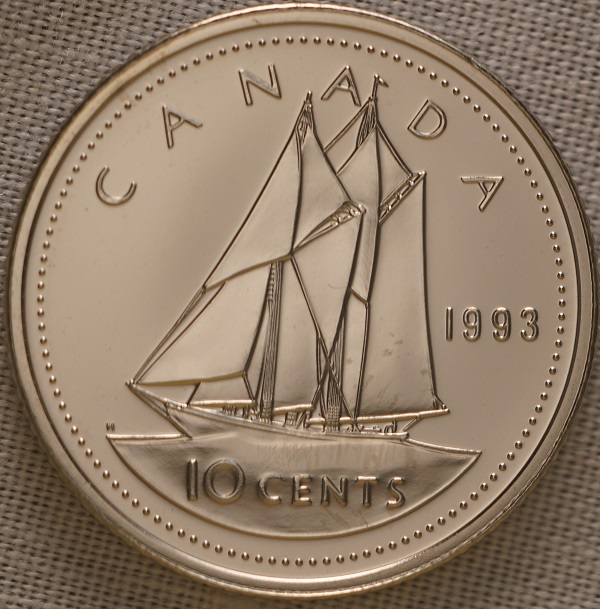 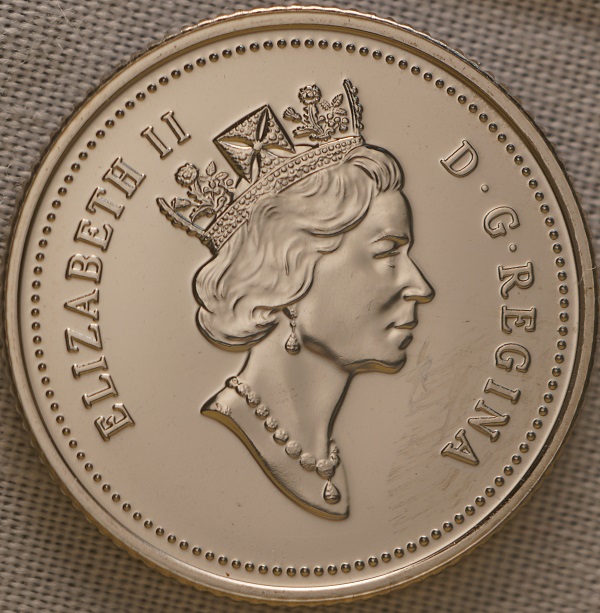 |
|
Page 2 of 2
|
Replies: 21 / Views: 6,145 |
Page 2 of 2
|







 First Page

 Posted 06/06/2016 9:10 pm


