| Author |
 Replies: 195 / Views: 19,437 Replies: 195 / Views: 19,437 |
|
|
|
Pillar of the Community
United States
1476 Posts |
Congratulations!  Images are looking good too!  I'm still playing with lighting as well. Got a new Exacto Knife set, different colored foam, felt, construction paper, tape, glue, (yummy).  I feel like a kindergartener again! Well, except for the Exacto knife.  Now to find more time to make some stuff. Although I am trying to learn more about light reflection and refraction first. I guess I could just start nibbling on the paste.  |
|
Pillar of the Community
 United States
4051 Posts |
mcshilling and Dar (and others reading this)...you should invest in a sheet of Canson Opalux art paper. That is my favorite diffuser material. It is what I have been using in the Jansjos I modify to do a first level diffusion. It is superb material for this purpose. Of course the exacto knife set, glue, etc are mandatory as well. A circle template is also valuable...
Contact me for photographic equipment or visit my home page at: http://macrocoins.com |
|
Pillar of the Community
 Canada
9774 Posts |
Looked up 'director smile' on Google, didn't get too far. One thread out of 3 pages was about a copy stand so I think I have the general idea of what it is.
Got to get my lighting good enough to take pics like 'rmc' , but will settle for 90% as good.
|
|
Pillar of the Community
United States
4051 Posts |
Google won't do you much good. Just search on CCF and you'll find all the relevant hits. I don't think I've published anywhere but here about these.
Contact me for photographic equipment or visit my home page at: http://macrocoins.com |
|
Pillar of the Community
United States
1476 Posts |
|
|
Pillar of the Community
United States
4051 Posts |
Yes but that is too expensive. One sheet should be $5 or less.
Contact me for photographic equipment or visit my home page at: http://macrocoins.com |
|
Pillar of the Community
Canada
9774 Posts |
Is that the stuff you are using on the smiles?
I did find your threads on it and the one Captain has is the one I found on Google.
|
|
Pillar of the Community
United States
4051 Posts |
I use Opalux for all my diffusers. Here's a single sheet (14" x 24") for US$3.34 but shipping might be expensive: http://www.amazon.com/Canson-Opalux...anson+opaluxThe 'Cap sent me a setup he 3D printed but I have not yet evaluated. I am also looking at a simple version. Opalux is key. Contact me for photographic equipment or visit my home page at: http://macrocoins.com |
|
Valued Member
United States
430 Posts |
You mean better than my sliced up ping pong balls  |
|
Pillar of the Community
United States
4051 Posts |
That's different! Ping Pong balls work great for the shorter working distance objectives. It's tough to get illumination in with those, and PPB do the job well.
Contact me for photographic equipment or visit my home page at: http://macrocoins.com |
|
Pillar of the Community
United States
1476 Posts |
I went ahead and ordered 10 sheets. It is more then I will ever need most likely. After I receive it, (around June 22), I will see if there is a good way to cheaply, package and ship it incase anyone else would like some. Let me find out the details. I hope I am not breaking any rules here. Just trying to be Helpful.  |
|
Pillar of the Community
Canada
9774 Posts |
Too bad I didn't get here sooner, I just order a sheet for $3.75 Can. from a local store. I had to do a lot of calling.
|
|
Pillar of the Community
Canada
9774 Posts |
Latest try 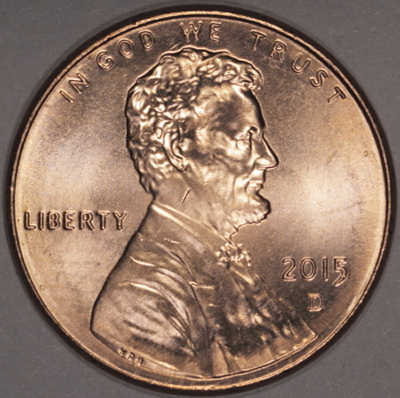 Why are my pics so small, it's 201kb Edited by mcshilling
06/10/2015 3:41 pm
|
|
Pillar of the Community
Canada
9774 Posts |
When you do your resize with DPP do you use the 'convert and save' if so how?
I think that's what is giving me the smaller pics.
|
|
Pillar of the Community
United States
4051 Posts |
Well-balanced shot. You can determine what areas are under-exposed or over-exposed, and in what channel, using the sliders in DPP. There are two numbers below the histogram. Bottom left one says "0", while bottom right says "255". Make the bottom left say 247, and you will see all the over-exposed pixels. The color of the pixel will tell you which channel is over-exposed. Do the same for lower right, ie change from 255 to 8 and you'll see which pixels are under-exposed. You can also slide the vertical bars around to see what shows up at what tone level. When you do this, you'll see no pixels that are under-exposed, but quite a few that are over-exposed, especially in Red channel. Doing what I say above, you'll see these: Lower Left set to 40, showing the darkest shadows around devices  Lower Right set to 247, showing the brightest highlights  Most important thing about this shot is that your lights are at a good angle. All the devices on the coin are surrounded by shadows, and bright on their surfaces. |
| |
Replies: 195 / Views: 19,437 |







 First Page
 Previous Page


 Posted 06/09/2015 4:12 pm


