Coin Community Family of Web Sites Join Thousands of Coin, Bullion, & Money Collectors
Coin, Banknote and Medal Collectors's Online Mall Vancouvers #1 Coin and Paper Money Dealer Royal Estate Auctions - $1 Coin AuctionsRoyal Canadian Mint products, Canadian, Polish, American, and world coins and banknotes. Specializing in Modern Numismatics Join Thousands of Coin, Bullion, & Money Collectors 300,000 items to help build your collection!


Username:
Password:
Save Password
Forgot your Password?


This page may contain links that result in small commissions to keep this free site up and running.

Welcome Guest! Registering and/or logging in will remove the anchor (bottom) ads. It's Free!

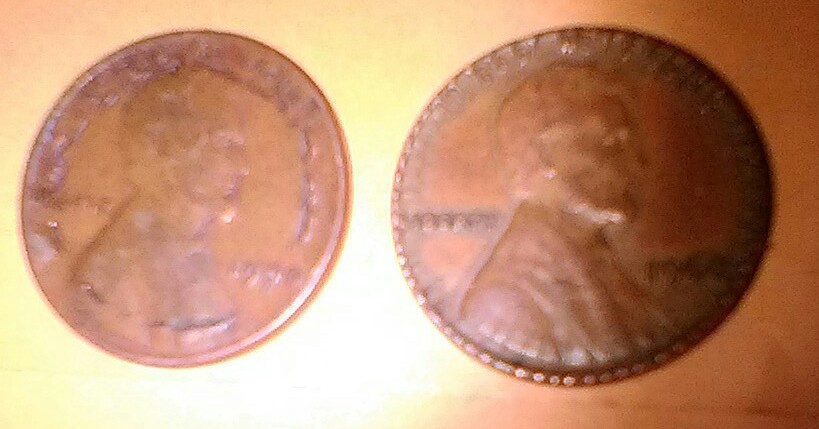
I Have Two Error Coin Pennies...

To participate in the forum you must log in or register.
Author Previous TopicReplies: 13 / Views: 1,213Next Topic  
New Member

United States
46 Posts
 Posted 11/20/2016  3:17 pm Show Profile   Bookmark this topic Add Roger Chappell to your friends list Get a Link to this Message Number of Subscribers
The first penny is a 1960, it has what looks like reeding on the front and back,but not on the sides. Also there are stress cracks going towards the center. My second coin is a 1940 Wheat penny. It has deep gauges on the front and back in a circular pattern. Also, on LIBERTY it has LI(EoverB) gauge ERTY

*** Moved by Staff to a more appropriate forum. ***
Moderator
Learn More...
John1's Avatar
United States
56855 Posts
 Posted 11/20/2016  3:29 pm  Show Profile   Bookmark this reply Add John1 to your friends list Get a Link to this Reply
to CCF. We are going to need photos.
John1
New Member
United States
46 Posts
 Posted 11/20/2016  4:40 pm  Show Profile   Bookmark this reply Add Roger Chappell to your friends list Get a Link to this Reply
Where or how do I send the photos?
Moderator
Learn More...
John1's Avatar
United States
56855 Posts
 Posted 11/20/2016  4:49 pm  Show Profile   Bookmark this reply Add John1 to your friends list Get a Link to this Reply
Click on tutorials for help.
John 1
New Member
United States
46 Posts
 Posted 11/20/2016  4:59 pm  Show Profile   Bookmark this reply Add Roger Chappell to your friends list Get a Link to this Reply
I went there and did that, I'll try again.
New Member
United States
46 Posts
 Posted 11/20/2016  5:55 pm  Show Profile   Bookmark this reply Add Roger Chappell to your friends list Get a Link to this Reply
I downloaded my photo, hit the optimizer, tried to move the graph to fit my photo,hit download photo. Nothing happened.
Pillar of the Community
Rackster's Avatar
United States
4809 Posts
 Posted 11/20/2016  7:10 pm  Show Profile   Bookmark this reply Add Rackster to your friends list Get a Link to this Reply
Hi Roger.

It can be a little tricky at first but you'll get the hang of it quickly. Once you have it you'll be posting pics steadily.
New Member
United States
46 Posts
 Posted 11/20/2016  7:52 pm  Show Profile   Bookmark this reply Add Roger Chappell to your friends list Get a Link to this Reply
Okay, I used the optimizer,it optimized my photo, I downloaded it.To make sure I downloaded my photo again, it asked if I wanted to replace this file? I said yes. Now, how do I get the download image to my forum posts. That's where I having problems. When I said upload to my post, it's going back to the original photo and it's saying it's to large to upload on my post. I using a cell phone. Could that be the problem?
New Member
United States
46 Posts
 Posted 11/20/2016  8:20 pm  Show Profile   Bookmark this reply Add Roger Chappell to your friends list Get a Link to this Reply
I uploaded my images twice, it said that it was successful, but I don't see it on my post.
New Member
United States
28 Posts
 Posted 11/20/2016  8:28 pm  Show Profile   Bookmark this reply Add megs61 to your friends list Get a Link to this Reply
I'm new here too and it was tricky to post at first. Once you ate successful at adding you pictures close the window and you should see your post. Scroll to the bottom and you will see options to preview and post. Hope this helps
New Member
United States
46 Posts
 Posted 11/20/2016  11:23 pm  Show Profile   Bookmark this reply Add Roger Chappell to your friends list Get a Link to this Reply


I-Have-Two-Error-Coin-Pennies...
Bedrock of the Community
biokemist6's Avatar
United States
12437 Posts
 Posted 11/21/2016  12:42 pm  Show Profile   Bookmark this reply Add biokemist6 to your friends list Get a Link to this Reply
Both coins have been damaged.
Pillar of the Community
Dustin6's Avatar
United States
3516 Posts
 Posted 11/21/2016  1:01 pm  Show Profile   Bookmark this reply Add Dustin6 to your friends list Get a Link to this Reply
to CCF!! with bio. Both coins are damaged
Bedrock of the Community
Coinfrog's Avatar
United States
94367 Posts
 Posted 11/21/2016  5:12 pm  Show Profile   Bookmark this reply Add Coinfrog to your friends list Get a Link to this Reply
The optimizer also lets you sharpen your focus, just play around with it.


to the CCF!


  Previous TopicReplies: 13 / Views: 1,213Next Topic  

To participate in the forum you must log in or register.


Disclaimer: While a tremendous amount of effort goes into ensuring the accuracy of the information contained in this site, Coin Community assumes no liability for errors. Copyright 2005 - 2026 Coin Community Family- all rights reserved worldwide. Use of any images or content on this website without prior written permission of Coin Community or the original lender is strictly prohibited.
Contact Us  |  Advertise Here  |  Privacy Policy / Terms of Use

Coin Community Forum © 2005 - 2026 Coin Community Forums
It took 0.31 seconds to rattle this change. Forums