Coin Community Family of Web Sites Join Thousands of Coin, Bullion, & Money Collectors
Royal Canadian Mint products, Canadian, Polish, American, and world coins and banknotes. Royal Estate Auctions - $1 Coin AuctionsJoin Thousands of Coin, Bullion, & Money Collectors Vancouvers #1 Coin and Paper Money Dealer Coin, Banknote and Medal Collectors's Online Mall 300,000 items to help build your collection! Specializing in Modern Numismatics


Username:
Password:
Save Password
Forgot your Password?


This page may contain links that result in small commissions to keep this free site up and running.

Welcome Guest! Registering and/or logging in will remove the anchor (bottom) ads. It's Free!

Need Help With Image Optimizer On Iphone

To participate in the forum you must log in or register.
Author Previous TopicReplies: 12 / Views: 3,084Next Topic  
Valued Member

United States
50 Posts
 Posted 07/27/2017  2:23 pm Show Profile   Bookmark this topic Add 120grain to your friends list Get a Link to this Message Number of Subscribers
Got my panama pacific coin today, the optimizer still will not let me save changes to the picture very frustrating. Maybe I could email pics to someone to post for me. The interface to add pictures just doesn't make any sense, I want to be involved in this community but I can't share pictures .
Moderator
Learn More...
jbuck's Avatar
United States
189767 Posts
 Posted 07/27/2017  3:51 pm  Show Profile   Bookmark this reply Add jbuck to your friends list Get a Link to this Reply

Quote:
the optimizer still will not let me save changes to the picture very frustrating.
What browser are you using?
Valued Member
United States
50 Posts
 Posted 07/27/2017  4:19 pm  Show Profile   Bookmark this reply Add 120grain to your friends list Get a Link to this Reply
Hey buck,
I am just using my phone. It lets me move the settings so the picture are under 300kb but no way to save the change.
Moderator
Learn More...
jbuck's Avatar
United States
189767 Posts
 Posted 07/27/2017  4:55 pm  Show Profile   Bookmark this reply Add jbuck to your friends list Get a Link to this Reply
When you save, it should download the modified picture. It could be that your phone is blocking the download. I have not tried from a phone, so I am not 100% sure how it will behave.
Valued Member
United States
50 Posts
 Posted 07/27/2017  5:18 pm  Show Profile   Bookmark this reply Add 120grain to your friends list Get a Link to this Reply
Unfortunately there is not a save button.
Moderator
Learn More...
jbuck's Avatar
United States
189767 Posts
 Posted 07/27/2017  5:23 pm  Show Profile   Bookmark this reply Add jbuck to your friends list Get a Link to this Reply
To the right, just above the image, just below the adjustments, there is a button "Save Image(s)"
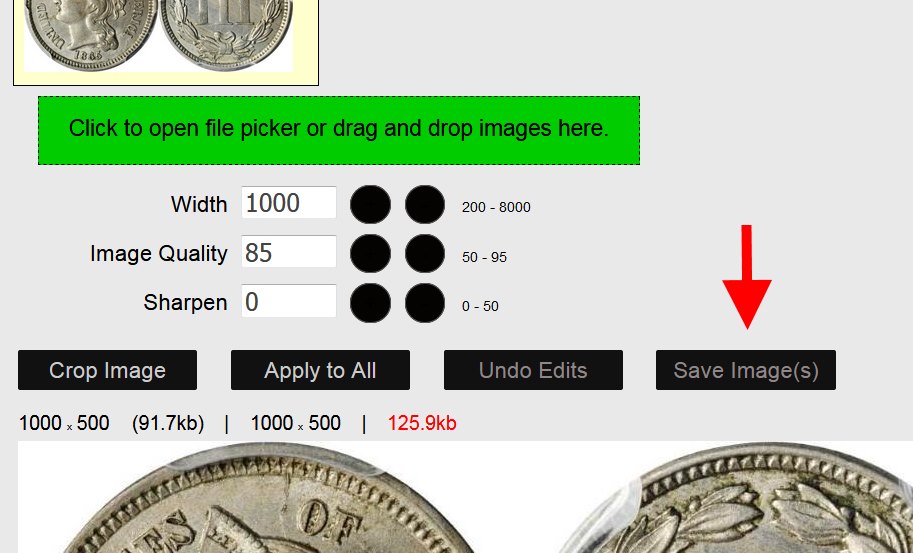
Need-Help-With-Image-Optimizer-On-Iphone
Valued Member
United States
50 Posts
 Posted 07/27/2017  5:43 pm  Show Profile   Bookmark this reply Add 120grain to your friends list Get a Link to this Reply
Jbuck,
Where your arrow is pointing my screen only has crop image, undo edits, and apply to all. Thanks for helping me try to figure it out
Moderator
Learn More...
jbuck's Avatar
United States
189767 Posts
 Posted 07/28/2017  11:56 am  Show Profile   Bookmark this reply Add jbuck to your friends list Get a Link to this Reply

Quote:
Where your arrow is pointing my screen only has crop image, undo edits, and apply to all. Thanks for helping me try to figure it out
What phone are you using? It shows and works fine on my Android, although the buttons are 2x2 instead of 4x1 becuase of the screen width. Maybe your is off the edge. Can you scroll from the right?


Quote:
anyways here is my latest coin
Looks great!
Valued Member
United States
50 Posts
 Posted 07/28/2017  2:58 pm  Show Profile   Bookmark this reply Add 120grain to your friends list Get a Link to this Reply
iPhone 6
Moderator
Learn More...
jbuck's Avatar
United States
189767 Posts
 Posted 07/28/2017  4:17 pm  Show Profile   Bookmark this reply Add jbuck to your friends list Get a Link to this Reply
I am going to split this part of the topic into its own. Maybe some iOS users can chime in.
Moderator
Learn More...
jbuck's Avatar
United States
189767 Posts
 Posted 07/31/2017  3:47 pm  Show Profile   Bookmark this reply Add jbuck to your friends list Get a Link to this Reply
I just realized my post above was made before the split, so the topic may have fell below the radar.
Valued Member
SomethingIsFishy's Avatar
United States
303 Posts
 Posted 10/14/2017  10:18 pm  Show Profile   Bookmark this reply Add SomethingIsFishy to your friends list Get a Link to this Reply
I have a 5c. I don't have a save button either. But if I hold a finger (or thumb) on the resized photo, I get a pop up menu with a save photo option. Hope this helps.
Valued Member
SomethingIsFishy's Avatar
United States
303 Posts
 Posted 10/14/2017  10:28 pm  Show Profile   Bookmark this reply Add SomethingIsFishy to your friends list Get a Link to this Reply
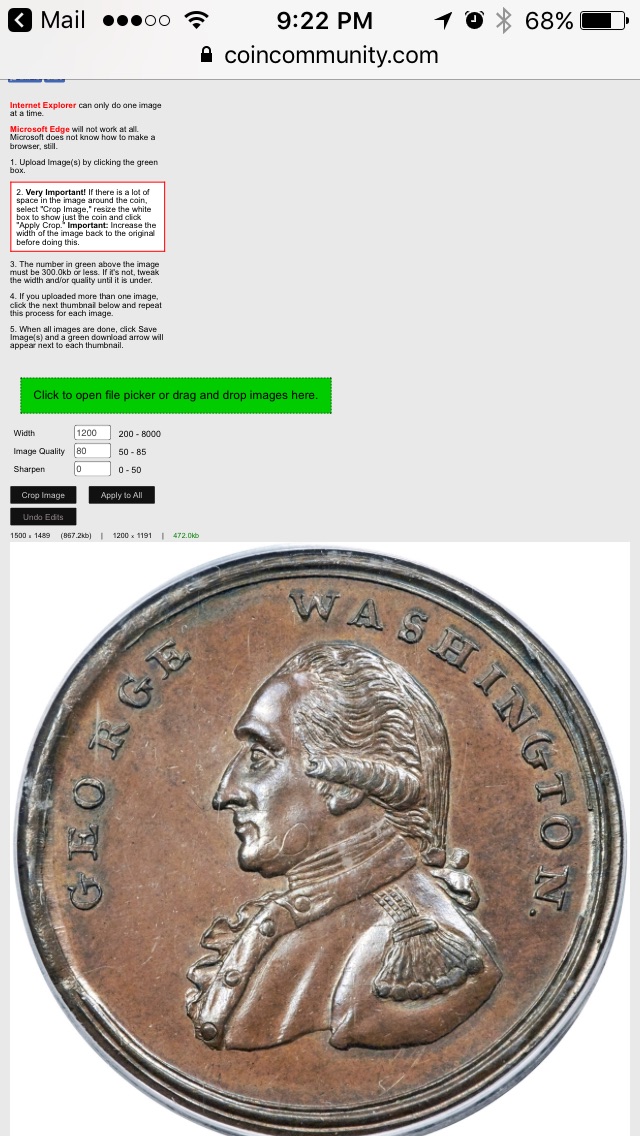
Here's the optimizer on my iPhone:


Need-Help-With-Image-Optimizer-On-Iphone

And if I hold my finger in the middle of the resized pic for a second or so I get this:
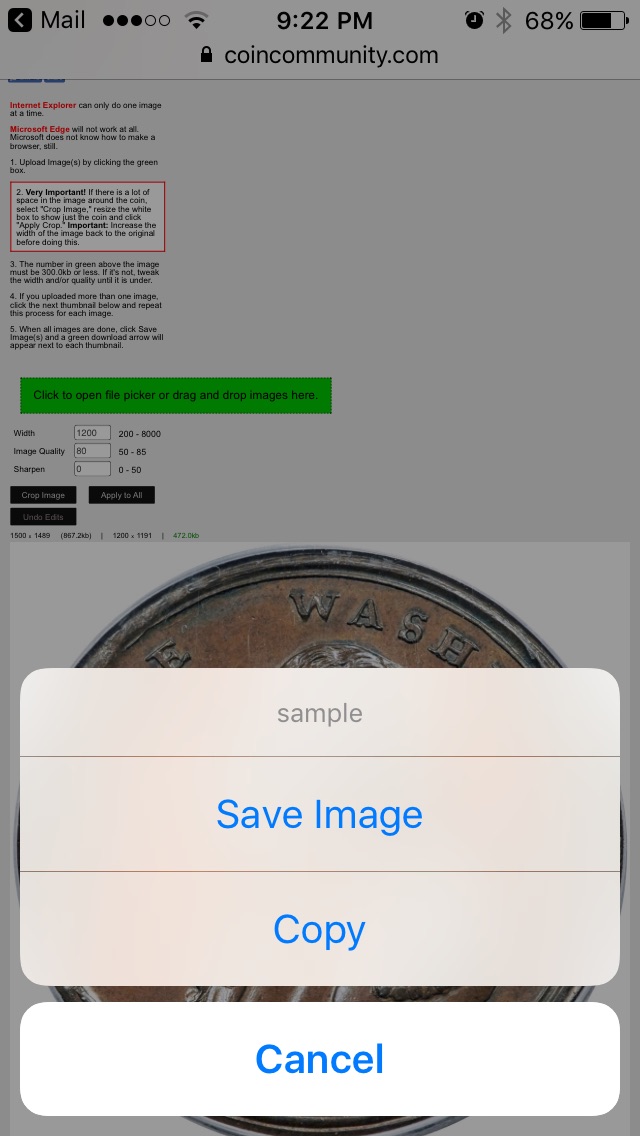

Need-Help-With-Image-Optimizer-On-Iphone
  Previous TopicReplies: 12 / Views: 3,084Next Topic  

To participate in the forum you must log in or register.


Disclaimer: While a tremendous amount of effort goes into ensuring the accuracy of the information contained in this site, Coin Community assumes no liability for errors. Copyright 2005 - 2026 Coin Community Family- all rights reserved worldwide. Use of any images or content on this website without prior written permission of Coin Community or the original lender is strictly prohibited.
Contact Us  |  Advertise Here  |  Privacy Policy / Terms of Use

Coin Community Forum © 2005 - 2026 Coin Community Forums
It took 0.46 seconds to rattle this change. Forums