|
This page may contain links that result in small commissions to keep this free site up and running.

Welcome Guest! Registering and/or logging in will remove the anchor (bottom) ads and the security checks. It's Free!
To participate in the forum you must log in or register. | Author |
 Replies: 6 / Views: 1,395 Replies: 6 / Views: 1,395 |
|
|
Bedrock of the Community
United States
12477 Posts |
I've been using an Android LG G3 for taking pics since I joined and it completely crapped out last Saturday night. I had over 1400 pics on there (mostly coins  ). I finally managed to transfer all of them via USB to my MacBook Pro. I bought a brand new LG G6 but it will not connect via USB to the MBP so I decided to use Bluetooth (the only option at the moment, I believe) to transfer them to my new phone. Now I am seeing a major reduction in resolution in the images after being transferred. Here's an example. This was a perfectly clear screenshot taken on my G3. Now it is unreadable on the G6: 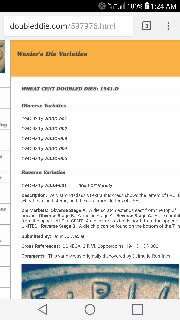 Why is this happening and what do you suggest? Why is this happening and what do you suggest?I also need a new MicroSD (old one is corrupted). If I transferred from the MBP directly to MicroSD, would quality be retained? Thanks! In Memory of Crazyb0 12-26-1951 to 7-27-2020
In Memory of Tootallious 3-31-1964 to 4-15-2020
In Memory of T-BOP 10-12-1949 to 1-19-2024
|
|
|
|
Pillar of the Community
 United States
4623 Posts |
If you display them on the computer are they still OK?
The LG G3's screen is 1440 x 2560 pixels but the G6 is 1440 x 2880 pixels - there is probably some weird adjustment going on to display the image without major cropping or black bars (like when you play a 4:3 movie on a 16:9 screen).
There may be a setting on the program you are using to display the photographs that would cause it to display as is vs. stretching to fit.
-----Burton 50+ year / Life / Emeritus ANA member (joined 12/1/1973) Life member: Numismatics International, CONECA Member: TNA, FtWCC, NETCC, EveryCountry (online) coin club Owned by three cats and a wife of 40+ years (joined 1983) Author: 3rd Edition of the Sample Slabs book, https://www.sampleslabs.info/ |
|
Moderator
 United States
196572 Posts |
I suspect the Bluetooth transfer did some sort of nasty data reduction to the files. How do the file sizes compare between the old phone, the Mac, and the new phone?
|
|
Bedrock of the Community
 United States
12477 Posts |
Okay, so after going through many of them on my new phone, I realized that all of the reduced quality images are in the 10-50kb range when they were most likely 10x that originally and have generic nonsense numerical filenames (not starting "2017-7-24..." for instance). I haven't checked the sizes listed on the MBP but watching the transfer on that end, all the sizes seemed to be what I'm accustomed to, e.g. 200-500kb or larger. Also of note, it transferred duplicates and triplicates of images. With some, there is the original, a copy of the original with "-1" added to the filename and one or two reduced resolution versions! Somehow, completely new files with completely different filenames were created during BT transfer. What a mess!  So, some images I have multiples of, some only in reduced quality and maybe some not at all. I have a new MicroSD on the way so, I'll try a hardline transfer to that (and all the documents I haven't tried yet) and see how it turns out. This is an old MBP (2007?) so it made me wonder if BT version is at play somewhere and also USB version in not being able to connect the G6 even with LG's current Mac software.  I guess I could try a Wi-Fi connection but, it took me a while to figure it out last time and I don't remember what I did.  In Memory of Crazyb0 12-26-1951 to 7-27-2020
In Memory of Tootallious 3-31-1964 to 4-15-2020
In Memory of T-BOP 10-12-1949 to 1-19-2024
Edited by spru
08/18/2017 01:06 am
|
|
Moderator
United States
196572 Posts |
The smaller duplicates of larger files might be thumbnail images. If you are looking for ideas, I will tell you what I do... All of my photos are automatically uploaded to Google Photos for an immediate backup. However, in order to get their unlimited storage (default is like 15 GB), I have allowed them to apply data reduction to the photos (shrink the file size). I cannot see the difference even when I got a new phone (which synced to Google for everything I had backed up, not just photos; I did not have to manually copy anything between the two phones). For posterity and the fact that I love redundancies for my redundancies, I always copy the original photos to my computer when I get the chance (I used to do USB, but I actually use an FTP program now because I am too lazy to connect a cable). On the big display, I have compared the originals to the ones stored in Google Photos. I cannot see any difference, even though the Google files are 50~75% of the original size. If this sounds like a sales pitch for Google Photos, it is. If not for it, I would have lost all of my vacation photos last year when the SD card suddenly died.  |
|
Bedrock of the Community
United States
12477 Posts |
I got my new MicroSD today (in basically one day through Amazon  ). I checked all the files on the MBP and they are exactly what was transferred to the new phone. So, the weird stuff happened during the USB transfer from the G3 to the MBP. Unfortunately, I have already factory reset the G3. Quote:
The smaller duplicates of larger files might be thumbnail images. I hadn't thought of that and you may be right. The .gifs I had also had duplicate .jpg versions so, thumbnail makes sense. I separated all the "degraded" pics into a separate folder on the Mac and put everything else on the new MicroSD. I ended up with 748 out of a little over 1400 original photos in original size. The "degraded" folder has 1101 images in it. I take that to mean around 450 were duplicates and I essentially lost 650 photos. Some of the low-res pics are not too bad and I may keep those but, some are horrible. The good thing: the vast majority of the "lost" photos have been uploaded to CCF! It turns out I actually do have a backup of sorts if I wanted to download all of them.  If not, it's not a major loss. My next concern will be trying to figure out how to take photos on the G6 that are as good as the G3. It can't focus as close as the G3 so it really reduces the quality when you zoom in on a pic. Eventually, I'm gonna have to get a real camera to take coin pics. In Memory of Crazyb0 12-26-1951 to 7-27-2020
In Memory of Tootallious 3-31-1964 to 4-15-2020
In Memory of T-BOP 10-12-1949 to 1-19-2024
Edited by spru
08/18/2017 11:17 pm
|
|
Moderator
United States
196572 Posts |
Quote:
The good thing: the vast majority of the "lost" photos have been uploaded to CCF! It turns out I actually do have a backup of sorts if I wanted to download all of them. If not, it's not a major loss. Excellent!  |
| |
Replies: 6 / Views: 1,395 |
|
To participate in the forum you must log in or register.
Disclaimer: While a tremendous amount of effort goes into ensuring the accuracy of the information contained in this site, Coin Community assumes no liability for errors. Copyright 2005 - 2026 Coin Community Family- all rights reserved worldwide. Use of any images or content on this website without prior written permission of Coin Community or the original lender is strictly prohibited.
Contact Us | Advertise Here | Privacy Policy / Terms of Use
|
| Coin Community Forum |
© 2005 - 2026 Coin Community Forums |
| It took 0.41 seconds to rattle this change. |
 |
|
| |
| |







 Posted 08/17/2017 10:43 am


