Coin Community Family of Web Sites Join Thousands of Coin, Bullion, & Money Collectors
Specializing in Modern Numismatics Royal Canadian Mint products, Canadian, Polish, American, and world coins and banknotes. Vancouvers #1 Coin and Paper Money Dealer Royal Estate Auctions - $1 Coin Auctions300,000 items to help build your collection! Join Thousands of Coin, Bullion, & Money Collectors Coin, Banknote and Medal Collectors's Online Mall


Username:
Password:
Save Password
Forgot your Password?


This page may contain links that result in small commissions to keep this free site up and running.

Welcome Guest! Registering and/or logging in will remove the anchor (bottom) ads. It's Free!

Is There A Program For Quickly Cropping + Rotating Large Groups Of Images?

To participate in the forum you must log in or register.
Author Previous TopicReplies: 5 / Views: 2,456Next Topic  
Valued Member
Johnathan55's Avatar
United States
128 Posts
 Posted 06/19/2018  8:02 pm Show Profile   Bookmark this topic Add Johnathan55 to your friends list Get a Link to this Message Number of Subscribers
I've been trying to find a bulk image editing program that will let me quickly edit, crop, rotate, etc large groups of images with as little clicking and dragging as possible.

I have a camera that takes decent pictures of coins, but for some reason if I try to fill the entire viewscreen of the camera with the coin, the edges always come out blurry. So I have to zoom out and take the picture, which means I have to crop and rotate every picture of every coin I take. Really frustrating and time consuming.

I'm currently using Paint dot net, which is a great free program, but I was hoping to find something quicker. Any advice?

Thank you!
Edited by Johnathan55
06/19/2018 8:11 pm
Moderator
Learn More...
Fuzzy317's Avatar
United States
14463 Posts
 Posted 06/19/2018  8:14 pm  Show Profile   Bookmark this reply Add Fuzzy317 to your friends list Get a Link to this Reply
I have never needed one for a bulk set of pictures. For single images, I have used either Paint, the CCF Free Image Optimizer, Picasa 3, or phone app Avairy. I have only tried these for one at a time. You may see if they have a bulk setting.
Bedrock of the Community
United States
10284 Posts
 Posted 06/19/2018  10:59 pm  Show Profile   Bookmark this reply Add TNG to your friends list Get a Link to this Reply
In photoscape ( free ) you can use a batch editor, I use it often. You can make them all the same size while you are at it. I have been using it for many years now. http://www.photoscape.org/ps/main/download.php
I am currently using version 3.7
Edited by TNG
06/19/2018 11:01 pm
Moderator
Learn More...
jbuck's Avatar
United States
189340 Posts
 Posted 06/20/2018  09:54 am  Show Profile   Bookmark this reply Add jbuck to your friends list Get a Link to this Reply
I do not know that I would trust a batch job for cropping. Rotating yes, but I think cropping needs more finesse.

I also use paint.net for my photos. I think the time is worth it to know I have the images the way I want them.

This is not to say my way is the only way, but it works for me.
Bedrock of the Community
United States
10284 Posts
 Posted 06/20/2018  10:24 am  Show Profile   Bookmark this reply Add TNG to your friends list Get a Link to this Reply
I do have to crop my images first individually in photoscape but can save them all in a folder, drop and drag as many as I like, hundreds at a time if I want, resize them all to 500 wide for example and the width will take care of itself unless I specify what I want that to be. Since I often crop coins 1x1, they stay square at any size.
My postcard shaped images are usually 600 wide and the height adjusts proportionately.

The program I really liked long ago was adobe Photodeluxe which was amazing but I think it has changed and cost money now.
Edited by TNG
06/20/2018 10:25 am
Valued Member
ngs428's Avatar
United States
359 Posts
 Posted 06/20/2018  8:52 pm  Show Profile   Bookmark this reply Add ngs428 to your friends list Get a Link to this Reply
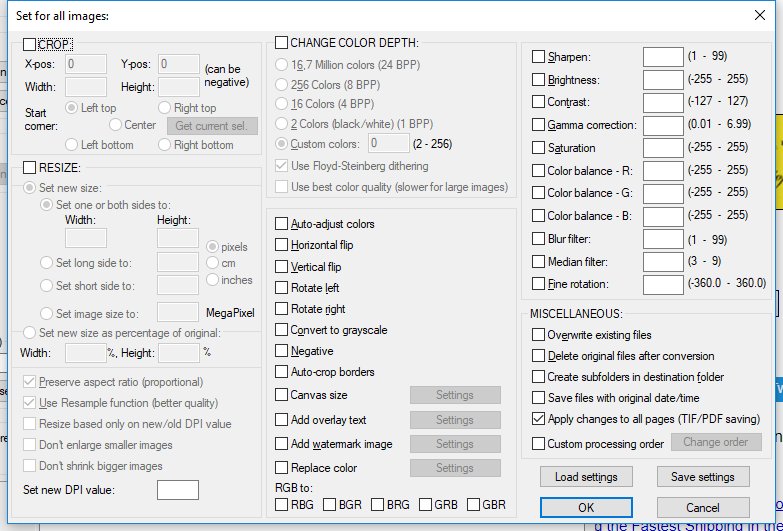
You could look at Irfanview, it has a bulk option. I don't know that cropping is part of that.

https://www.irfanview.com/

EDIT: Irfanview can bulk crop and rotate and more. Here is a screenshot of the bulk otions. It also has a bulk renaming feature.

Is-There-A-Program-For-Quickly-Cropping-+-Rotating-Large-Groups-Of-Images?
Edited by ngs428
06/20/2018 9:17 pm
  Previous TopicReplies: 5 / Views: 2,456Next Topic  

To participate in the forum you must log in or register.


Disclaimer: While a tremendous amount of effort goes into ensuring the accuracy of the information contained in this site, Coin Community assumes no liability for errors. Copyright 2005 - 2026 Coin Community Family- all rights reserved worldwide. Use of any images or content on this website without prior written permission of Coin Community or the original lender is strictly prohibited.
Contact Us  |  Advertise Here  |  Privacy Policy / Terms of Use

Coin Community Forum © 2005 - 2026 Coin Community Forums
It took 0.24 seconds to rattle this change. Forums