Coin Community Family of Web Sites Join Thousands of Coin, Bullion, & Money Collectors
Vancouvers #1 Coin and Paper Money Dealer 300,000 items to help build your collection! Royal Estate Auctions - $1 Coin AuctionsSpecializing in Modern Numismatics Coin, Banknote and Medal Collectors's Online Mall Join Thousands of Coin, Bullion, & Money Collectors Royal Canadian Mint products, Canadian, Polish, American, and world coins and banknotes.


Username:
Password:
Save Password
Forgot your Password?


This page may contain links that result in small commissions to keep this free site up and running.

Welcome Guest! Registering and/or logging in will remove the anchor (bottom) ads. It's Free!

Have I Just Found My First Clipped Penny

To participate in the forum you must log in or register.
Author Previous TopicReplies: 35 / Views: 3,597Next Topic
Page: of 3
Pillar of the Community
Halo1st's Avatar
United States
2775 Posts
 Posted 03/11/2019  8:00 pm  Show Profile   Bookmark this reply Add Halo1st to your friends list Get a Link to this Reply
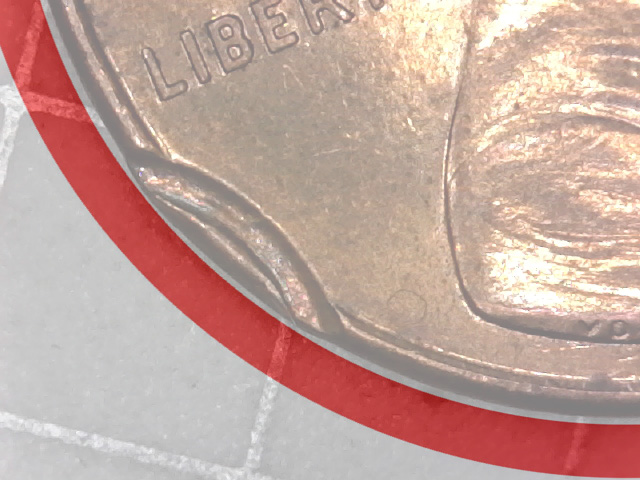
I found the original image is at a bit of an angle. Seemingly not a straight on perfect circle image to start with. Had to tweak or alter my circle to outline the part presented in image by way of an overlay. Not making reference to the indention, but the outline or image contour as a whole. Please share an easier or cleaner way. Thanks, Doug.
Have-I-Just-Found-My-First-Clipped-Penny
Edited by Halo1st
03/11/2019 8:16 pm
Bedrock of the Community
coop's Avatar
United States
62064 Posts
 Posted 03/11/2019  8:06 pm  Show Profile   Bookmark this reply Add coop to your friends list Get a Link to this Reply
I think you figured it out. But on Photoshop I placed the original image, then used the canvas feature to make a 4000 Pixel square around the image. Then I make a huge circle around the curve of the edge of the coin. (Took several times to get the right size. I changed the lower canvas color to red, the moved the circle evenly the same amount just beyond the circle line. Then slid the circle over enough make the arc that you see on my image. Then cropped the image and saw, that the area in question was not in line the edge of the coin. That is how I created the curved ark. (Something new to me)
Pillar of the Community
Halo1st's Avatar
United States
2775 Posts
 Posted 03/11/2019  8:24 pm  Show Profile   Bookmark this reply Add Halo1st to your friends list Get a Link to this Reply
I'm still learning using photoshop elements 9. I think its a stripped down version, with some basic, but not all the same functionality as the original program. Thanks, Doug.
Edited by Halo1st
03/11/2019 8:30 pm
Pillar of the Community
Chase007's Avatar
United States
7512 Posts
 Posted 03/11/2019  9:13 pm  Show Profile   Bookmark this reply Add Chase007 to your friends list Get a Link to this Reply

Quote:
When working up this image, I noticed it was not a struck through error. But it is a Post Strike Damage issue

coop, you usually do get to the bottom of things
The answer was in the Fifth and Sixth pictures.
Bedrock of the Community
coop's Avatar
United States
62064 Posts
 Posted 03/11/2019  9:25 pm  Show Profile   Bookmark this reply Add coop to your friends list Get a Link to this Reply
When I edit, I see the images more and realize what others said. Seeing it closer up, I could see the truth about this coin.
  Previous TopicReplies: 35 / Views: 3,597Next Topic
Page: of 3

To participate in the forum you must log in or register.


Disclaimer: While a tremendous amount of effort goes into ensuring the accuracy of the information contained in this site, Coin Community assumes no liability for errors. Copyright 2005 - 2026 Coin Community Family- all rights reserved worldwide. Use of any images or content on this website without prior written permission of Coin Community or the original lender is strictly prohibited.
Contact Us  |  Advertise Here  |  Privacy Policy / Terms of Use

Coin Community Forum © 2005 - 2026 Coin Community Forums
It took 0.19 seconds to rattle this change. Forums