| Author |
 Replies: 29 / Views: 3,311 Replies: 29 / Views: 3,311 |
|
|
|
Pillar of the Community
United States
3540 Posts |
....and where do I send my coins for a photography shoot? :)
NICE WORK!!
|
|
Valued Member
United States
424 Posts |
Incredible shots.  Last one really looks good. |
|
Moderator
 United States
23522 Posts |
Now, let's talk about postprocessing.  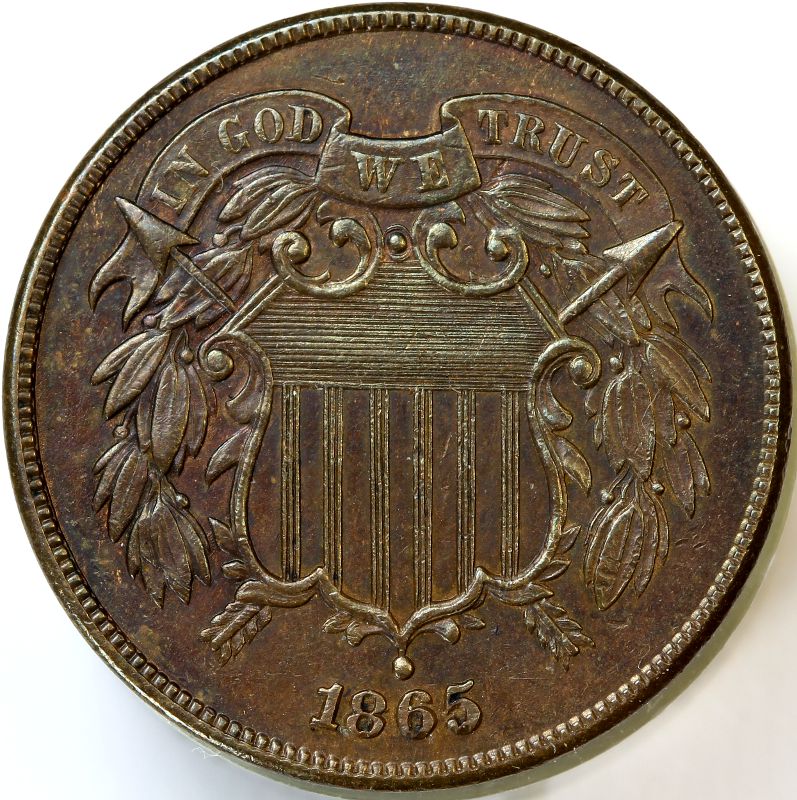 |
|
Pillar of the Community
  United States
5953 Posts |
Well you have me on that My expertise in Gimp is zero. I can crop and re-size and that's about it. I know it will do a lot more but I first need to know the correct terms for what I want to do.
|
|
Moderator
United States
23522 Posts |
I don't know if what I posted above is an improvement, not having the coin in-hand. It's your latest image (I pulled the full-size one from your site), using the Sharpen filter at 40% and 30% of Contrast, in that order. I am very surprised that I was able to add 30% Contrast; 10% is the norm and many coins start looking funny at 20%. It's a testament to the basic quality of your shots.
If you're going to do sharpness/color/contrast adjustments, always do them to the original-size image, before scaling it down. Adjustments which are borderline-objectionable at 2200px are much less so at 800px.
|
|
New Member
United States
33 Posts |
|
|
Valued Member
United States
380 Posts |
Great job, its great to see such improvement through your posts! Congrats on the glass too!
PS Nice coin!
|
|
New Member
United States
33 Posts |
SuperDave, do you mind telling us some of the steps you used in post so that we can try to emulate it?
|
|
Moderator
United States
23522 Posts |
Quote:
SuperDave, do you mind telling us some of the steps you used in post so that we can try to emulate it? I listed them exactly in my last post. Sharpen Filter at 40%, Contrast at 30%, in that order, using the Gimp. Nothing else, except resizing to post here (I scaled to 800px, saved at 80% Jpeg Quality, for a reasonable filesize from Richard's 2500px, 2.5Mb originals). Richard's basic images were that good. They needed nothing else. It's a testament (yeah, I'm gonna get a plug in) to the fundamental combination of Canon dSLR, Macro lens and most especially Zoom Browser. Competitors can definitely equal the quality, but they cannot offer it at anywhere near the same price. I very much favor the Gimp over Photoshop - "free" beats the living snot out of "pay" - and I feel the Gimp does much better with Sharpening. Mind you, I say this as someone who has thrown the money at Adobe for Photoshop. I don't use it. |
|
Pillar of the Community
United States
5953 Posts |
Look out world here I come Is it real or is it Kodak.. Well Canon anyway. The first time I have ever been able to portray Luster on a coin properly...   |
|
Pillar of the Community
United States
737 Posts |
Looking good Nohope! Beautiful shot. Upgrading my gear soon. You know what they say "Spend what you can on the body and take a loan out for the glass".  |
|
Pillar of the Community
United States
1064 Posts |
Really a nice shot Nohope, looks like 3D, so clear! Thanks for posting...
|
|
Valued Member
United States
91 Posts |
Wow!.....Look at all those steps! Great shot! Boy, you are hooked now...there will be no stopping you Alan |
|
Pillar of the Community
United States
1305 Posts |
Wonderful photos!! I really enjoy looking at these types of images. Thanks for sharing.
|
| |
Replies: 29 / Views: 3,311 |




 First Page


 Posted 04/03/2011 7:54 pm





