Coin Community Family of Web Sites Join Thousands of Coin, Bullion, & Money Collectors
Join Thousands of Coin, Bullion, & Money Collectors Specializing in Modern Numismatics Royal Estate Auctions - $1 Coin AuctionsVancouvers #1 Coin and Paper Money Dealer Coin, Banknote and Medal Collectors's Online Mall Royal Canadian Mint products, Canadian, Polish, American, and world coins and banknotes. 300,000 items to help build your collection!


Username:
Password:
Save Password
Forgot your Password?


This page may contain links that result in small commissions to keep this free site up and running.

Welcome Guest! Registering and/or logging in will remove the anchor (bottom) ads. It's Free!

1968 S Jefferson Nickel

To participate in the forum you must log in or register.
Author Previous TopicReplies: 11 / Views: 1,646Next Topic  
New Member
PSdesign's Avatar
United States
19 Posts
 Posted 11/16/2020  10:21 pm Show Profile   Bookmark this topic Add PSdesign to your friends list Get a Link to this Message Number of Subscribers
Greetings!
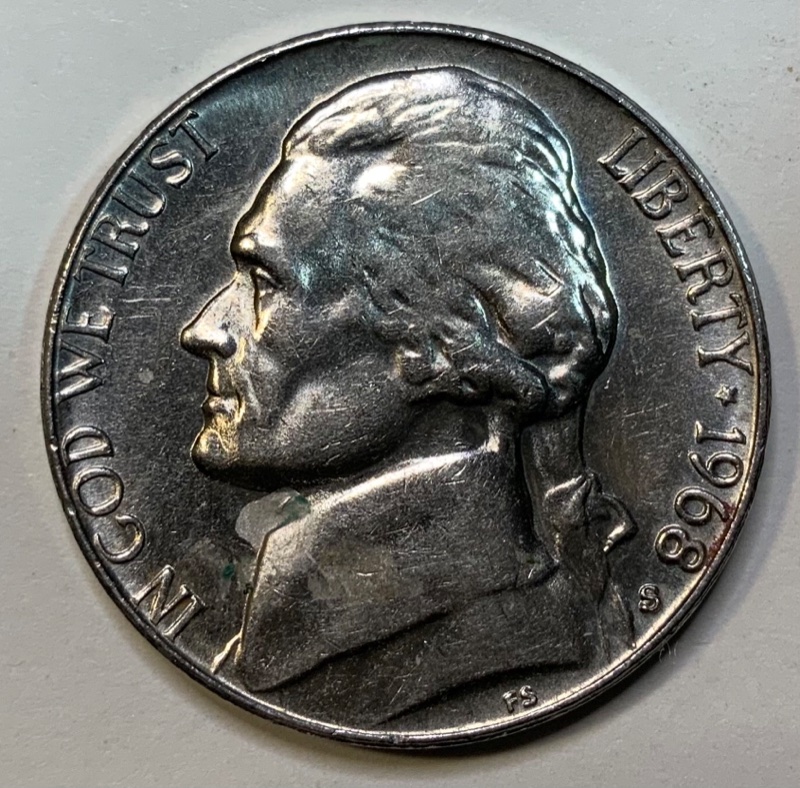
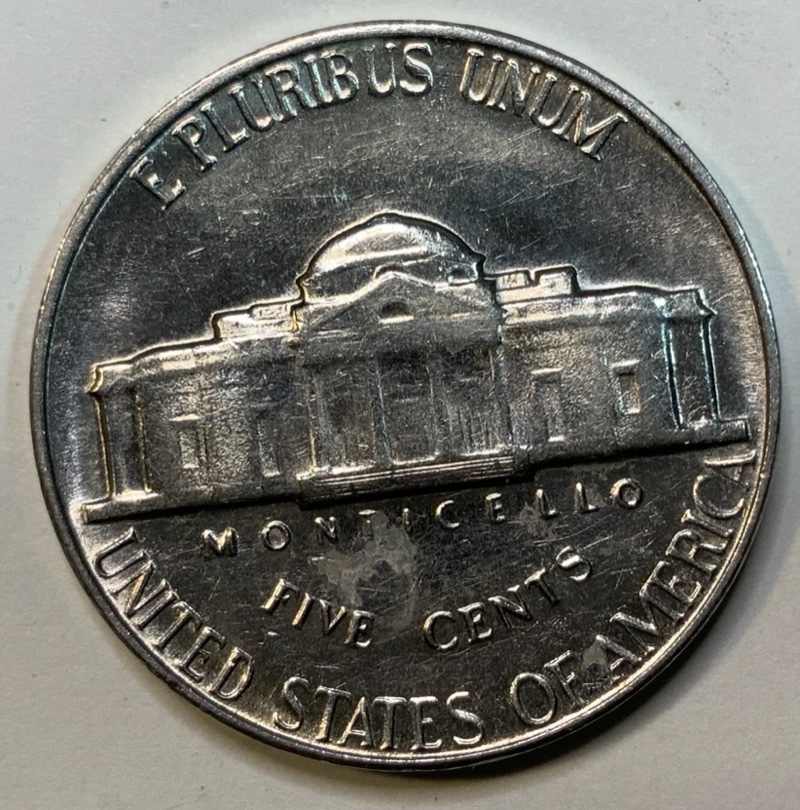
So this nickel and when I flip it over from north to south is crooked. I'm sure you know what I mean, it's off like maybe 15 or so degrees. The amount that it's off is reflected in the picture. Does this add to the value? Thanks again.
1968-S-Jefferson-Nickel
Pillar of the Community
westernsky's Avatar
United States
7620 Posts
 Posted 11/17/2020  12:55 am  Show Profile   Bookmark this reply Add westernsky to your friends list Get a Link to this Reply
Slightly rotated die error.

Not enough to warrant a premium in my opinion.

.... to the Community!

Moderator
Learn More...
Spence's Avatar
United States
34410 Posts
 Posted 11/17/2020  08:01 am  Show Profile   Bookmark this reply Add Spence to your friends list Get a Link to this Reply
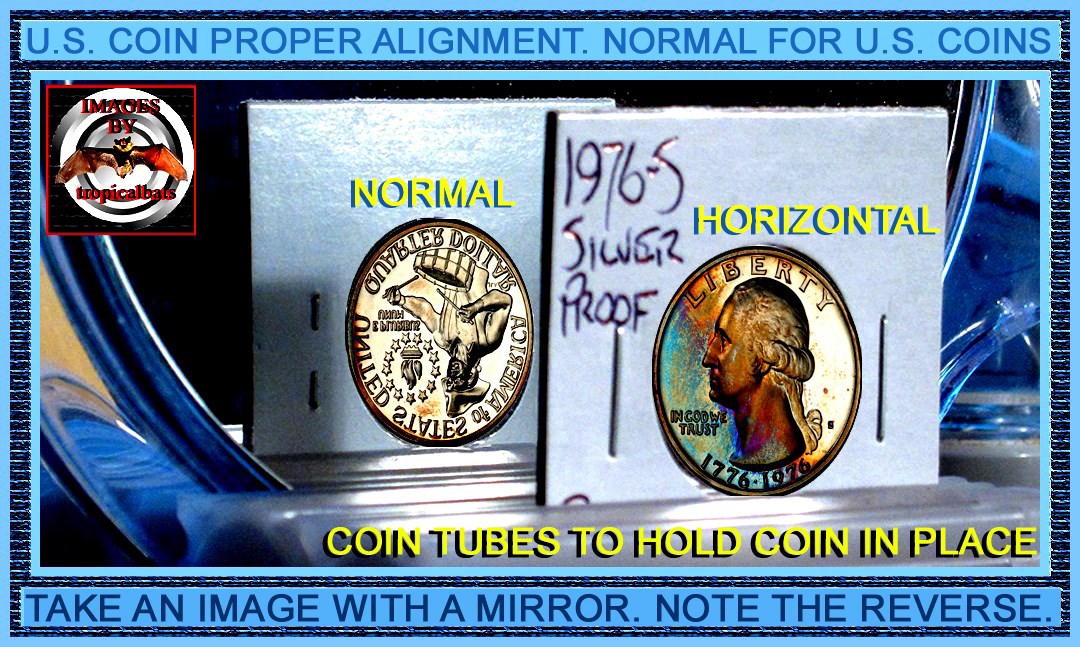
Perhaps no premium, but still a fun find. By the way, an easy way to photograph this is to position the coin in front of a mirror and then take a picture slightly obliquely, so that both the coin and its reflection are visible.
"If you climb a good tree, you get a push."
-----Ghanaian proverb

"The danger we all now face is distinguishing between what is authentic and what is performed."
-----King Adz
Bedrock of the Community
coop's Avatar
United States
62064 Posts
 Posted 11/17/2020  08:42 am  Show Profile   Bookmark this reply Add coop to your friends list Get a Link to this Reply
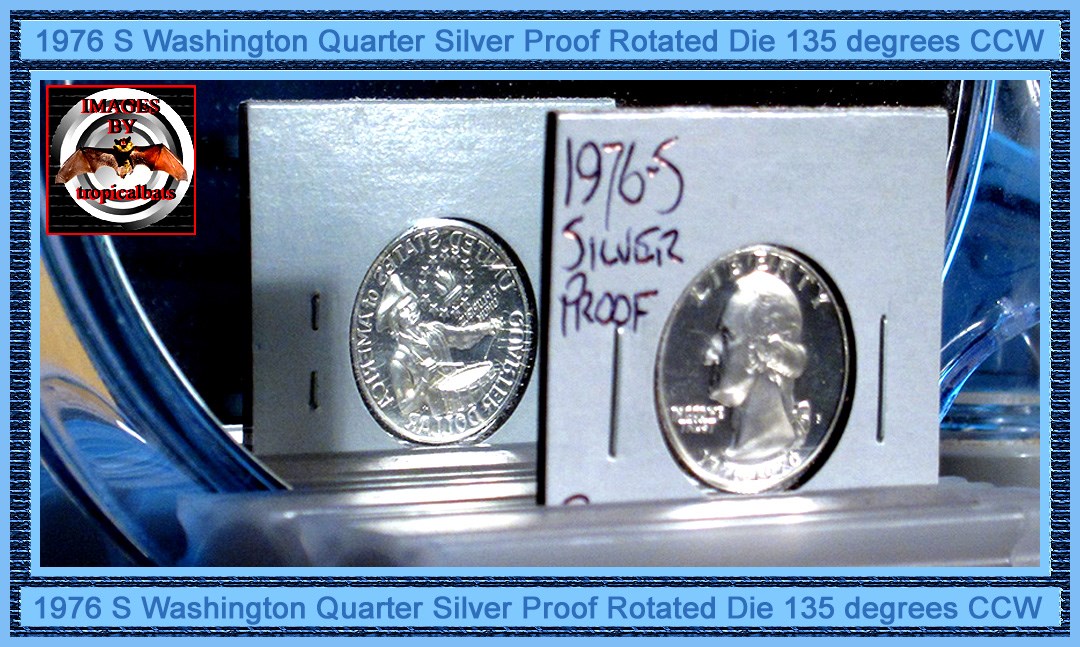
I always figure 45 degrees,+ for a rotated die error.
Bedrock of the Community
Coinfrog's Avatar
United States
94367 Posts
 Posted 11/17/2020  08:46 am  Show Profile   Bookmark this reply Add Coinfrog to your friends list Get a Link to this Reply


to the CCF!
New Member
PSdesign's Avatar
United States
19 Posts
 Posted 11/17/2020  11:21 am  Show Profile   Bookmark this reply Add PSdesign to your friends list Get a Link to this Reply
Thank you, and great idea about the mirror thing! I'm really enjoying this forum. I hope you all have a great day!
Bedrock of the Community
coop's Avatar
United States
62064 Posts
 Posted 11/17/2020  11:46 am  Show Profile   Bookmark this reply Add coop to your friends list Get a Link to this Reply
1968-S-Jefferson-Nickel
Question: How did I get images to fit into the images that someone else took and added other images from another source? I got it correct on the first try. So how did I do it on the first set of images? Think about it?
Simple: I made a duplicate image of the one I wanted to replace. Cropped to the size of the coin image I wanted to replace. Cropped another regular image of the coin exacty to the save area. Took the size image of the coins image size I wanted to replace. Took the second image and made it the same size. Slid the cropped image over the first image, and it was done. Flattened and save the edited new image with a different name.
Highlight the area between these two lines and the answer will appear. (Wanted to allow a thinking period to see if you could figure it out.
Edited by coop
11/17/2020 11:49 am
New Member
PSdesign's Avatar
United States
19 Posts
 Posted 11/17/2020  7:42 pm  Show Profile   Bookmark this reply Add PSdesign to your friends list Get a Link to this Reply
I'm a graphic designer so my first obvious guess would be photoshop.
Bedrock of the Community
coop's Avatar
United States
62064 Posts
 Posted 11/17/2020  11:02 pm  Show Profile   Bookmark this reply Add coop to your friends list Get a Link to this Reply
The answer is hidden in the snow zone between the lines.
New Member
PSdesign's Avatar
United States
19 Posts
 Posted 11/18/2020  2:08 pm  Show Profile   Bookmark this reply Add PSdesign to your friends list Get a Link to this Reply
I tried to view it but I couldn't see it. :(
Bedrock of the Community
coop's Avatar
United States
62064 Posts
 Posted 11/19/2020  11:15 am  Show Profile   Bookmark this reply Add coop to your friends list Get a Link to this Reply
Scroll over that area and highlight it.
Valued Member
United States
181 Posts
 Posted 11/20/2020  5:33 pm  Show Profile   Bookmark this reply Add Hermz to your friends list Get a Link to this Reply
Coop;
Just saying, on mobile, I had to guess on what you were trying to do as when I highlight the area, nothing appears. I had to copy and paste into google search bar after highlighting.
  Previous TopicReplies: 11 / Views: 1,646Next Topic  

To participate in the forum you must log in or register.


Disclaimer: While a tremendous amount of effort goes into ensuring the accuracy of the information contained in this site, Coin Community assumes no liability for errors. Copyright 2005 - 2026 Coin Community Family- all rights reserved worldwide. Use of any images or content on this website without prior written permission of Coin Community or the original lender is strictly prohibited.
Contact Us  |  Advertise Here  |  Privacy Policy / Terms of Use

Coin Community Forum © 2005 - 2026 Coin Community Forums
It took 0.39 seconds to rattle this change. Forums