Coin Community Family of Web Sites Join Thousands of Coin, Bullion, & Money Collectors
Join Thousands of Coin, Bullion, & Money Collectors Vancouvers #1 Coin and Paper Money Dealer Royal Estate Auctions - $1 Coin AuctionsRoyal Canadian Mint products, Canadian, Polish, American, and world coins and banknotes. Coin, Banknote and Medal Collectors's Online Mall Specializing in Modern Numismatics 300,000 items to help build your collection!


Username:
Password:
Save Password
Forgot your Password?


This page may contain links that result in small commissions to keep this free site up and running.

Welcome Guest! Registering and/or logging in will remove the anchor (bottom) ads. It's Free!

Size And Resizing Pictures..again..sorry!

To participate in the forum you must log in or register.
Author Previous TopicReplies: 4 / Views: 1,646Next Topic  
Valued Member
akglen's Avatar
United States
170 Posts
 Posted 02/13/2009  2:40 pm Show Profile   Bookmark this topic Add akglen to your friends list Get a Link to this Message Number of Subscribers
I use a Canon sx110is to take my pictures and MS office picture manager to edit them.
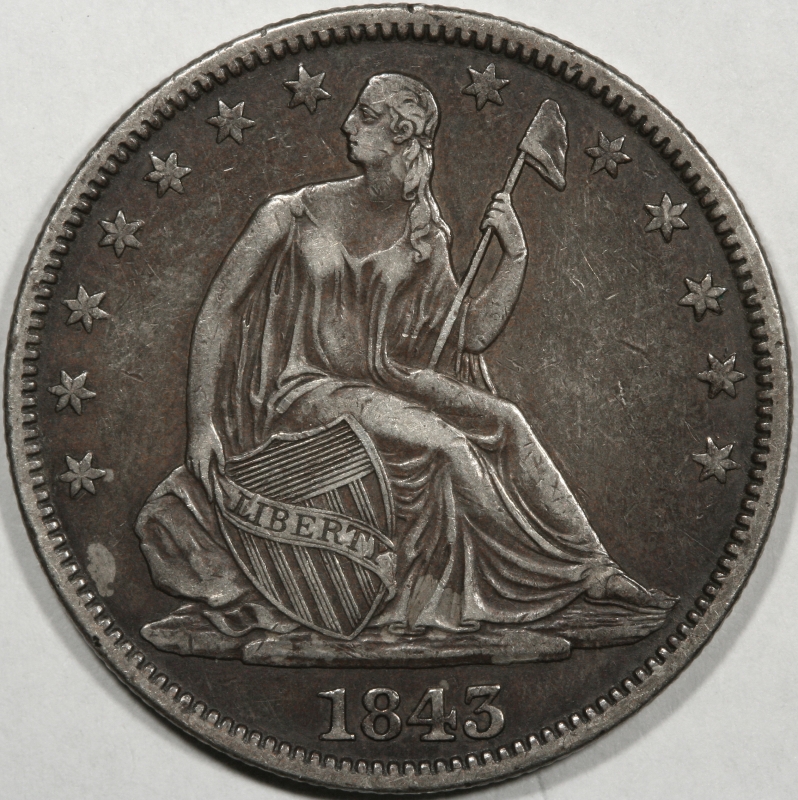
I am learning but very slowly about taking coin pictures. The only thing I do once I have uploaded the picture onto my computer is crop them to cut out the background. With these two pictures they were 1.3mb and 1.64 after I did that. They were to big to upload into the gallery so I re-sized them. Do I lose too much detail by doing this? If there is a better size or some way to get additional detail please let me know.
The second thing I am thinking about is that when I crop the pictures, everything from a penny to a dollar coin appear to be the same size, I lose all sense of scale. Is this something I should take into account somehow?
thanks,
Size-And-Resizing-Pictures..again..sorry!
Moderator
Learn More...
John1's Avatar
United States
56855 Posts
 Posted 02/13/2009  2:51 pm  Show Profile   Bookmark this reply Add John1 to your friends list Get a Link to this Reply
Why not just use Photobucket.com ?
John1
Pillar of the Community
chequer's Avatar
Canada
4227 Posts
 Posted 02/13/2009  2:54 pm  Show Profile   Bookmark this reply Add chequer to your friends list Get a Link to this Reply
with the photobucket, but there looks like lots of detail in those pics to me
Moderator
Learn More...
SsuperDdave's Avatar
United States
23522 Posts
 Posted 02/13/2009  6:20 pm  Show Profile   Bookmark this reply Add SsuperDdave to your friends list Get a Link to this Reply
Hmmm.

1) Truly excellent pics for an SX110IS.

2) You don't lose enough detail by downsizing to make a difference on a computer monitor.

3) Does your software allow a "quality" setting when saving? I use the Gimp, which is free, and save my images which are to be posted online at a lower quality setting. The 4MB pics I take, downsized to 800 pixels and saved at 60% Quality, fit CCF's Member Gallery (you're eligible - do you have a Member Gallery?) and come in at about 500KB each. Detail is still quite sufficient:

Size-And-Resizing-Pictures..again..sorry!

I might recommend that you download and install the Gimp:

http://www.gimp.org/

It's powerful, and maybe intimidating, but if you use it only to crop, size and save pics it will do the trick.
Valued Member
akglen's Avatar
United States
170 Posts
 Posted 02/13/2009  11:04 pm  Show Profile   Bookmark this reply Add akglen to your friends list Get a Link to this Reply
I used photobucket until I got the required number of posts then started using the photo gallery here on this site. I don't know that one or the other is better, each has limits. I guess what I was worried about was the file size, mine seem to be about half the size of SD's and was thinking I was losing some detail this way. I have no idea of what the software I have will do so will have to experiment with it and look into Gimp.
Thanks for the idea's,
  Previous TopicReplies: 4 / Views: 1,646Next Topic  

To participate in the forum you must log in or register.


Disclaimer: While a tremendous amount of effort goes into ensuring the accuracy of the information contained in this site, Coin Community assumes no liability for errors. Copyright 2005 - 2026 Coin Community Family- all rights reserved worldwide. Use of any images or content on this website without prior written permission of Coin Community or the original lender is strictly prohibited.
Contact Us  |  Advertise Here  |  Privacy Policy / Terms of Use

Coin Community Forum © 2005 - 2026 Coin Community Forums
It took 0.25 seconds to rattle this change. Forums