| Author |
 Replies: 54 / Views: 8,634 Replies: 54 / Views: 8,634 |
|
|
|
|
Pillar of the Community
United States
8533 Posts |
Without any controls for the LEDs, I've been angling the penny to get rid of the glare. It's not the best but it's better. Different fabrics seem to help too. I need a good flat black, I think.
Oregon coin geek.....*** GO BEAVS ! ! ! ***
|
|
Pillar of the Community
Canada
1723 Posts |
If you are looking through rolls and you want to take a close up look at a particular feature of a coin, can you just use a good magnifying glass or will that distort what you are looking at?
|
|
Moderator
 United States
56855 Posts |
You can use a good loupe, I use a 14x but sometimes you need a higher mag and the high mag loupes tend to distort above 14x in my experience. Also if you want to post a close up pic it helps to have a really good camera or a usb microscope. John1  |
|
Pillar of the Community
United States
8533 Posts |
My wife is using my USB scope to look for cams and wams on Lincoln's. Works for her since she's about blind, lol. She likes being able to view the penny on a 19 inch monitor.
Oregon coin geek.....*** GO BEAVS ! ! ! ***
|
|
Pillar of the Community
United States
1137 Posts |
Great info on glare, thanks!
|
|
Pillar of the Community
United States
3546 Posts |
Hi, Just for the benefit of having some additional comparative photos from other USB cameras using alternate lighting techniques it may be of use to read the following thread: https://goccf.com/t/88598The majority of my photos within the above thread were taken using a simple single source spiral CFL bulb (see attached photo). The USB camera's included LED lights were not used at the time that I took these shots. In order to diffuse the intensity of the CFL light stream I simply molded(then taped) a piece of 8 1/2" x 11" white copy paper to the goose neck light's outer reflective housing which contained the CFL light. Obviously, the CFL bulb then had this piece of paper between it and the coin... Then to achieve the impression of uniformly scattered light with minimal shadowing or glare I then taped another 8 1/2" x 11" piece of white copy paper to the tripod legs (holding the USB camera). I angled this additional piece of white paper in a way such that the light shown down onto the coin using this extra piece of paper as a reflector and simultaneously from the original CFL light source. The reflected light, however, came in from a direction 180 degrees different from the original CFL light source to cancel out any shadowing effects etc... The bottom line is that virtually any of these cameras will produce decent photos if the lighting arrangements are properly set up taking into consideration reflection, glare, shadows, and intensity. I am convinced than with a little ingenuity an adequately functioning camera setup can be completely assembled for under $ 40. (excluding the cost of an adjustable vertically moving camera stand) mdpmedia 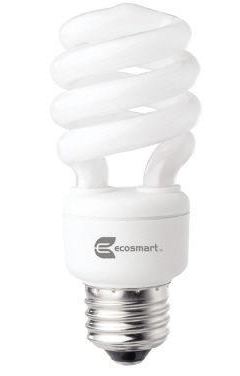 |
|
Pillar of the Community
United States
8533 Posts |
Wouldn't a cpl Jansjo lights with diffusers be an easier set up ?
Oregon coin geek.....*** GO BEAVS ! ! ! ***
|
|
Valued Member
United States
192 Posts |
I am not familiar with the lighting terms, or scopes either, I have a Fugifilm EXR w/ 16mega CMOS, 15x zoom=44-66mm 1.35-5.3 camera, and need to know what the best type microscope to take pics through/ What eyepiece and objective combination do I need to view the entire circumference of the coin?
|
|
Pillar of the Community
United States
3546 Posts |
Quote:
Wouldn't a cpl Jansjo lights with diffusers be an easier set up ? From what I have read about these type of lights it appears that they do not come with a built-in dimmer mechanism. Am I correct about this issue? If this is the case, what is the most economical and 'easy' method to increase and decrease light intensity of the Jansjo lights without having to purchase costly ancillary equipment? mdpmedia |
|
Pillar of the Community
United States
4050 Posts |
Nope, no dimmer on the Jansjos. They're intended as desk lamps, so always full on. It's simple to add layers of diffusion to dim them and same time even out their light distribution. Just tape some translucent paper over them. Need them darker, put another layer on. They stay cool enough to not melt the tape adhesives from my experience.
Contact me for photographic equipment or visit my home page at: http://macrocoins.com |
|
Pillar of the Community
United States
1299 Posts |
|
|
Pillar of the Community
United States
3546 Posts |
Ham,
Thanks for the suggestion, however, but what seemed to be an obvious and simple solution turned out to cause more problems than I initially had before integrating this type of dimmer.
These type of aforementioned dimmers are available at Lowes and Home Depot for under $ 15.
Unfortunately, when connecting to one of these types of dimming devices 'dimmable' CFL bulbs produced an electrical interference in the form of vertically moving horizontal lines on my laptop screen while being connected to a USB camera.
Then I connected this dimmer to a normal 'non-dimmable' CFL bulb and the light intensity would never diminish to a required low enough level without suddenly cutting off.
I did not try this dimmer with LED lighting since CFL bulbs have routinely produced the overall best true-to-life coin photos at least using my USB equipment.
A work-around solution must surely exist for this type of dimmer but I exhausted both my available time and level of interest trying to make this dimmer function properly with my current photographic equipment.
mdpmedia
|
|
Moderator
United States
23522 Posts |
Dimmers change nothing. You're going to have to increase exposure to compensate for less light, and the hot spots won't change as a result.
If you want to vary the light of a given lamp, use diffusers.
|
|
Pillar of the Community
United States
4050 Posts |
LED bulbs work on current control, not voltage. The small power supply that comes with the Jansjos takes the incoming voltage, rectifies it to DC, then uses that DC to force a current through the LED bulb. The current level through the bulb is regulated, ie regardless of the incoming voltage (over a very wide range) the supply provides a constant current so you don't see any flickering or variation in intensity if the utility voltage varies. Almost all the inexpensive dimmers vary the average voltage using a pulse waveform created by a silicon controlled rectifier. This method won't do anything to the LED power supply unless the pulse width is so narrow the regulators stop working, and at that point the supply current will collapse and the LED will go dark. Sometimes you'll see a flickering when this happens. There is no external way to adjust the intensity on the Jansjos. You may be able to modify the power supply but that would take some effort and understanding of how the thing works.
Based on my experience with diffusers, if you are going to build one it's a golden opportunity to adjust the size and shape the resulting source to maximize photographic qualities, ie rather than simply making a diffuser, make a director.
Contact me for photographic equipment or visit my home page at: http://macrocoins.com |
|
Pillar of the Community
United States
1795 Posts |
I spent the money and use a Dino-Lite takes a little practice to get the lighting right but very nice camera and you can download it too your computer to.
|
|
|
Replies: 54 / Views: 8,634 |
|







 First Page
 Previous Page


 Posted 03/04/2012 12:18 pm





