| Author |
 Replies: 16 / Views: 3,926 Replies: 16 / Views: 3,926 |
Page 2 of 2
|
|
|
|
Pillar of the Community
United States
1234 Posts |
get better lights or play with the Free Image Optimizer 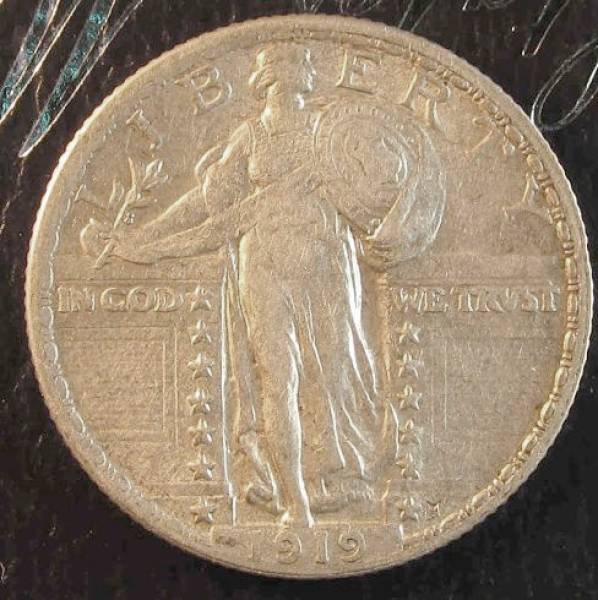 This is the same image with Exposure at 50 and Colour saturation at -50 |
|
New Member
 United States
25 Posts |
The coin is very silver. That corrected image look much closer to the proper tone. I will see if I can adjust my exposure and find how to do color saturation.
thanks
(I will see what I can find on lighting too)
|
|
Pillar of the Community
United States
1234 Posts |
The Exposure and Saturation are both in the Free Image Optimizer at the bottom of the Reply to topic window. You might be able to set your camera to a different exposure but just using the software is easier IMHO.
Also light might seem White to a human eye but to a camera it's usually a bit yellow. My basic idea on light is the more the better.
|
|
Moderator
 United States
23522 Posts |
It's the White Balance setting on your camera. Cameras need to be "told" what kind of light is in use - daylight, incandescent, fluorescent, etc. Your images look like you're using incandescent lighting on the wrong White Balance setting. Your camera should have an "Auto" setting among the choices - give that a shot first.
What camera is it?
|
|
New Member
United States
25 Posts |
It is a canon power shot sx160is.
|
|
Pillar of the Community
United States
898 Posts |
I would assume most of that has to do with the saturation setting. Good luck
|
|
Moderator
United States
23522 Posts |
Quote:
It is a canon power shot sx160is.
Time to hit up your manual. Try the Auto white balance setting first, then possibly "Tungsten" which is the setting for incandescent lighting. Canon is notorious for Tungsten being a little off, though. In a pinch, your camera also has a "Custom" setting. What happens there is, you take a shot of a blank white or grey sheet under the same lighting as you're shooting coins, and essentially "tell" the camera that's the light. It then corrects perfectly for it. Use a monochromatic, detail-less background and make your goal to be getting the color of that background correct. The coin will then be correct, keeping in mind that it may not necessarily be exactly what you see in-hand unless you look at the coin under the exact same lighting you use to shoot it. There is no need to adjust color in postprocessing with this camera. It's capable of getting it right in-camera. |
|
Pillar of the Community
United States
5825 Posts |
As others have said there are two ways to correct your problem:
-- lighting that's closer to "natural"
-- adjust your "white balance"
Actually a combination of both will produce the best results.
Lighting is probably the toughest to get adjusted properly.
|
|
New Member
United States
25 Posts |
I will work on both. I like the led light that I have seen mentioned from ikea. Just wish one was close by.
I did change the white balance to auto adjust and it helped.
|
|
Moderator
United States
23522 Posts |
The nature of the lighting is completely irrelevant. It doesn't matter what the lighting is, the camera requires a white balance correction. Cameras don't know "natural."
|
|
Pillar of the Community
2087 Posts |
Quote:
The nature of the lighting is completely irrelevant. It doesn't matter what the lighting is, the camera requires a white balance correction. Cameras don't know "natural." I am not familiar with your camera but I find custom white balance seems to fix all such problems. I suspect your camera may not allow for custom white balance. I get a similar gold color when I use compact florescent bulbs for lighting. As already stated its fixed by adjusting the white balance. If your camera does allow you to customize the white balance invest in an 18% grey card at $20.00 it will make a huge difference to your coin photography. http://www.bhphotovideo.com/c/produ...y_Cards.html |
|
Moderator
United States
23522 Posts |
Yes, his camera can do a Custom white balance. That makes candles, red heat lamps and probably ultraviolet lights fair game for his needs.
|
|
Pillar of the Community
United States
5825 Posts |
Quote:
The nature of the lighting is completely irrelevant. It doesn't matter what the lighting is, the camera requires a white balance correction. Cameras don't know "natural." But the human eye does, and you want your image to look as close to what you see "in hand" as reasonable possible. And a good starting point is to select a light source that closely mimics "natural" light. THEN "white balance" can more easily correct the image to something close to what the eye sees. |
|
Moderator
United States
23522 Posts |
Quote:
THEN "white balance" can more easily correct the image to something close to what the eye sees.
No. The correction is not "easier" regardless of the light source.  I am really getting frustrated with you guys pushing this member to spend money on new equipment, or time to learn new technique, which he doesn't need to. |
|
Pillar of the Community
2087 Posts |
Quote:
No. The correction is not "easier" regardless of the light source.  Your head must be getting sore! Yep your right just adjust the white balance using the lighting( turned on of course) you will take the photograph with..its as simple as that! The 18%grey card helps but even that isn't necessary. If the lighting is not bright enough... then make the exposure longer! ( as long as you have a stable set up) Its only when you start to look at axial lighting and other techniques that you might want to up the lighting but even then its not completely necessary. Rule 1: know your camera!! Rule two.... set it to "M" ( thats for "manual" not "macro"). The only exception to this rule is when you use aperture priority( but that's cheating!!) If your using auto or the macro setting you are always going to have niggling little problems. Edit learnign to take photographs manually with digital cameras is a breeze!! You get instant feedback on what you've done..you can delete your mistakes. Digital cameras make it easy to learn. Can you imagine the learning curve if you had to wait a week or 2 weeks to get the prints back to see what you had done right or wrong. The funny thing is I believe these days people ( in general not specifically) are terrified of playing around with their cameras..... as a result... its auto all the way!! ( or of course the macro setting) Edited by austrokiwi
02/17/2014 4:55 pm
|
|
Page 2 of 2
|
Replies: 16 / Views: 3,926 |
Page 2 of 2
|





 First Page

 Posted 02/15/2014 12:56 pm


