| Author |
 Replies: 31 / Views: 4,388 Replies: 31 / Views: 4,388 |
Page 3 of 3
|
|
|
|
Pillar of the Community
United States
3505 Posts |
Why don't you put together a step by step process for posting photos, bobby131313? So many here, new and old, struggle with the process that it may be time for you to do so. Nobody cares about how big the photos should be, they just want to post them.
|
|
Bedrock of the Community
United States
94367 Posts |
I daresay I am older than most anyone on the CCF, and have turned to the off-site source mentioned in my post above not out of sophistication but out of frustration like so many of you. It is very easy to use.  |
|
Pillar of the Community
United States
8715 Posts |
I recently wrote some short instructions on how to upload images. If you want I can post them here.
|
|
Pillar of the Community
United States
3505 Posts |
Thanks guys, I just don't understand why members have to provide shortcuts to what should be a simple process. Why can't we just click on a button that uploads a photo?" Why do we need a set of instructions to complete what should be such a simple task?
I can easily add a photo to any post anywhere else on the internet, I don't get why it's so difficult to do so here.
Edited by nfine
06/03/2018 8:50 pm
|
|
Bedrock of the Community
United States
12057 Posts |
The only thing that could possibly make it any easier is if clicking the Upload Photo directly opened a file browser / folder picker dialog box instead of requiring you to do two separate actions (choose the photo through one button and then upload it using a second button)
CCF puts a cap of about 300KB on photo uploads -- this helps mobile users & people on bad connections, and prevents wasting data by forcing users to load threads with 500MB worth of images.
I do not find the current system difficult to use at all. When you upload a picture to your computer from a scanner/camera/SD card, or download a picture from the Internet, it is stored in a folder on your computer. All you have to do to make it show up here is navigate to that folder and choose to upload it.
I think what probably "gets" most people is that very few modern photos are under 300KB. (My DSLR defaults to 24 MP 3600x3600 photos of around 28MB each.) The average cell phone photo (e.g. an iPhone 6/7 or Galaxy 6/7) is around 3-5 MB, as are most 8-12MP digital camera photos. You have to configure your phone/camera to save files in a "small" size -- on my Samsung Galaxy, photos can be saved as Large (100%), Medium (70%) and Small (30%) so I set it to Small and that way they can be e-mailed and uploaded. The Image Optimizer used here is great for fixing the photos down to 300KB or smaller, but I admit it's not the easiest to use. Ideally, the forum code would have a script that "resizes" photos down to 300KB automatically, instead of requiring manual fixing by the end-user, but that costs both time and money to implement.
In this era of seemingly infinite storage available at seemingly negligible costs, we think nothing of having 1TB of data on a hard disk, or of downloading a 20GB 1080p HD movie, nor having a photo album with 500GB of photos in it. That's fine when the data is stored on YOUR equipment. When it's stored on someone else's server, they have to pay for it -- imagine how many hard drives you'd need if you had 20,000 users each trying to store 500GB of their photos on your website! Server storage space is not cheap, especially when you run forums that are, by and large, free (I estimate less than 20% of CCF regulars are supporters.)
My first computer stored data on a cassette tape -- it could hold about 20KB, quite a lot in an era when most programs were well under 4KB -- and I remember being insanely happy with a 10 MB hard drive in an IBM XT...things change.
Member ANA - EAC - TNA - SSDC - CCT #890 "Most of the things worth doing in the world had been declared impossible before they were done." -- Louis D. Brandeis |
|
Bedrock of the Community
United States
94367 Posts |
Good input, makes sense, but many CCF members continue to have difficulty with the present in-house system. Unsure why, but the complaints continue. I sought an outside option because, in my dotage, I was tired of the kickback.
|
|
Forum Dad
 United States
24222 Posts |
And every person that posts with an outside image sources will have TONS of completely useless posts when their image source is done. The biggest one that comes to mind is coop. Every one of coop's incredibly helpful posts will be useless if something happens to inkfrog, or god forbid him. Years and years and years of super quality posts gone. Also as I said already the only other option is to have images compressed to around 250K when uploaded like other places do. I tried that and people screamed bloody murder. August of last year we added another disk just for image uploads, it's already over 20% used. This disk alone per month costs triple what most of you pay per month hosting. When this disk is full, I have to start deleting old images. Don't even get me started on people that upload completely irrelevant 300KB images just trying to be funny. Happens a lot. If every image on the disk that's like this..... 274KB: Not cropped, 99% jpg compression.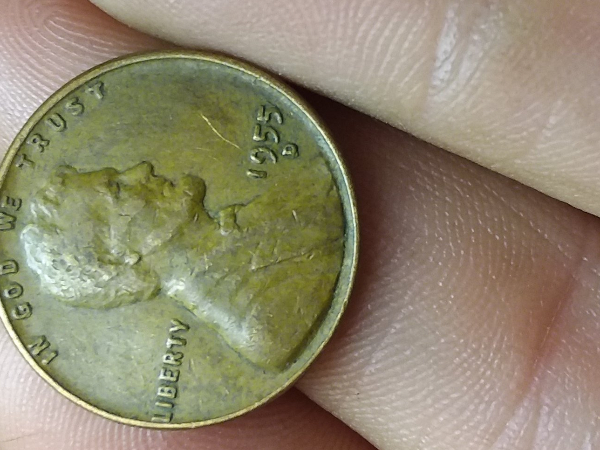 Was like this... (took me 15 seconds to tweak) 38KB: Cropped, rotated, 75% compression.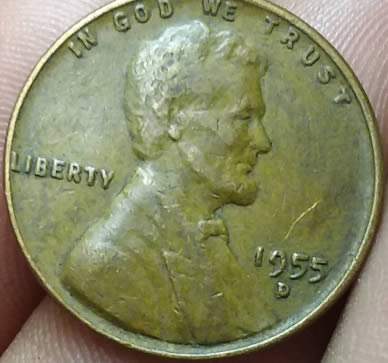 Then the new disk would likely be less than 5% full. But unfortunately a lot of people don't care or can't be bothered to take 10 minutes to learn something. |
|
Bedrock of the Community
United States
20753 Posts |
I'm lost as to what this is all about and I'm really old. In my 80's now and no problem with showing, posting, cropping photos of any kind. I've got a simple old type of photo program, cheaply purchased at almost any place, that allows me to take a photo, crop it, turn it, print it or anything else that photo shop programs do. Regardless of what I use to take a photo I simply put it on my desktop computer, do anything I want with it, save to a file and done. Then in the reply box at the bottom of this message, it says Upload Image so I click in that and it takes me to my computer's pile of photos and I click on one and POOF, it goes to this reply thing. I use a Cell phone or mini camera with a SD card to take photos. Not sure what people are even saying about it's all so complicated.  It was just a few clicks and done. |
|
Pillar of the Community
United States
4233 Posts |
1. "Switch To Full Reply". 2. "Free Image Optimizer" - opens new tab. 3. Drag image to "Click to open file picker or drag and drop images here" green box <OR> click green box, browse, and open it. 4. Select thumbnail image to work on if you upload more than one. 5. Rotate image as needed. Hover over image and rotation arrows appear in upper left. 6. "Crop Image", drag corners around image, "Apply Crop". 7. "Width" - change to value near or equal to what is displayed, to avoid sizing glitch I described in my earlier post. 8. "Save Image(s)" 9. Click green download arrow on image(s). Original file name will have "ccfopt" appended. 10. Switch back to "Full Reply" window. 11. "Upload Image" opens new window. "Browse" to new "ccfopt" image, "Open", file name selected appears next to "Browse" button. 12. "Upload File to kbbpll's post".  These steps typically take me under 2 minutes. A lot of that time is waiting for the computer and browsing my cluttered Downloads folder in step 11. If you use a phone or digital camera, you _know_ you're going to have to go through either the CCF image optimizer, or your own, or you have your camera set to "small", or etc. The size limit here is clearly not going to go away any time soon. Steps 2-9 above will have to be done, whether using CCF or something else. Echoing @paralyse, I spent my career in IT, starting with a system in college where you had to walk a quarter mile across campus to the computer center to get a hardcopy printout, to the original IBM PC where you had to keep swapping the "program disk" with the "data disk", all the way to being a database architect for Microsoft's Bing Maps where we have petabytes of storage in three trailers processing images 24 hours a day and the database servers cost $30,000 each. Even then, you _still_ had to be conscious of space limits. I can guarantee that when some rogue programmer ran a new process that created millions of useless files, we tracked him down and flogged him. Storage isn't free, and even in today's world of the "cloud" all that stuff still lives on physical storage in a data center that has a limit. Maybe the steps above are a bit kludgey, but the overall process to me is sound. If you just practice it a couple times, it all works just fine. |
|
Pillar of the Community
United States
3505 Posts |
12 steps, with work in between, to complete what should be a one or two click function. Probably not too much for frequent users to work through, but the younger folks who are going to keep this site going aren't going to do this.
|
|
Pillar of the Community
United States
8715 Posts |
Someone please tell me exactly what is hard to do regarding uploading pics. I registered on CCF only last year and I didn't have a hard time uploading pics from the first minute I registered here.
Edited by SilverDollar2017
06/04/2018 1:10 pm
|
|
Forum Dad
United States
24222 Posts |
Quote:
Probably not too much for frequent users to work through, but the younger folks who are going to keep this site going aren't going to do this. Sure they will, and they do. We average a thousand posts and 20 new members a day here and all signs show it increasing. This guy joined and had pics uploaded in about 3 minutes including using the optimizer..... http://goccf.com/t/320591This is what happens most of the time. Some have an issue in the beginning, but read the tutorial, then have no issues. Long time problems are rare. |
|
Pillar of the Community
United States
4233 Posts |
I think what differentiates this site from others is that it's specific to coins and currency. It's not Facebook or Snapchat. A 2MB blurry image that's 90% background is useless. Forcing people to be better stewards of their images is a good thing. My first topic almost 5 years ago contained images, and despite a crappy camera and worse photo skills, it wasn't that difficult to crop and post them here. I hope the steps outlined above helps somebody.
|
|
Moderator
United States
194816 Posts |
Quote:
A 2MB blurry image that's 90% background is useless. Forcing people to be better stewards of their images is a good thing. That sums it up rather well.  |
|
Pillar of the Community
United States
8533 Posts |
Personally I like the optimizer and become really frustrated when I search for old threads and pics are no longer there because they used an outside host. I think we should quit allowing that or like Bobby said we'll have useless old threads.
Oregon coin geek.....*** GO BEAVS ! ! ! ***
|
|
Page 3 of 3
|
Replies: 31 / Views: 4,388 |
Page 3 of 3
|







 First Page
 Previous Page


 Posted 06/03/2018 8:35 pm





