| Author |
 Replies: 24 / Views: 7,600 Replies: 24 / Views: 7,600 |
Page 2 of 2
|
|
|
|
Moderator
  United States
34565 Posts |
@tj--glad this thread is helping you learn something too! Here is my first attempt at shooting this coin on a pedestal with the black background. It is a bit harder to get the whole coin in focus and it still is a bit brighter than in hand.  "If you climb a good tree, you get a push."
-----Ghanaian proverb
"The danger we all now face is distinguishing between what is authentic and what is performed."
-----King Adz
|
|
Pillar of the Community
United States
9395 Posts |
Maybe you could experiment with manually varying the exposure? The latest picture looks overexposed.
|
|
Pillar of the Community
United States
5825 Posts |
I highly recommend a non-reflective black or dark gray for a background.
Colored backgrounds will influence the overall color of the coin as seen by the camera.
You want the colors the camera collects to be totally from the coin.
That also means the lighting should be or imitate sunlight (generally called white light).
Then when you get the true color of the coin you can later crop out the black/gray background and insert your own choice of color.
|
|
Moderator
United States
34565 Posts |
Ok yes thanks @kanga, I've got the message for using a black background super clear! @pepactonius, I'm not sure how to manually vary the exposure with the simple setup that I have. Perhaps I need to experiment more with my light sources. More to come... Added: Here is the same elevated set-up, but with no extra light from the flashlight. The color is even further off from the copper that I see with the coin in hand.  "If you climb a good tree, you get a push."
-----Ghanaian proverb
"The danger we all now face is distinguishing between what is authentic and what is performed."
-----King Adz
Edited by Spence
07/20/2019 10:17 am
|
|
Pillar of the Community
United States
1376 Posts |
What are you using to take these photos? Cell phone? Point and Shoot camera? DSLR?
IMHO you're getting a purple/pink colored coin, instead of a copper colored coin, because of lighting and white balance, not because of the background or elevating the coin.
What are you using for lighting? and if you're using more than one source of light, then are the lights the same, i.e., same light bulb. Non-uniform lighting can cause weird color effects because the camera can't correct for color temperature accurately.
Edited by BadDog
07/20/2019 12:04 pm
|
|
Moderator
United States
34565 Posts |
Quote:
Also, before anyone asks, my photographic setup is pretty basic: I have a cheapo Celestron digital microscope with free Microspin capture software. I have covered the harsh LEDs with some diffusing plastic, but augment that light with a handheld flashlight. For post-processing, I use the free Office 2010 software that came with my computer. Other than resizing the pics to get the pixel count low enough to post of CCF, the only post-processing I did was hit auto-brightness. "If you climb a good tree, you get a push."
-----Ghanaian proverb
"The danger we all now face is distinguishing between what is authentic and what is performed."
-----King Adz
|
|
Pillar of the Community
United States
1376 Posts |
Using the two different light sources will cause problems. The sensor in the digital microscope won't be able to adequately compensate.
I would try turning off the LEDs on the microscope and just use an external light source. You can try the flashlight and if you want to diffuse that light you can just rubber band a piece of tissue paper over it.
You want to try to remove all other light sources, so taking the photos in a darkened room might work best.
Edited by BadDog
07/20/2019 4:54 pm
|
|
Moderator
United States
34565 Posts |
I've been playing around with this some today and think that I have a solution, at least for my setup. For whatever reason, the color of the coin is truer with the white background, but the black background is overall more pleasing. What I have discovered is that if I include a slip of white paper in the pic, the color remains pretty true and then I can crop out this portion. I'm sure that this effort is necessary due to the cheapness (and potentially age) of my Celestron camera. What do all y'all think of these?   added: Quote:
Not sure where you pulled that quote from, it isn't in this thread Check the bottom of my first post in this thread.  "If you climb a good tree, you get a push."
-----Ghanaian proverb
"The danger we all now face is distinguishing between what is authentic and what is performed."
-----King Adz
Edited by Spence
07/20/2019 4:56 pm
|
|
Moderator
United States
34565 Posts |
As recommended @BD, here is a pic with the room pretty much dark and a tissue over the flashlight. I agree that having the two types of light must be an issue for this camera. Maybe this latest one is even better? 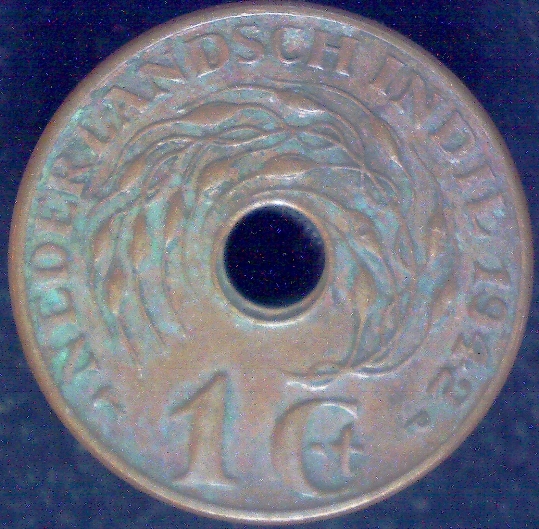 "If you climb a good tree, you get a push."
-----Ghanaian proverb
"The danger we all now face is distinguishing between what is authentic and what is performed."
-----King Adz
|
|
Pillar of the Community
 United States
8946 Posts |
Much better, but maybe slightly brighter?
|
|
Moderator
United States
34565 Posts |
@GC, ok thanks. As bright as the one above it, or somewhere in the middle?
"If you climb a good tree, you get a push."
-----Ghanaian proverb
"The danger we all now face is distinguishing between what is authentic and what is performed."
-----King Adz
|
|
Pillar of the Community
United States
1376 Posts |
Are you sure that the coin and the microscope camera are parallel to each other? It looks like the top of the coin is more in focus than the bottom. This usually means the two aren't parallel.
|
|
Moderator
United States
34565 Posts |
Yes good point @BD. I definitely need to improve the parallelism between the camera lens and the coin. What are your thoughts on the color?
"If you climb a good tree, you get a push."
-----Ghanaian proverb
"The danger we all now face is distinguishing between what is authentic and what is performed."
-----King Adz
|
|
Pillar of the Community
United States
1376 Posts |
You're really the only one who can comment on color as you're the only one who's seeing the coin in hand. We can give comments that can help you achieve accurate color, but that's about it  What you really need is to be able to white balance your images. You can do this, but not with the software you're currently using. If you want to explore white balancing, then there is a free program, GIMP, that can help you do that. It's the program I use, but it does have a fairly steep learning curve. Without doing image post processing, the best you can really do is to achieve good focus, reduce stray light, reduce reflections and use a single source of light, or multiple sources that are exactly the same. |
|
Pillar of the Community
United States
9395 Posts |
Quote:
What you really need is to be able to white balance your images. You can do this, but not with the software you're currently using. If you want to explore white balancing, then there is a free program, GIMP, that can help you do that. It's the program I use, but it does have a fairly steep learning curve. It looks like your only method of controlling white balance and brightness is by varying the background color. This means the best background may be different for each coin, unless a lot of post-processing is done. One answer to this problem is the "$400 setup" described in a long thread on this subforum. With that setup, you can: - adjust white balance to match the lighting - get best focus via magnified live view on the PC screen - choose the best aperture to balance DOF and diffraction blur - control the coin exposure regardless of the background - get parallelism using mirrors and live view - have great lighting flexibility using a lens-attached diffuser and Jansjo lights - use microscope objectives, if needed - use focus stacking, when needed - use axial or pseudoaxial lighting when needed |
|
Page 2 of 2
|
Replies: 24 / Views: 7,600 |
Page 2 of 2
|




 First Page


 Posted 07/20/2019 09:02 am





