| Author |
 Replies: 35 / Views: 7,345 Replies: 35 / Views: 7,345 |
|
Valued Member
United States
422 Posts |
Hello, I'm trying to get a picture of an uncirculated Sacagawea coin and I can't do it. I'm using a 10MP camera in macro mode. I also tried scanning my coin. I have attached both pictures.  This is the scanned picture 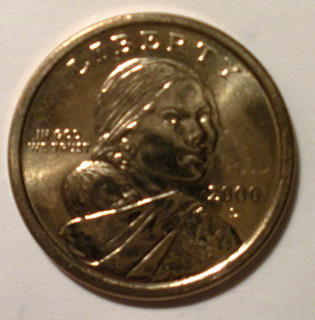 This is the picture taken with my camera Please HELP!! Thanks, Rich |
|
|
|
Pillar of the Community
United States
677 Posts |
Try taking the coin out of the flip and scanning it. I usually have pretty good luck on my scanner.
|
|
Pillar of the Community
United States
2254 Posts |
You most likely don't need to use macro mode, but when you do use it, you should be using some kind of tripod and timer delay so it's completely hands free.
First we will need to know what equipment you have for imaging in general. Do you have a tripod, a copystand, etc. What type of lighting? Your color looks pretty good, so you probably won't need to mess with white balance too much.
My suggestion, start simple. Grab two stacks of books(5 or 6 high) and form a wall on both sides of the coin. PLace the camera on top like it was a bridge. You will probably be 7-8 inches away hopefully. Have the camera on regular full auto, focus, turn the timer on, and take a shot. You will be able to crop and resize it from there. Make sure there is plenty of light as well. Show the results here and we can work from there. What type of camera anyway?
When you start getting into more detail on the pictures, we have resident experts that can take over.
|
|
Valued Member
 United States
422 Posts |
Hello, I'm using a small tabletop tripod that goes from 6 to 14 inches in height. My camera is a Nikon coolpix S560 I believe, just a 10 megapixel point and shoot. I'm just using the regular light from my house, no special photograph lighting. I have a desk lamp I can try and work with. I'll try the books and tripod again. My scanner is an Epson Perfection series 300. So far all of my proof coins (mostly proof sets and modern commems) come out great with the scanner. I'm concerned that my Presidential dollar sets and anything with the Sacagawea dollar won't come out good. I'll keep at it and keep posting. Thanks, Rich |
|
Pillar of the Community
United States
2254 Posts |
The book idea was only if you didn't have a tripod. On the tripod, are you pushing the button or are you using the timer delay feature? I would make sure you are hands free. I would also take the tripod up a bit, use full auto without macro mode, zoom in as far as you can where it will still focus, and take a picture. this will allow plenty of light in, and should also get rid of any shake regardless if it has image stabilization.
Then just crop and resize.
|
|
Valued Member
United States
422 Posts |
Hello,
Do you think investing in an illuminated flat panel for shadowless photos is necessary? I'd like to be able to do this without spending anymore money where not needed. Also, with a golden colored coin what background color should I use? A white piece of paper? A black piece of paper? Also, should I do this from the floor or from a table?
Thanks,
Rich
Edited by snitchard
02/26/2010 6:09 pm
|
|
New Member
United States
25 Posts |
I'm new to collecting but have found that my scanner works pretty well but I do have to remove the coin from the sleeve for it to work.
|
|
Moderator
 United States
23522 Posts |
|
|
Pillar of the Community
 United States
1551 Posts |
Looking at the photos lighting is a big problem! Look at some of the photos I have posted they are all free hand! Try something simple 1st.
1st go out and get a 5000 lum light bulb they cost about 4.00 dollars
2nd Set the coin at an angle where the light is not reflecting directly back at your camera as that tends to bleach out the photo.
3rd Use your elbows as a tripod and look for just a single point on the coin exhale slowly keeping your sight on the spot and squeeze. Think of it as being prone shooting a rifle.
I will post a pic of some angle to try as lighting is 1/2 the battle and light glare is a killer.
|
|
Pillar of the Community
United States
1551 Posts |
OK The 2 photos of this coin are from the same spot all I did was more my light down so the coin would not reflect as much light off of it. The coin is at a 90 degree angle from the table. I move the light (NOT THE COIN) The lamb has 2 swivels on it and I got it at Home Depot for something like 19.95 and the bulb (Florance 5000 lum) for about 4 bucks. I use ArcSoft photo software, as I like it better, but that is just what I like there is no right or wrong. The last 2 photos are of my coin sent up and the type of light.  I hope this helps If you drink a lot of coffee  Stick to a real tripod. I have one I find this just easier. Just take your time and you will get it      |
|
Moderator
United States
23522 Posts |
First, stop holding the camera to shoot. You will not get a satisfactory shot without the camera on a solid mount. Drop $20 on the cheapest Best Buy tripod; it'll make you a hero in your own eyes.
Second, use a delayed shutter. Your hands introduce a shake into the camera when you press the shutter, regardless of how steady you feel.
Third? It doesn't matter. Do those first two, and the rest will be easy. We'll talk about it then.
|
|
Pillar of the Community
United States
1551 Posts |
sorry the order of the photos are wrong here is a side by side to show you what lighting is about  |
|
Pillar of the Community
Australia
9765 Posts |
Here is a copy of a previous post.... This is how I take my pics, with a few of Bobby131313's ideas. Prepare a black background and mount a screw into it, then add some felt on top to hold the coin in place.  Balance the coin on top, lean the coin to one side slightly if you have to, to save reflection from coin.  Place cut-down juice or milk container over the coin. This not only stops glare but gives you a steady platform for taking the pic. Try different length containers until you find one that you can focus closest with.  I then place an old magnifying glass on top to increase the size of the pic. At this point you could place a piece of paper with a hole cut in it, and shoot through this to stop the glare of LED's.  I then shine light through the side of the container, this stops the glare. You can adjust the height of the light to add or subtract the amount of light on the coin surface. I only have one light, but two might work better.  This is the coin pic after editing in Microsoft Picture Manager. No colour adjustment, just cropped and darkened a little. All this on fully automatic setting on the camera.  Hope this helps This is how a Sac comes out... _USA_Sacagawea__1.jpg) Steve |
|
Pillar of the Community
United States
1551 Posts |
I like that steve I think the milk jug defusing the light is a great idea!!
I will have to try your method
|
|
Valued Member
United States
422 Posts |
Hello, Am I close? 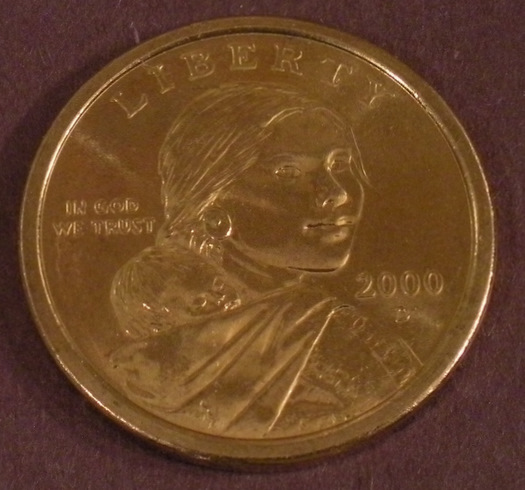 Thanks, Rich |
|
Pillar of the Community
United States
1551 Posts |
You need to play with your angle and light but you are getting better. Think of it as golfing Practice, Practice, Practice.
|
| |
Replies: 35 / Views: 7,345 |










 Posted 02/26/2010 07:21 am


