Coin Community Family of Web Sites Join Thousands of Coin, Bullion, & Money Collectors
Royal Estate Auctions - $1 Coin AuctionsCoin, Banknote and Medal Collectors's Online Mall Specializing in Modern Numismatics Royal Canadian Mint products, Canadian, Polish, American, and world coins and banknotes. Join Thousands of Coin, Bullion, & Money Collectors Vancouvers #1 Coin and Paper Money Dealer 300,000 items to help build your collection!


Username:
Password:
Save Password
Forgot your Password?


This page may contain links that result in small commissions to keep this free site up and running.

Welcome Guest! Registering and/or logging in will remove the anchor (bottom) ads. It's Free!

Opinions Please

To participate in the forum you must log in or register.
Author Previous TopicReplies: 5 / Views: 1,497Next Topic  
Pillar of the Community
jprine's Avatar
United States
1599 Posts
 Posted 10/18/2011  9:42 pm Show Profile   Bookmark this topic Add jprine to your friends list Get a Link to this Message Number of Subscribers
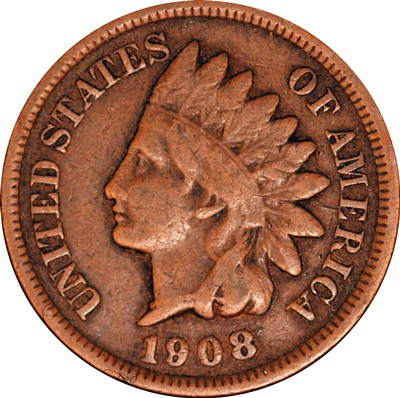
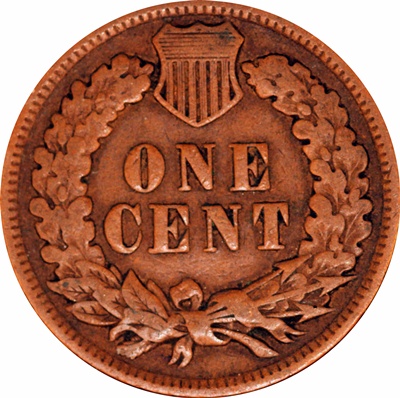
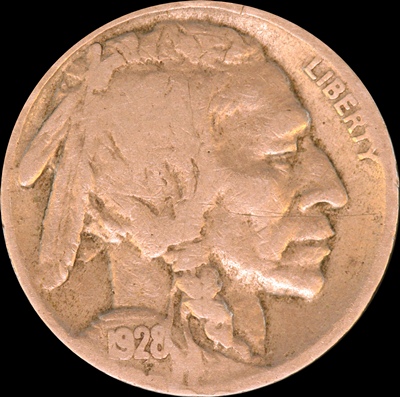
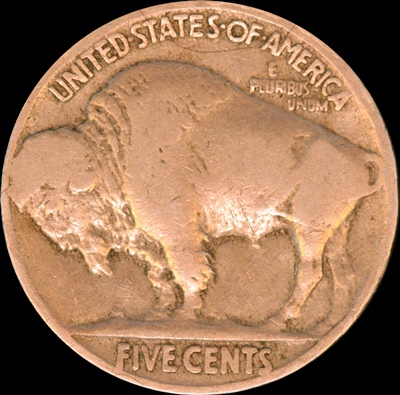
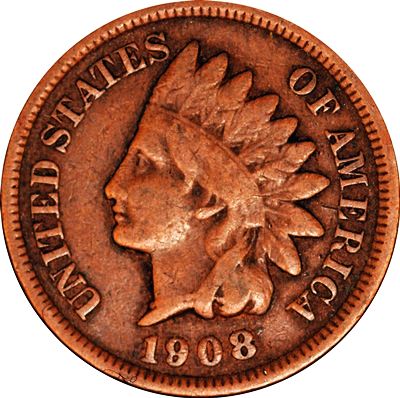
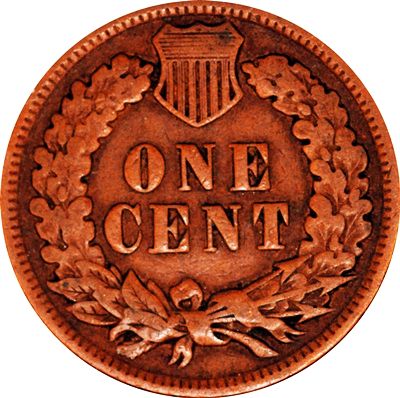
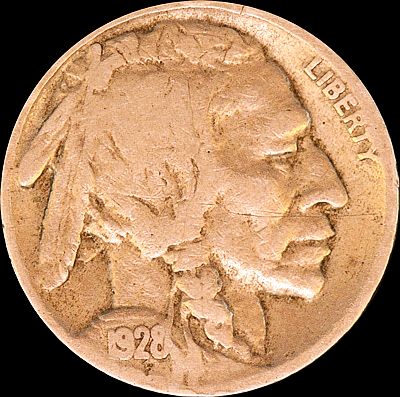
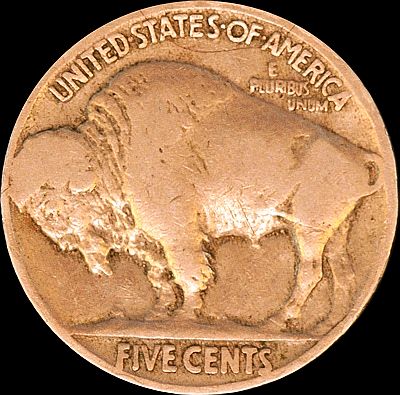
I have been moving for several months and have just gotten back to trying to improve my photo skills. I have read a good bit here and actually "stole" a set up design. I am still having lighting problems. I am using two goose necks, but the bases of the bulbs are intermediate. I have not been able to find daylight (3500K) lights with the correct base. Anyway, I am interested in any input about the two coins below (IHP found roll searching recently and the buffalo from awhile back). Thanks.

Opinions-Please
Opinions-Please
Opinions-Please
Opinions-Please
Pillar of the Community
aladinslamp's Avatar
United States
3076 Posts
 Posted 10/19/2011  12:32 am  Show Profile   Bookmark this reply Add aladinslamp to your friends list Get a Link to this Reply
I'm not an expert yet , but I have been having some good results lately so I will give an input anyone can step on if they wish....I think the first thing I realized is LIGHTING LIGHTING LIGHTING...is a very key factor...as you know I'm sure..however..there is a great difference on how to approach a particular coin and I SHOULD SAY the type of metal..copper VS silver for example are at extreme differences in there requirements...
My first impression is you have too much light...
But that's not actually correct....
The cameras 3 main setting points interpret what they think they see and you get (your picture)what it thinks is best for you...
Those 3 things are,, ISO shutter speed and the F stop value ....only lately have I actually seen on screen seen the actual differences in the settings before taking pictures using the cameras live view funtion, which not all cameras have..however.. its the knowledge of these settings and which way you tweak them, and what the outcome will be... For example...I used to think I needed the lower
F stop and higher shutter speed on shiny coins..I was trying to hit or fix the shutter at say 800 to say 1500
out come was ok on shiny UNC coins...
Practical application reveals I needed lower shutter speeds
however,, After a week of playing..I then dropped the speed to around 650 or so.... there is a point as you lessen the shutter speed say to 500 then to 300 WITH my present settings, the coin was to overlit and had the washed out look as your coins do...when I lowered or slowed my shutter speed down...TO much light..
Most cameras control the shutter speed do to the aperture setting you may choose, it allows more or less light on the coin.
depending on the type of coin you are shooting...there is a balance ....Having full manual control over the camera is a must or it takes a bazillion guess shots to get one good one....I leave all my settings as is and change one feature at a time to review the results to see if I am going in the right direction.....I don't think its the lights your using right now but rather how your settings are at the moment...
are using the light source...Dave and Ray could give you some better general reference starters , say ISO and F stop For copper and old nickles settings by which you can slowly alter.. If your using a point an shoot camera,, try the white balance and reduce the light settings and see your results...hope this helps...

Pillar of the Community
aladinslamp's Avatar
United States
3076 Posts
 Posted 10/19/2011  12:52 am  Show Profile   Bookmark this reply Add aladinslamp to your friends list Get a Link to this Reply
you can always tweak your photo's, my meagear attempt.. as I don't have your coins in hand..using Irfanview, Gimp or photoshop and otheres

Opinions-Please

Opinions-Please

Opinions-Please

Opinions-Please
Pillar of the Community
Learn More...
United States
4038 Posts
 Posted 10/19/2011  10:08 am  Show Profile   Bookmark this reply Add rmpsrpms to your friends list Get a Link to this Reply
I'm not fond of having the primary light shining from below as you show in these photos. It's an unnatural perspective. The most obvious outcome that illustrates this is the light shining on the Buffalo's belly. The only situation I can think of where this would occur is if the buffalo was a statue, and it was night time with lights shining on it from below. The other example is the illuminated cheekbones of the Squaw and Chief, which again seem very unnatural. Most folks will recommend lighting from high clock angles, and although they may not really know why, this is the reason.
Contact me for photographic equipment or visit my home page at:
http://macrocoins.com
Valued Member
United States
132 Posts
 Posted 10/19/2011  12:55 pm  Show Profile   Bookmark this reply Add dmott88 to your friends list Get a Link to this Reply
Try using indirect light. A 'T' standup with outlets having the bulbs facing the ceiling. Use white sheets to make a mock photo room to prevent shadows and outside light sources. This seems to work well for us. Also we use a golf tee driven into a piece of wood to set the coins on. This way the camera will focus purely on the coin and no the background. I hope this may be some use.

Daniel
New Member
Amadauss's Avatar
United States
41 Posts
 Posted 10/19/2011  7:07 pm  Show Profile   Bookmark this reply Add Amadauss to your friends list Get a Link to this Reply
Have to use indirect light. I usually set my iso at about 400 with f 11. Have two systems. I built a white box, white all sides with front open to position camera, cut two holes on either side of box and shine light in from both to the back of box. Put coin or anything small I am shooting in box with no light shining directly on subject. Then use another light source I adjust hand held most of the time aimed at the top of the box. Camera is always on tripod.
The other I am now playing around with is setting the camera to shot straight down with a piece of glass set at a 45 so the camera has to shot through the glass to take the picture. I set up a very bright light shinng at the glass directly at the coin, positioned under the glass with a small object in front of the coin to block direct light. Idea is the light reflects off the glass and on to the coin. When done right the pictures are fantastic. So invision a camera at the 9 oclock position the coin at the center of the dial and the light source at the 3. With a small dark object between the center and 3 to block direct light on the coin. The glass would be at a 45 going from outside the 9 to just over the box. Hope that makes sense. If you have a good camera, shot in RAW mode and then you can adjust a little in photoshop or another program that accepts RAW files.
  Previous TopicReplies: 5 / Views: 1,497Next Topic  

To participate in the forum you must log in or register.


Disclaimer: While a tremendous amount of effort goes into ensuring the accuracy of the information contained in this site, Coin Community assumes no liability for errors. Copyright 2005 - 2026 Coin Community Family- all rights reserved worldwide. Use of any images or content on this website without prior written permission of Coin Community or the original lender is strictly prohibited.
Contact Us  |  Advertise Here  |  Privacy Policy / Terms of Use

Coin Community Forum © 2005 - 2026 Coin Community Forums
It took 0.27 seconds to rattle this change. Forums