Coin Community Family of Web Sites Join Thousands of Coin, Bullion, & Money Collectors
Royal Canadian Mint products, Canadian, Polish, American, and world coins and banknotes. Vancouvers #1 Coin and Paper Money Dealer Specializing in Modern Numismatics Coin, Banknote and Medal Collectors's Online Mall Royal Estate Auctions - $1 Coin AuctionsJoin Thousands of Coin, Bullion, & Money Collectors 300,000 items to help build your collection!


Username:
Password:
Save Password
Forgot your Password?


This page may contain links that result in small commissions to keep this free site up and running.

Welcome Guest! Registering and/or logging in will remove the anchor (bottom) ads. It's Free!

Help With Celestron 44302-A - Green/Garbled Image

To participate in the forum you must log in or register.
Author Previous TopicReplies: 5 / Views: 2,817Next Topic  
Valued Member
Lonz's Avatar
494 Posts
 Posted 04/28/2012  10:01 pm Show Profile   Bookmark this topic Add Lonz to your friends list Get a Link to this Message Number of Subscribers
Hi folks. I've searched and searched for a day and a half and cannot find any clue to what might be happening with my celestron 44302-a.

My main system is a dell dimension 9100, 4GB RAM, NvIdia GeForce video card, running Vista 64bit (SP2). Laptop is a Toshiba S90 (?) with 6GB RAM, running windows 7 64bit

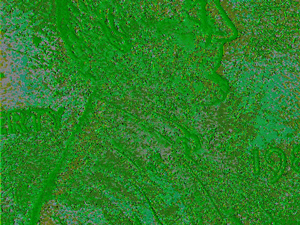
When I first plugged it in after installing the software it was green/garbled. I switched some settings around... still same... unplugged and plugged in many times... same... than I switched some settings (video size/bitmap to jpeg/ etc..) and it worked... for a little bit. All of a sudden it went back to green/garbled when I tried to capture an image.

The (extremely frustrating and temporary ) solution has been to unplug the device/cover the lens and plug it back in and change random video image settings within the program until it works again for 15 minutes.

I purchased from ebay and the seller is willing to take it back, I just want to make sure it is the device that is faulty and not one of my drivers or the fact that my systems are 64 bit.

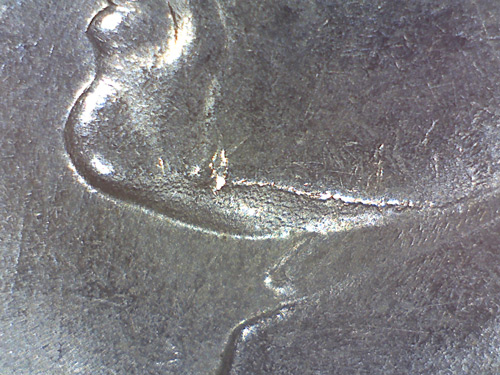
I've included a sample of a garbled image as well as a successful one.


Help-With-Celestron-44302-A---Green/Garbled-Image

Help-With-Celestron-44302-A---Green/Garbled-Image

Hoping it's a simple driver issue - those of you that have this model any assistance - or anyone else that's good with video capture drivers/troubleshooting.

I did contact celestron and the seller of the device - waiting on both until after the weekend.
Pillar of the Community
52Raymo's Avatar
United States
8517 Posts
 Posted 04/29/2012  11:45 am  Show Profile   Check 52Raymo's eBay Listings Bookmark this reply Add 52Raymo to your friends list Get a Link to this Reply
I have one but mine worked perfectly from the get go. I have no idea what to do to fix yours except what you've already done.
Oregon coin geek.....*** GO BEAVS ! ! ! ***
Valued Member
Lonz's Avatar
494 Posts
 Posted 04/29/2012  1:23 pm  Show Profile   Bookmark this reply Add Lonz to your friends list Get a Link to this Reply
I was afraid of that - it just sucks since they arent available in stores and have to wait.
New Member
Engineer's Avatar
United States
38 Posts
 Posted 04/30/2012  05:18 am  Show Profile   Bookmark this reply Add Engineer to your friends list Get a Link to this Reply
You don't say whether you're having problems on both systems. If so, its most likely the scope (or incompatibility with 64 bit).
Valued Member
Lonz's Avatar
494 Posts
 Posted 04/30/2012  10:01 am  Show Profile   Bookmark this reply Add Lonz to your friends list Get a Link to this Reply
It doesn't work for either system. I tried to run in compatibility mode in windows 7, but to no avail.
Valued Member
Lonz's Avatar
494 Posts
 Posted 05/14/2012  2:42 pm  Show Profile   Bookmark this reply Add Lonz to your friends list Get a Link to this Reply
*****UPDATE******

I received a new one from a different retailer - Adorama. This one worked perfectly from the start.

Also the Celestron Tech got back to me and mentioned that it was probably a CCD/CMOS (can't remember which one) sensor issue for anyone else having issues.
  Previous TopicReplies: 5 / Views: 2,817Next Topic  

To participate in the forum you must log in or register.


Disclaimer: While a tremendous amount of effort goes into ensuring the accuracy of the information contained in this site, Coin Community assumes no liability for errors. Copyright 2005 - 2026 Coin Community Family- all rights reserved worldwide. Use of any images or content on this website without prior written permission of Coin Community or the original lender is strictly prohibited.
Contact Us  |  Advertise Here  |  Privacy Policy / Terms of Use

Coin Community Forum © 2005 - 2026 Coin Community Forums
It took 0.24 seconds to rattle this change. Forums