


Coin Community Family of Web Sites Join Thousands of Coin, Bullion, & Money Collectors
Royal Canadian Mint products, Canadian, Polish, American, and world coins and banknotes. Royal Estate Auctions - $1 Coin AuctionsCoin, Banknote and Medal Collectors's Online Mall Join Thousands of Coin, Bullion, & Money Collectors Specializing in Modern Numismatics Vancouvers #1 Coin and Paper Money Dealer 300,000 items to help build your collection!


Username:
Password:
Save Password
Forgot your Password?


This page may contain links that result in small commissions to keep this free site up and running.

Welcome Guest! Registering and/or logging in will remove the anchor (bottom) ads. It's Free!

Panasonic Dmc-Fh8 And Reflections On Proofs Etc.

To participate in the forum you must log in or register.
Author Previous TopicReplies: 4 / Views: 1,479Next Topic  
Valued Member
Schwanke's Avatar
United States
242 Posts
 Posted 08/25/2012  3:22 pm Show Profile   Bookmark this topic Add Schwanke to your friends list Get a Link to this Message Number of Subscribers
I am new to shooting photos in macro mode though my dad is fairly versed in it as a non-paid professional photographer but he has never had to effectively 'shoot mirrors'.

I am using a DMC-FH8 camera as it seemed to be reasonable macro mode for the price. Its a 16 mega pixel with optical and digital zoom though it only shoots in jpg not raw. It has some manual control features but I dont know enough about them off hand to know how they would affect the options. I'll be consulting with my dad at the same time as any help from you guys but he is short on time due to work and hasnt had a chance to read the full deal on my camera.

How do you keep the reflective surfaces of the coin from having the reflection of the camera itself in it? I was able to get rid of outside reflections by placing black cardboard next to the camera but the camera itself still reflects.

We tried doing an offset, taking a picture where the camera itself is out of the reflection but I noticed that sometimes the white balance goes screwy because of the fact that the 'main focus' is actually the white cardboard of the 2x2 flip and not the coin itself. I had the two sides of my 1897 British Penny come out completely different white balances because of this.

Ideas? Its not a snazzy camera that takes lenses but my dad said that getting into that range can add a couple hundred dollars to the purcahse to do it right.

I am extremely happy with the shots that I get on coins that are not reflective its just like for example the deep cameo proof 1976 Ike dollar I bought myself for my birthday year is so mirror finish I might as well be taking a picture of the camera instead of the coin lol.

Thanks as allways! :D
Moderator
Learn More...
SsuperDdave's Avatar
United States
23522 Posts
 Posted 08/25/2012  3:42 pm  Show Profile   Bookmark this reply Add SsuperDdave to your friends list Get a Link to this Reply
Your camera has the ability to do a Custom white balance setting, and an "Area" setting in the autofocus controls which will force it to focus and meter in the exact center of the frame. This will solve your white balance problems.

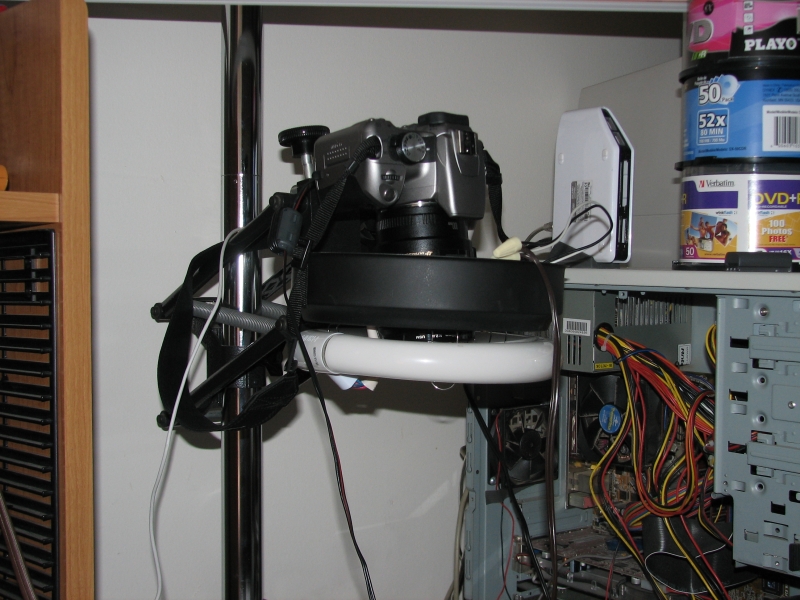
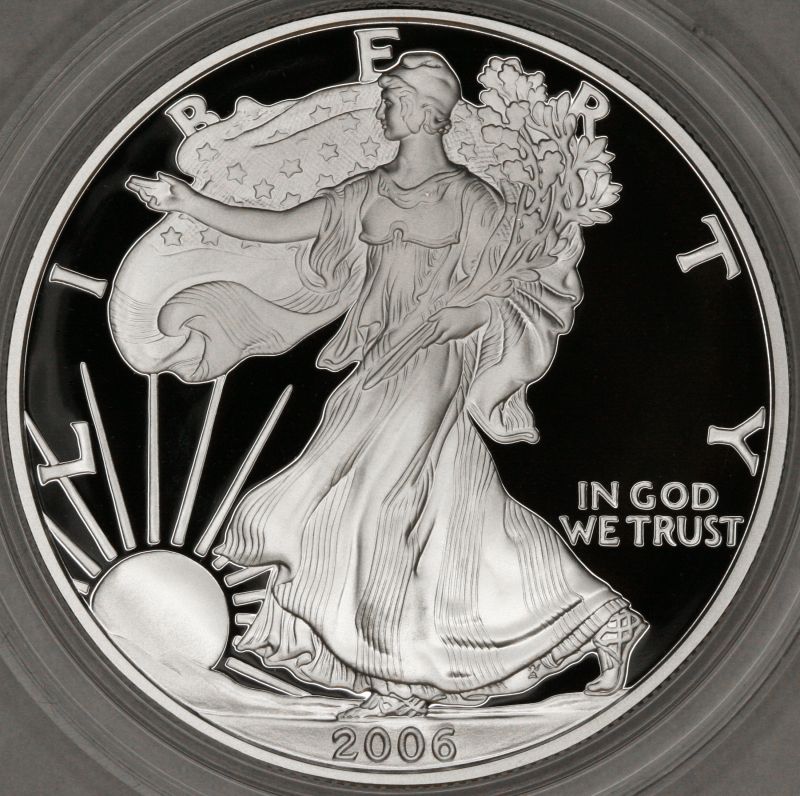
The only way I've ever been able to get the camera out of a Proof image is to use a circline fluorescent with the center cut out, and the camera poked through it. The light coming from every direction at once takes the camera out of the image:

Panasonic-Dmc-Fh8-And-Reflections-On-Proofs-Etc.

Works pretty good.

Panasonic-Dmc-Fh8-And-Reflections-On-Proofs-Etc.

Only on Proofs, though, or maybe a DMPL. Regular strikes look downright odd, lit this way.
Valued Member
Schwanke's Avatar
United States
242 Posts
 Posted 08/25/2012  4:08 pm  Show Profile   Bookmark this reply Add Schwanke to your friends list Get a Link to this Reply
Rather impressive. Whats the stand your using? Is that home brew or is that something bught and would it take my camera? (Has a standard mount screw hole)

Thanks!
Moderator
Learn More...
SsuperDdave's Avatar
United States
23522 Posts
 Posted 08/25/2012  4:56 pm  Show Profile   Bookmark this reply Add SsuperDdave to your friends list Get a Link to this Reply
The stand you see there is a regular photographic copystand. It was much too big for coin photography, meant for product imaging. Now gathering dust since I've switched to a bellows rig.
Valued Member
Schwanke's Avatar
United States
242 Posts
 Posted 08/26/2012  03:24 am  Show Profile   Bookmark this reply Add Schwanke to your friends list Get a Link to this Reply
We were at home depot last night lookin into options (my Dad and I) and the circular flourcent fixture with bulb that would work like you suggest was 30 dollars or so. My dad *thinks* that we can save 27 dollars hehe by taking some black cardstock and creating a portal to shoot through with just enough space for the lense and having almost 100% background (with additional good lighting) should remove the reflection.

I'll try and remember to post back here if that does do it though I may go your route if it doesn't.

Thanks for the ideas though. May still prove my solution.
  Previous TopicReplies: 4 / Views: 1,479Next Topic  

To participate in the forum you must log in or register.


Disclaimer: While a tremendous amount of effort goes into ensuring the accuracy of the information contained in this site, Coin Community assumes no liability for errors. Copyright 2005 - 2026 Coin Community Family- all rights reserved worldwide. Use of any images or content on this website without prior written permission of Coin Community or the original lender is strictly prohibited.
Contact Us  |  Advertise Here  |  Privacy Policy / Terms of Use

Coin Community Forum © 2005 - 2026 Coin Community Forums
It took 0.19 seconds to rattle this change. Forums