



Coin Community Family of Web Sites Join Thousands of Coin, Bullion, & Money Collectors
Coin, Banknote and Medal Collectors's Online Mall Vancouvers #1 Coin and Paper Money Dealer Specializing in Modern Numismatics Join Thousands of Coin, Bullion, & Money Collectors 300,000 items to help build your collection! Shop for APMEX Bullion on eBay!Royal Canadian Mint products, Canadian, Polish, American, and world coins and banknotes.


Username:
Password:
Save Password
Forgot your Password?


This page may contain links that result in small commissions to keep this free site up and running.

Welcome Guest! Registering and/or logging in will remove the anchor (bottom) ads. It's Free!

Editing?

To participate in the forum you must log in or register.
Author Previous TopicReplies: 7 / Views: 2,479Next Topic  
Pillar of the Community
austrokiwi's Avatar
2087 Posts
 Posted 02/06/2013  01:45 am Show Profile   Bookmark this topic Add austrokiwi to your friends list Get a Link to this Message Number of Subscribers
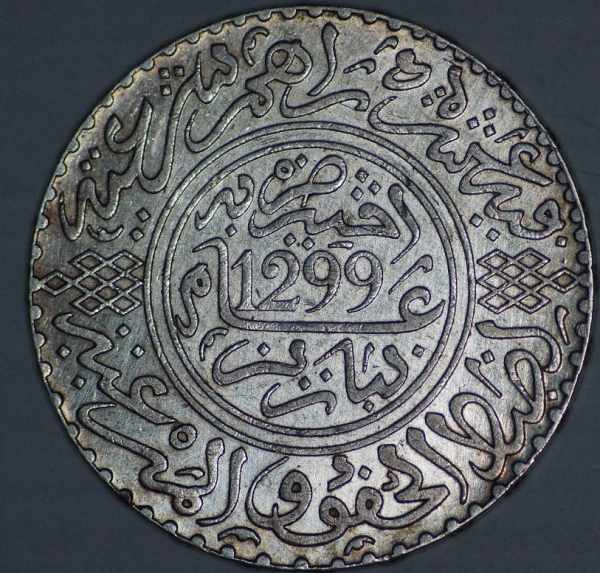
I have up till this month used a sony A380 to take macro photos( with a Macro lens) this month I upgraded the camera to a A65. Unfortunately the new camera( and admittedly the old) is far more intelligent than I am. Using a cheap Sigma DG (70mm-300mm 1.4 - 5.6) lens that has a macro setting, a cheap LED ring light the camera ( preferably with as little meddling from me as possible) takes brilliant photos however my editing is shocking ( through ignorance) Have a look as this photo (please note it has been reduced from 8.75mb):


Editing?

I seem to only be able to crop my photos using a square how do I crop using a circle so that I can just have the coin and no background?
Pillar of the Community
wheatiefan's Avatar
United States
507 Posts
 Posted 02/06/2013  09:08 am  Show Profile   Check wheatiefan's eBay Listings Bookmark this reply Add wheatiefan to your friends list Get a Link to this Reply
It is difficult to impossible to have "no background" depending on what you mean.

GIF images can have 'transparent' backgrounds. These appear to float on the background. But the quality of GIFs is poor.

JPGs must have a background. You can set it to white or black if you prefer, but it will still show up. Your coin may blend in if the image background is a perfect match to the rest of the web page.

One method is to use the 'magic wand' tool to select the entire background (and none of the coin) and change that to white/black.

Another method is available if one of your selection tools is a circle instead of a square. You can encircle the coin and use a command to say 'everything outside of this circle should be white/black'. Of course this only works with circular coins.

The exact methods and tools will change with the software you use. I use GraphicConverter. Many people use GIMP or PhotoShop or similar programs.

I used to spend a lot of time with this selecting and changing the background stuff. Now I use black felt as a background and it is often acceptable straight off the camera.


Here is one of my old images where I changed the background. Notice the irregular gray pixels around the rim at 11:00 - 2:00:

Editing?

Here is one of my newer pics where the background was black felt without any further adjustments:

Editing?

I choose black, although many people like a white background.

But the take home point is for JPEGs there must be a background.

To further muddle the waters, there are different opinions as to which colors complement which metal compositions. . .
Moderator
Learn More...
SsuperDdave's Avatar
United States
23522 Posts
 Posted 02/06/2013  1:14 pm  Show Profile   Bookmark this reply Add SsuperDdave to your friends list Get a Link to this Reply
Had I not already been familiar with graphics processing software, it would have been more difficult for me to learn postprocessing than the photography itself. All you need to understand how to shoot coins is Aperture, ISO and Exposure. Wheatiefan's words stand on their own; I've no better advice than his.

One thing you *can* do, though: Acquire a little pedestal, smaller than the diameter of the coin while remaining stable. It doesn't need to be so much as 25mm high. Cover the top of the pedestal with felt so as to be safe with the coin sitting on it, and shoot the coin on the pedestal. This will cause the background to be out of focus - there isn't enough depth of field for the lens to focus it all - and the effect will be much more pleasing than your posted image (which is pretty darn good).

What is the physical diameter of the coin shown? I'm unfamiliar with it.
Pillar of the Community
austrokiwi's Avatar
2087 Posts
 Posted 02/06/2013  2:21 pm  Show Profile   Bookmark this reply Add austrokiwi to your friends list Get a Link to this Reply
Thanks 4 the comments so far. The coin, a Moroccan 10 dirhams(38mm), was on a small pedestal over a white background. The camera set to auto+ took three photos to make the final image. I guess I need to learn more about editing.
Valued Member
coffeecup57's Avatar
United States
146 Posts
 Posted 02/06/2013  7:44 pm  Show Profile   Bookmark this reply Add coffeecup57 to your friends list Get a Link to this Reply
Wheatiefan and SsuperDdave are right the second shot wheatiefan shows is great looking on its own.
If you don't have to edit go with it.

Editing can be a time consuming process.Cutting the shape down,changing the background,if the cutdown isn't just right
you get bleed over of the background color onto your coin or the color doesn't take in the whole background and
leaves a few stray pixels around the coin as in the first shot wheatiefan shows.Then if your software allows it you
can zoom in and edit pixel by pixel.Corel Draw was an old software I used years ago that was really good at this.
Paint shop Pro and Microsoft Picture It were my most recent until my new computer wouldn't run microsoft picture it
and I went to photo shop elements 11.These give you a cookie cutter that allows cutting circles and other shapes.

You shooting in .jpeg with files that large or .tiff or is the camera got a bunch of megapixels.Three photos to
make one?Are you layering?

regards
coffeecup57


Pillar of the Community
austrokiwi's Avatar
2087 Posts
 Posted 02/07/2013  03:35 am  Show Profile   Bookmark this reply Add austrokiwi to your friends list Get a Link to this Reply


Quote:
You shooting in .jpeg with files that large or .tiff or is the camera got a bunch of megapixels.Three photos to
make one?Are you layering?


I haven't changed any of the factory settings(yet). My old camera was 14 mega pixels. For some of the shots I was taking this wasn't enough the new one is just shy of 23 mega pixels.

It is taking .jpeg at the ,moment but I suppose RAW would be better. The Auto+ setting "recognizes" the style of shot and adjust the camera settings. So with some shots it creates a single image using multiple photos on other occasions it just takes one shot to make an image. I hope this makes sense as I stated the camera is obviously more intelligent than I am.
Valued Member
coinzip's Avatar
United States
104 Posts
 Posted 02/20/2013  2:02 pm  Show Profile   Bookmark this reply Add coinzip to your friends list Get a Link to this Reply
I use photoscape for circle crop and resize......I shoot with a Sony a230 and no lights

Editing?

Pillar of the Community
robster's Avatar
Australia
674 Posts
 Posted 02/21/2013  12:47 am  Show Profile   Bookmark this reply Add robster to your friends list Get a Link to this Reply
Editing? Editing?
Edited with Photoscape 100mm macro lens 2x Jansjo lights.
  Previous TopicReplies: 7 / Views: 2,479Next Topic  

To participate in the forum you must log in or register.


Disclaimer: While a tremendous amount of effort goes into ensuring the accuracy of the information contained in this site, Coin Community assumes no liability for errors. Copyright 2005 - 2026 Coin Community Family- all rights reserved worldwide. Use of any images or content on this website without prior written permission of Coin Community or the original lender is strictly prohibited.
Contact Us  |  Advertise Here  |  Privacy Policy / Terms of Use

Coin Community Forum © 2005 - 2026 Coin Community Forums
It took 0.28 seconds to rattle this change. Forums