| Author |
 Replies: 48 / Views: 6,669 Replies: 48 / Views: 6,669 |
|
|
|
Moderator
 United States
23522 Posts |
Quote:
SD, would you like to see a RAW single image to play with? That was shot JPG?  /faints /revives Yes, please, could you ship me a RAW? I'll do a little comparison processing between levels of PP intervention. My only option for hosting results that large is Dropbox without also doing a from-scratch gallery implementation at one of my domains. |
|
Pillar of the Community
 United States
4051 Posts |
OK, it's on its way to you. It's 23.5MB, so not sure if your email client will have an issue or not. Mine doesn't like 10MB or bigger. Let me know if it doesn't arrive and we'll need to figure something else out...
Contact me for photographic equipment or visit my home page at: http://macrocoins.com |
|
Moderator
United States
23522 Posts |
Hasn't arrived yet, but both Gmail and my CCF mail should be able to handle that size. Gmail has recently increased Attachment size to 25MB, and if I recall Bobby once mentioned that CCF Mail really doesn't care what size it is.
|
|
Pillar of the Community
United States
4051 Posts |
I got a returned email error, so I'm breaking it up to 5MB max. I think it's a problem with my outgoing server, not yours...
Contact me for photographic equipment or visit my home page at: http://macrocoins.com |
|
Moderator
United States
23522 Posts |
I have them; came out 7 parts, but Windows doesn't see an associated filetype so I don't know what to use to reassemble them.
|
|
Pillar of the Community
United States
4051 Posts |
I have no idea how to reassemble them.
How shall I get the file to you? This is frustrating.
Contact me for photographic equipment or visit my home page at: http://macrocoins.com |
|
Pillar of the Community
United States
4051 Posts |
OK, sent it by Yahoo mail. They allow up to 25MB...
|
|
Moderator
United States
23522 Posts |
Failing that, let me know how you disassembled them - what software was used. With that knowledge, I can reverse-engineer the process, probably even if it was something proprietary to your email.
|
|
Pillar of the Community
United States
4051 Posts |
I use MS Outlook Express for WinXP as my email client. It has a check box that says anything larger than X gets split up into multiple pieces.
|
|
Moderator
United States
23522 Posts |
Happily, I have the Yahoo file successfully open in DPP. Outlook Express uses software to break up large attachments which can only be reassembled by Outlook Express, and it's not compatible with Windows 7. I could have gotten around that, but it would have been a sizable undertaking.
|
|
Moderator
United States
23522 Posts |
Erk. I'd forgotten you did a stack for the .jpg. The focus of the RAW file is just a couple molecules below the highest spots, and I can't manipulate the sharpness at that level in DPP more accurately than the jpg engine already does. I conclude that, at least for stacking, RAW would be far more trouble than it's worth. I will say, I think I like the color a bit better using Picture Style "Faithful" and Auto White Balance in DPP than your jpg; the jpg is a bit green at the periphery and a bit red in the center, both of which my settings greatly ameliorate. Both of those adjustments are available in-camera; you might want to give them a shot. I tried all the Picture Style settings against all the White Balance settings including numeric Color Temperature, and settled on what I liked best. Disclaimer: Although I'm using a high pixel density IPS monitor, it isn't calibrated. If you don't see in your jpg what I'm describing, you might have to filter my results. I'll post the result below. Sharpness 3, color adjustments as mentioned, and zero luminance or chroma reduction; none was necessary. It's a bit oversaturated viewed as a whole coin; is the color a little closer in shade or is your coin actually a bit closer to "golden" (as opposed to red) as depicted in your images? 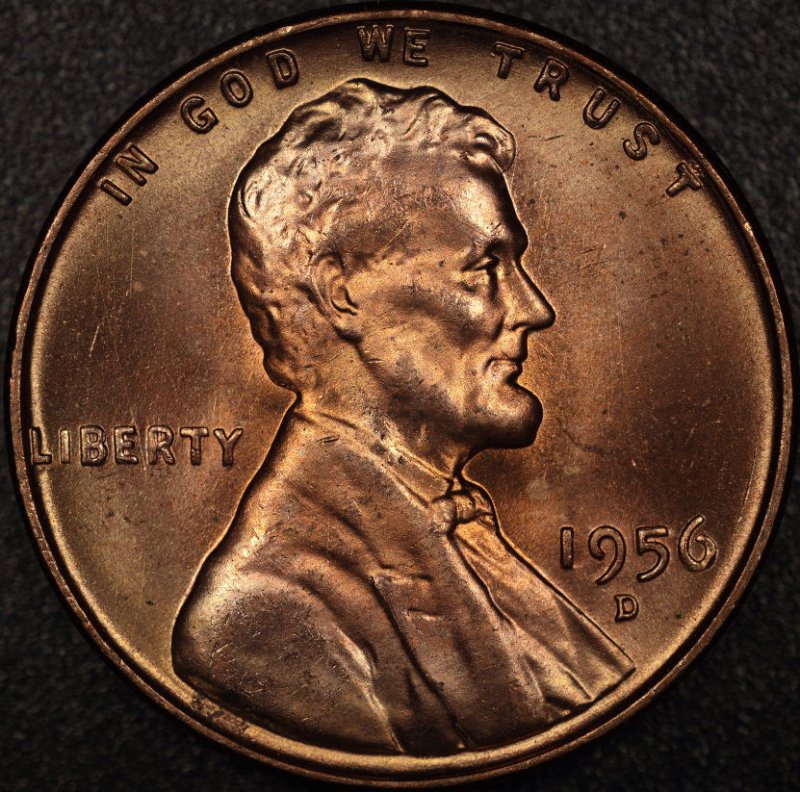 |
|
Pillar of the Community
United States
4051 Posts |
When deciding on color temp and tint, I usually ignore what I see on the monitor and adjust for a known quantity. I choose my backgrounds to be as close to grey as possible, then adjust to get a balanced grey at whatever brightness level I end up with in the final image. I do it this way because my images look different when viewed with different programs, let alone on different monitors. Nikon ViewNX2 makes everything a bit yellow, while DPP makes it all a bit green and dark. Most "faithful" looking IMO, from color to sharpness to exposure, is the viewer in CZP. Anyway, in this case, I adjusted the color temp a little cooler than shot to balance the background grey RGB to around 10% average. If you wand around on the background in my original, you'll see a range from 17,17,17 in the shadows of the pits up to 56,57,52 in the highlights, so the highlights show a tiny green shift and missing a bit of blue. Your adjusted image ranges from 7,5,6 up to 61,57,54, still missing blue but shifted toward red. Glancing around I saw a 49,37,37, so there's a definite red tint to the image. For the original stack, I adjusted the color temp from as-shot, which was about 3200K, to 3149K. The image I sent you was right out of camera at 3200K. Double-checking an 18% grey card, I see it's fairly well balanced even at 3200. Here's a 18% grey card shot at same settings as the RAW image I sent you:  Contact me for photographic equipment or visit my home page at: http://macrocoins.com |
|
Pillar of the Community
United States
4051 Posts |
Shooting the grey card I see a little light falloff at the corners at f/2.8. This is improved at f/3.3 so I re-WB with the grey card at f/3.3 and then shot the coin on top of the grey card. Note you can't necessarily trust this method with a non-Apo lens, as the background will shift color due to long-CA. But the 105PN is well-enough corrected that it's probably OK to trust the background color. Single image, focused this time on Lincoln's throat rather than beard, and with f/3.3 the DOF is a tiny bit better...  edited to add: Quote:
It's a bit oversaturated viewed as a whole coin; is the color a little closer in shade or is your coin actually a bit closer to "golden" (as opposed to red) as depicted in your images? Forgot to answer...this coin is lightly-toned, with sort of pinkish edges with a touch of green, and orangish center. On my monitor the last image matches its color very well. Edited by rmpsrpms
04/16/2013 11:24 am
|
|
Pillar of the Community
United States
627 Posts |
For future reference, you can transfer files this size by dumping them on a site like Dropbox.com
I believe you get 1GB of free space, and you can open up the folder you create to only people you allow.
|
|
Pillar of the Community
United States
4051 Posts |
Cool, thanks Brandon. Now if I can only remember...
|
| |
Replies: 48 / Views: 6,669 |





 First Page


 Posted 04/15/2013 8:51 pm


